# OnePageCRM Developer Documentation — curated corpus
> The OnePageCRM developer guides, tutorials, protocol references (OAuth,
> webhooks, OQL, MCP) and REST API resource summaries, concatenated as markdown.
> Each page is also fetchable individually as raw markdown by appending .md to
> its path (e.g. https://developer.onepagecrm.com/oauth/overview.md).
>
> Detailed REST operation pages are not inlined here. For one operation, fetch
> its markdown (e.g. https://developer.onepagecrm.com/api/reference/contacts/get-contacts.md); for
> full per-endpoint schemas use the OpenAPI 3 spec: https://raw.githubusercontent.com/OnePageCRM/swagger/master/swagger.yaml
---
# OnePageCRM Developers
URL: https://developer.onepagecrm.com/
Let's build your action-focused CRM, together. Integrate with OnePageCRM using
our REST API, OAuth, webhooks, and MCP server — and ship the workflows your
customers ask for.
## What you can build
**Build integrations.** Wire OnePageCRM into the rest of your stack — sync
contacts, automate follow-ups, push deals into your data warehouse.
**Automate workflows.** React to CRM events the moment they happen — webhooks
for contacts, companies, deals, actions, notes, calls, and meetings.
**Connect AI agents.** Query and update CRM data from agents and copilots via
OQL and the MCP server. Real-time, structured access.
## The surfaces
**Read and write CRM data.** A REST API for contacts, companies, deals, actions,
notes, calls, and meetings. HTTP Basic auth, JSON in, JSON out. Everything is
documented in the OpenAPI spec, and the API reference gives you copy-ready curl
for every endpoint. See .
**React to changes in real time.** Subscribe to webhooks for created, updated,
and deleted events on every resource — plus action completions and deal status
changes. See .
**Authorize third-party apps.** OAuth 2.1 lets your app act on behalf of a
OnePageCRM user with the right scopes — authorization-code flow with PKCE and
rotating refresh tokens. See .
**Build with AI.** Agent-readable docs for your AI coding assistant, and a live
MCP server that lets AI agents query and update the CRM. See
.
**Ask questions of your data.** OQL is a JSON query language over all seven core
entities — filters, lookups, aggregates, and grouping, instead of paging
everything down. It runs through the MCP server. See
.
**Connect without a full integration.** Map records to your own system with
External ID, add a Custom Button to the contact and deal menus, or pre-fill the
Add Contact form from a link. See
.
## Built for agents
Every documentation page on this site is published as clean markdown, indexed in
llms.txt and described in agents.json — so your coding assistant works from real
endpoints and real field names. Agents that need live data connect to the MCP
server and query or update the CRM through the Model Context Protocol.
-
-
-
## Featured tutorials
- **Make your first API call** — authenticate, list your contacts, and parse the
response in under five minutes.
- **Subscribe to webhook events** — react to CRM changes in real time. Register a
webhook, receive a payload, and respond correctly.
- **Query CRM data with OQL** — use OQL to read contacts, deals, actions, and
notes with filters, aggregates, and date helpers.
---
# Quickstart
URL: https://developer.onepagecrm.com/getting-started/quickstart/
By the end of this page you'll have made an authenticated call against
the OnePageCRM REST API and parsed the response. We'll use **HTTP Basic
auth with your own user credentials** — the simplest path for scripts,
internal tools, and accessing your own account.
> **Building an app that acts on behalf of other OnePageCRM users?**
> Use [OAuth 2.1](/oauth/overview/) instead. Skip the API key flow
> below and follow the [OAuth quickstart](/oauth/quickstart/).
## 1. Get your API credentials
Sign in to OnePageCRM and open the **API settings** page:
[https://app.onepagecrm.com/app/api](https://app.onepagecrm.com/app/api)
Open the **Configuration** tab. You need two values:
| Value | Used as |
| ---------- | ------------------ |
| `user_id` | HTTP Basic username |
| `api_key` | HTTP Basic password |
Treat the `api_key` like a password — it grants full access to your
account. Don't commit it to source control.
## 2. Make your first request
The base URL for the REST API is:
```
https://app.onepagecrm.com/api/v3
```
A good first call is listing your contacts:
```bash
curl -u "USER_ID:API_KEY" \
https://app.onepagecrm.com/api/v3/contacts.json
```
Replace `USER_ID` and `API_KEY` with your values. The `.json` suffix
sets the response format. Another useful early call is
`GET /bootstrap` — it returns account-wide reference data (statuses,
deal stages, custom field schemas, etc.) in one request:
```bash
curl -u "USER_ID:API_KEY" \
https://app.onepagecrm.com/api/v3/bootstrap.json
```
## 3. Read the response
OnePageCRM wraps every response in a standard envelope:
```json
{
"status": 0,
"message": "OK",
"timestamp": 1716205200,
"data": {
"contacts": [
{ "id": "5f...", "first_name": "Ada", "last_name": "Lovelace", "...": "..." }
],
"total_count": 1,
"page": 1,
"per_page": 10,
"max_page": 1
}
}
```
- `status: 0` means success. Non-zero status codes correspond to
[documented error categories](/api/errors/).
- `data` carries the actual payload, shaped per the endpoint.
- List endpoints include [pagination](/api/pagination/) (`page`,
`per_page`, `max_page`, `total_count`). Request more pages with
`?page=2`.
## Common errors
| HTTP status | What it usually means | Fix |
| --- | --- | --- |
| `401 Unauthorized` | Wrong `user_id` or `api_key`, or missing `Authorization` header. | Double-check both values; re-copy from the API settings page. |
| `403 Forbidden` | Credentials are correct but the user lacks permission for that resource. | Check the user's role or whether the record belongs to a teammate. |
| `404 Not Found` | Typo in the path, or the record ID doesn't exist. | Confirm the endpoint URL against the [API reference](/api/reference/). |
| `400 Bad Request` | Required field missing or a value is invalid on a write request. | Inspect the `errors` object in the response body for the offending field — see [errors](/api/errors/). |
| `429 Too Many Requests` | You're being [rate-limited](/api/rate-limits/). | Slow down. Back off exponentially with jitter and retry. |
## What to read next
- **[The data model](/getting-started/data-model/)** — the seven core entities behind every OnePageCRM surface, and the Action Stream that ties them together. Ten minutes here saves hours later.
- **[API reference](/api/reference/)** — every endpoint, parameter, and response shape. Try requests directly from the browser.
- **[Subscribe to webhook events](/tutorials/webhooks/)** — react to CRM changes in real time instead of polling.
- **[Query CRM data with OQL](/tutorials/oql/)** — one JSON query language across contacts, deals, actions, notes, calls, and meetings. Runs through the MCP server today.
- **[OAuth 2.1](/oauth/overview/)** — when your app needs to act on behalf of users other than yourself.
- **[MCP for AI agents](/mcp/overview/)** — let Claude, ChatGPT, or your favorite agent talk to your CRM.
---
# The OnePageCRM data model
URL: https://developer.onepagecrm.com/getting-started/data-model/
OnePageCRM is action-focused. It is a queue of next steps, not a
database of records. The data model exists to answer one question:
**who do I follow up with next, and why?** Read this page once and
you'll understand the domain before you touch a single endpoint.
## The map
Seven core entities. Contacts sit at the center — everything else
hangs off a contact.
```text
Company ◄──┐ (optional link)
│
Contact ─── the hub of the model
├── Actions what to do next (assigned to a user)
├── Deals sales opportunities (status + pipeline stage)
├── Notes the written record (can also reference a deal)
├── Calls logged calls
└── Meetings logged meetings
```
| Entity | Belongs to | Key references |
| --- | --- | --- |
| Contact | Company (optional) | `company_id`, `owner_id` |
| Company | — | rolls up status and tags (when sync is on) |
| Deal | Contact (required) | `contact_id`, `owner_id`, `pipeline_id` |
| Action | Contact (required) | `contact_id`, `assignee_id` |
| Note | Contact (required) | `contact_id`, `author_id`, optional deal link (`deal_id` in OQL, `linked_deal_id` in the REST API) |
| Call | Contact (required) | `contact_id`, `author_id` |
| Meeting | Contact (required) | `contact_id`, `author_id` |
Two rules carry most of the model:
- **A deal cannot exist without a contact.** Neither can an action,
note, call, or meeting. Resolve the contact first; everything else
follows.
- **A contact can exist without a company.** The company link is
optional — but a contact must have a name or a company name.
## Contacts
A contact is a person in your CRM. The contact is the hub — every
other record (except companies) points at exactly one contact.
- A contact needs a first/last name **or** a company name. Both
together is normal; a contact with neither is rejected.
- The company display name is a plain string (`company` in OQL,
`company_name` in the REST API); `company_id` is the optional link
to a Company record. They are separate fields — see
[Companies](#companies) for why.
- Every contact has an **owner** (`owner_id`, a user) — the team
member responsible for it.
- `status_id` and `lead_source_id` classify the contact — see
[Statuses and lead sources](#statuses-and-lead-sources).
- Contacts carry `tags`, per-user `starred`, and
[custom fields](#custom-fields).
- A contact's position in the Action Stream comes from its top
action — see [Actions](#actions-and-the-action-stream).
Field-level reference: [OQL contacts](/oql/entities/contacts/).
## Companies
A company groups the contacts that belong to one organization.
Companies are deliberately lightweight:
- **No owner.** Ownership lives on contacts, not companies.
- **Auto-created.** Save a contact with a company name and no
`company_id`, and the company record is created (or reused) and
linked. You never create a company directly.
- **Roll-ups, not source data.** A company can sync a common status
and common tags across all of its contacts when sync is enabled.
Company size is the count of its non-deleted contacts.
- Contacts can also be linked across companies — one person who
matters to several organizations.
- Companies support their own [custom fields](#custom-fields).
Field-level reference: [OQL companies](/oql/entities/companies/).
## Deals
A deal is a sales opportunity attached to a contact.
- **One primary contact, required.** A deal can additionally be
linked to more contacts, but `contact_id` always points at the
primary one.
- **Status is exactly one of** `pending`, `won`, `lost`.
- **Stage is a per-pipeline integer**, not sequential — a typical
pipeline uses values like `10`, `20`, `40`. Accounts can have
multiple pipelines, each with its own stages. A pipeline is a sales
or a delivery pipeline — deals in a delivery pipeline are always
won (they track post-sales projects). Pending deals expose `stage`;
won and lost deals expose `last_stage`.
- **Two close dates.** `expected_close_date` is the forecast on a
pending deal. `close_date` is the actual date, set when the deal
becomes won or lost.
- **Money.** `amount` is the deal value; recurring deals multiply it
by `months`, and totals, margin, and commission are computed from
these.
- **Line items.** A deal can carry deal items (name, description,
qty, price, cost, amount); `has_deal_items` flags their presence.
- **Own owner.** A deal's `owner_id` is independent of the contact's
owner — a teammate can own the deal on your contact.
- Deals support their own [custom fields](#custom-fields), and notes
can reference a deal.
Field-level reference: [OQL deals](/oql/entities/deals/).
## Actions and the Action Stream
Actions are why the rest of the model exists. An action is a short
task (max 140 characters) on a contact, assigned to a user, with one
of five types. Every surface exposes the type in the `status` field.
| Type | Meaning | Date | Action Stream position |
| --- | --- | --- | --- |
| `asap` | Do now | none | Top |
| `date` | Scheduled for a date | `date` | Sorted by date; overdue rises |
| `date_time` | Scheduled with an exact time | `date` + `exact_time` | Sorted by timestamp, in the assignee's timezone |
| `waiting` | Waiting on the contact | `waiting_since` | Below dated actions |
| `queued` | No deadline yet | none, position only | Bottom |
Completing an action stamps a completion time and removes it from
the stream; you can reopen it later. Completed actions stay on the
contact as history.
### The one-next-action principle
Each contact has **one top next action per assignee** — the most
urgent open, non-queued action. The system maintains this for you:
- A contact can hold only one `asap` action per assignee. Create a
second and the existing one is automatically demoted to a dated
action for today.
- When you complete the top action, the next most urgent action on
that contact takes its place. No manual promotion needed.
- Queued actions never become the top action on their own — they
wait until you give them a date or make them ASAP.
### How the stream sorts
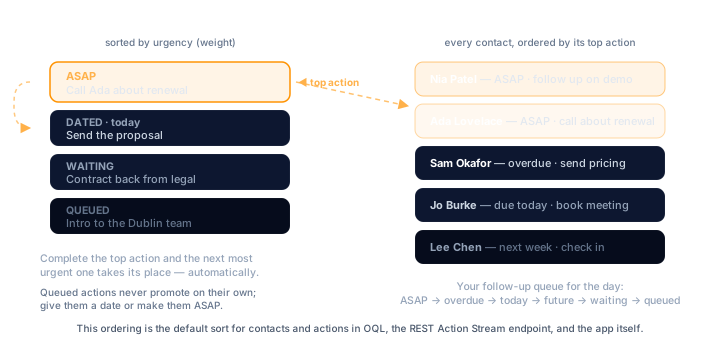
Every action carries a computed `weight`. Higher means more urgent.
The resulting order is: ASAP → overdue → today → future dates →
waiting → queued. Queued actions sort by their manual position.
The **Action Stream** is the list of contacts sorted by the weight
of their top next action — your follow-up queue for the day. The
REST API exposes it read-only, and in OQL, contacts and actions
return in Action Stream order by default when you omit `order_by` —
see [OQL concepts](/oql/concepts/).
Accounts can also define **predefined actions** and action groups —
reusable templates (with date and type shortcuts) applied to a
contact in one click.
Field-level reference: [OQL actions](/oql/entities/actions/).
## Notes, calls, and meetings
Notes, calls, and meetings are the logged history of what happened
with a contact.
- All three require a contact. A note can additionally reference a
deal (`deal_id` in OQL, `linked_deal_id` in the REST API), but it
is always contact-scoped first.
- Each records an **author** (`author_id`) — the user who logged it.
`author_id` never changes. The `author` display name stored
alongside it does on notes: editing a note restamps `author` with
the editing user's name. Calls and meetings keep the original name.
- Logging any of the three updates the contact's
`last_activity_date`.
Field-level references: [notes](/oql/entities/notes/),
[calls](/oql/entities/calls/), [meetings](/oql/entities/meetings/).
## Cross-cutting concepts
### Ownership, assignment, authorship
Three different user references, three different meanings:
| Field | Lives on | Means |
| --- | --- | --- |
| `owner_id` | Contact | Who the contact belongs to. Drives visibility. |
| `owner_id` | Deal | Who owns the deal. Independent of the contact's owner. |
| `assignee_id` | Action | Who has to do it. Can be any teammate, not just the contact owner. |
| `author_id` | Note, Call, Meeting | Who logged it. Immutable (the `author` *name* on a note reflects the last editor). |
Companies have none of these — they inherit everything from their
contacts.
### Statuses and lead sources
Both are **account-defined, ordered lists**, not global enums. Each
entry has a `system_id` (e.g. `lead`, `prospect`, `customer`), a
display name, and a position. The contact stores just the system id
as a string. API surfaces expose the id as `status_id` /
`lead_source_id` and resolve the display label into `status` /
`lead_source`. The default status for a new contact is `lead`.
Fetch the account's actual lists over the API — the
[quickstart](/getting-started/quickstart/) shows the call.
### Tags
Tags are free-form strings kept in one account-level list. They live
on **contacts only** — deals, actions, notes, calls, and meetings
have no tags. Adding a new tag to a contact adds it to the account
list automatically. A company can mirror a common tag set across all
of its contacts when tag sync is enabled.
### Custom fields
A custom field is an account-defined, typed field available on
contacts, companies, and deals. The literal type values are `single`
and `multi` (single- and multi-line text), `number`, `dropdown`,
`date`, `checkbox`, `anniversary`, and
[`external_id`](/integrations/external-id/). In [OQL](/oql/overview/)
they're queryable by name as `custom_fields.` — in `select`, `where`, and
`order_by` — and `custom_fields.*` returns them all (filterability
depends on the field type).
### Private contacts
A contact can be marked private. In the app, a private contact is
visible **only to its owner**. The REST API goes further: it excludes
private contacts entirely — even the owner cannot fetch one over the
API. Records hanging off a private contact (deals, actions, notes,
calls, meetings) inherit the restriction. Webhooks skip full-payload
events for private contacts too; only `deleted` events still fire —
see [webhook events](/webhooks/events/).
### IDs and timestamps
Every entity ID is a 24-character hex string
(`"507f1f77bcf86cd799439011"`), unique per entity type and stable for
the life of the record. Every record
carries `created_at` and `modified_at`; some entities add purpose
fields like the contact's `last_activity_date`.
## Beyond the seven
The REST API exposes more than the core records. Supporting resources
either configure the account — users, statuses, lead sources, pipelines,
custom-field definitions, predefined actions — or read across it, like
the [Action Stream](#actions-and-the-action-stream). Most are covered
above as cross-cutting concepts; the full list is in the
[API reference](/api/reference/).
## One entity, every surface
The same seven core entities appear on every surface. This table is the
crosswalk:
| Entity | REST root | Webhook `type` | OQL `from` | MCP |
| --- | --- | --- | --- | :-: |
| Contact | `/api/v3/contacts` | `contact` | [`contacts`](/oql/entities/contacts/) | ✓ |
| Company | `/api/v3/companies` | `company` | [`companies`](/oql/entities/companies/) | ✓ |
| Deal | `/api/v3/deals` | `deal` | [`deals`](/oql/entities/deals/) | ✓ |
| Action | `/api/v3/actions` | `action` | [`actions`](/oql/entities/actions/) | ✓ |
| Note | `/api/v3/notes` | `note` | [`notes`](/oql/entities/notes/) | ✓ |
| Call | `/api/v3/calls` | `call` | [`calls`](/oql/entities/calls/) | ✓ |
| Meeting | `/api/v3/meetings` | `meeting` | [`meetings`](/oql/entities/meetings/) | ✓ |
- **REST** — every endpoint, parameter, and response shape in the
[API reference](/api/reference/).
- **Webhooks** — the full `type` × `reason` event matrix in
[Events](/webhooks/events/).
- **OQL** — one JSON query language across all seven core entities;
start with the [overview](/oql/overview/).
- **MCP** — the [MCP server](/mcp/overview/) exposes all seven
through its `query` tool (OQL), plus `create` and `update` for
writes.
## Where to go next
- [Quickstart](/getting-started/quickstart/) — get credentials and
make your first call in five minutes.
- [Your first API call](/tutorials/first-api-call/) — a guided
walkthrough of the request/response cycle.
- [OQL concepts](/oql/concepts/) — the query language built on this
model.
- [Webhooks overview](/webhooks/overview/) — react to changes in
these entities in real time.
---
# Build with AI
URL: https://developer.onepagecrm.com/build-with-ai/
This site is built for agents as well as people. Feed our docs to your AI
coding assistant, or connect an AI agent straight to live CRM data.
## Two ways to build with AI
**Build with an AI assistant.** Working in Claude Code, Cursor, or another
AI coding tool? Point it at our agent-readable docs and it writes the
integration with you — correct endpoints, real field names, no
hallucinated API.
**Build for AI agents.** Giving an AI agent live access to a customer's
CRM? Connect it to our MCP server and it can query and update contacts,
deals, actions, and more — as the signed-in user, with their permissions.
## Feed your coding assistant
Every page on this site is published in formats an AI tool can consume
directly, so your assistant builds against the real API, not a guess at it.
- **llms.txt** — — a curated map
of every docs section, plus an Instructions block that tells an agent how
to use the API. Small enough to paste in whole.
- **llms-full.txt** — — the
curated developer docs corpus: concepts, tutorials, protocol references and
API resource summaries in one file. Detailed REST operation pages are not
inlined — fetch a single operation's `.md` or use the OpenAPI spec for exact
schemas.
- **Markdown mirrors** — append `.md` to any docs URL for the raw markdown,
no nav or chrome. Cleaner for an LLM than scraping the HTML. Every page
also has a "Copy as Markdown" button. Example:
- **OpenAPI spec** — — the canonical,
machine-readable API definition, versioned on GitHub. Point a codegen tool at
the raw swagger.yaml
()
for a typed client instead of hand-writing requests.
- **agents.json** —
— a machine-readable manifest that points agents to all of the above and
lists the live MCP server. An emerging standard; we ship it early.
Start your agent with one paste:
```text
Read https://developer.onepagecrm.com/llms.txt — it indexes the
OnePageCRM developer docs and explains how to authenticate.
Help me build a Node.js service that syncs contacts into OnePageCRM
via the REST API. When you need the full text of a page, fetch its
markdown by appending .md to the URL.
```
## Give an agent live access to the CRM
The OnePageCRM [MCP server](/mcp/overview/) lets an AI agent read and write
CRM data through the Model Context Protocol — describe the schema, pull
account context, query with [OQL](/oql/overview/), and create or update
records.
Endpoint:
```
https://app.onepagecrm.com/mcp
```
Add it as a connector, sign in, approve the consent screen — no API key
pasted into the agent, and you can revoke access anytime.
Connects out of the box: **ChatGPT**, **Claude**, **Mistral's Le Chat**,
**Grok**, and **Perplexity**. Building your own agent? Any MCP client can
request the `mcp` scope.
- [MCP overview](/mcp/overview/) — the endpoint, the five tools, scopes, and how to connect a client that isn't listed.
- [Setup with screenshots](https://help.onepagecrm.com/article/1017-mcp) — the help-center guide.
## Keep going
- [The data model](/getting-started/data-model/) — the seven core entities every surface, and every agent, works with.
- [MCP reference](/mcp/overview/) — the five tools: describe, context, query, create, update.
- [API reference](/api/reference/) — every endpoint, rendered from the OpenAPI spec.
---
# Authentication
URL: https://developer.onepagecrm.com/api/authentication/
Every request to the REST API must be authenticated. The base URL is:
```
https://app.onepagecrm.com/api/v3
```
There are two ways to authenticate. Pick the one that matches what
you're building:
| Method | Best for |
| --- | --- |
| [HTTP Basic](#http-basic-auth) | Scripts, internal tools, accessing your own account |
| [OAuth 2.1](#oauth-21) | Apps acting on behalf of other OnePageCRM users |
## HTTP Basic auth
The simplest path. Sign in to OnePageCRM and open the
[API settings page](https://app.onepagecrm.com/app/api), then open the
**Configuration** tab. You need two values:
| Value | Used as |
| --- | --- |
| `user_id` | HTTP Basic username |
| `api_key` | HTTP Basic password |
Pass them with every request:
```bash
curl -u "USER_ID:API_KEY" \
https://app.onepagecrm.com/api/v3/contacts.json
```
That's it. If this is your first call, the
[quickstart](/getting-started/quickstart/) walks you through the
response envelope and a few useful endpoints.
Treat the `api_key` like a password. It grants full access to your
account. Keep it in an environment variable or a secrets manager —
never in source control.
## OAuth 2.1
> **OAuth is in closed beta.** Client registration is currently handled
> by the OnePageCRM team — [request access](/oauth/registration/). You
> can build against your own account with
> [HTTP Basic](#http-basic-auth) in the meantime.
If your app acts on behalf of other OnePageCRM users, use
[OAuth 2.1](/oauth/overview/). Your app never sees the user's API key —
it gets an access token from the OnePageCRM authorization server and
sends it as a Bearer header:
```bash
curl -H "Authorization: Bearer ACCESS_TOKEN" \
https://app.onepagecrm.com/api/v3/contacts.json
```
The token response includes an `aud` field — the base URL of the
user's CRM API. Build your API URLs from it rather than hard-coding
`app.onepagecrm.com`. The [OAuth reference](/oauth/reference/) covers
the full token response.
### Scopes
Scope is enforced per endpoint:
| Endpoint type | Accepted scopes |
| --- | --- |
| Read (GET) | `crm` or `crm.readonly` |
| Write (POST, PUT, DELETE) | `crm` |
A `crm.readonly` token attempting a write gets `403` with the message
`Insufficient OAuth scope. Required: crm`.
### OAuth endpoint coverage
Nearly all endpoints accept OAuth tokens. A few are API-key only —
chiefly `GET /bootstrap`; fetch the individual reference
endpoints (`statuses`, `pipelines`, `custom_fields`, ...) instead. An
API-key-only endpoint answers an OAuth token with `403` and the
message `This endpoint is not available for OAuth applications`.
## Security notes
- **Treat the `api_key` as a password.** It grants full access to the
account. Store it in environment variables, not code.
- **Use OAuth for anything user-facing.** Never ask another user to
hand you their API key — [OAuth 2.1](/oauth/overview/) exists so they
don't have to.
- **Always use HTTPS.** The API is only served over HTTPS; never log or
cache credentials in plaintext.
## What to read next
- **[Quickstart](/getting-started/quickstart/)** — make your first call in under five minutes.
- **[Errors](/api/errors/)** — the response envelope and every error code.
- **[API reference](/api/reference/)** — every endpoint, parameter, and response shape.
---
# Errors
URL: https://developer.onepagecrm.com/api/errors/
Success and error responses use two different JSON envelopes.
Check the HTTP status code first, then branch on `error_name`.
## The envelopes
A successful response:
```json
{
"status": 0,
"message": "OK",
"timestamp": 1765456800,
"data": { "...": "..." }
}
```
An error response drops `timestamp` and `data` and carries error fields
instead:
```json
{
"status": 400,
"message": "Invalid request data",
"error_name": "invalid_request_data",
"error_message": "A validation error has occurred",
"errors": { "...": "..." }
}
```
| Field | Type | Appears in | Description |
| --- | --- | --- | --- |
| `status` | integer | both | `0` on success. On errors, an application status code — it can differ from the HTTP status (see below) |
| `message` | string | both | Short human-readable summary |
| `timestamp` | integer | success only | Unix time in seconds |
| `data` | object | success only | The payload |
| `error_name` | string | errors only | Machine identifier, e.g. `invalid_auth_token`. Branch on this, not on `error_message` |
| `error_message` | string | errors only | Human explanation of what went wrong |
| `errors` | object | errors only | Field-level details on validation failures; `{}` otherwise |
Exact `error_message` text can change. Match on `error_name` in code;
log `error_message` for debugging.
One trap: the body's `status` does not always match the HTTP status.
Bad credentials, for example, return HTTP `401` with `"status": 400` in
the body. Trust the HTTP status code and `error_name`.
## HTTP status codes
| HTTP | Meaning | `error_name` examples | Fix |
| --- | --- | --- | --- |
| `400` | Invalid or incomplete request data. Also the default for unclassified errors — including duplicate records (`duplicated_entity`, `resource_already_exists`) | `invalid_request_data`, `duplicated_entity`, `resource_already_exists` | Inspect `errors` for the offending fields; check the request shape against the [API reference](/api/reference/) |
| `401` | Authentication missing or invalid | `invalid_auth_token` (API key), `invalid_access_token` (OAuth), `invalid_login`, `authorization_data_not_found` (no auth sent) | Re-check credentials; refresh an expired OAuth token. See [Authentication](/api/authentication/) |
| `402` | Payment required | `trial_expired`, `subscription_canceled` | The account's subscription has lapsed — the account owner needs to update billing |
| `403` | Forbidden, including OAuth scope errors | `no_permission_to_complete_action` | Check the user's permissions and your token's scope (below) |
| `404` | Resource not found | `resource_not_found` | Check the path and record ID against the [API reference](/api/reference/) |
| `405` | HTTP method not allowed | `method_not_allowed` | Use the verb the endpoint documents |
| `429` | Too many concurrent connections | — | Back off and retry. Note: the request-rate throttle returns `403` with a plain-text `Rate Limit Exceeded` body instead. See [Rate limits](/api/rate-limits/) |
| `500` | Internal server error | `internal_server_error` | Retry; if it persists, contact support |
| `503` | Maintenance or temporary unavailability | `service_unavailable` | Retry later. See the [maintenance note](/api/rate-limits/) |
## Worked examples
### 401 — bad credentials
```bash
curl -u "USER_ID:WRONG_KEY" \
https://app.onepagecrm.com/api/v3/contacts.json
```
```json
{
"status": 400,
"message": "Invalid auth token",
"error_name": "invalid_auth_token",
"error_message": "Authorization token is invalid",
"errors": {}
}
```
Note the mismatch: the HTTP status is `401`, but the body says
`"status": 400`. This is expected — branch on the HTTP status and
`error_name`, not the body's `status` field.
Re-copy your `user_id` and `api_key` from the
[API settings page](https://app.onepagecrm.com/app/api). OAuth requests
fail the same way but with `error_name: invalid_access_token` — that
usually means the access token expired. Refresh it and retry.
### 403 — insufficient OAuth scope
A `crm.readonly` token attempting a write:
```bash
curl -X POST \
-H "Authorization: Bearer READONLY_TOKEN" \
-H "Content-Type: application/json" \
-d '{"last_name": "Lovelace"}' \
https://app.onepagecrm.com/api/v3/contacts.json
```
```json
{
"status": 403,
"message": "You have no permission to complete this action",
"error_name": "no_permission_to_complete_action",
"error_message": "Insufficient OAuth scope. Required: crm",
"errors": {}
}
```
Write endpoints require the `crm` scope. Request it during
authorization — see [Authentication](/api/authentication/) for the
scope rules, and note that some endpoints reject OAuth tokens entirely
with `This endpoint is not available for OAuth applications`.
### 400 — validation failure
Creating a contact with incomplete data:
```bash
curl -u "USER_ID:API_KEY" \
-X POST \
-H "Content-Type: application/json" \
-d '{}' \
https://app.onepagecrm.com/api/v3/contacts.json
```
```json
{
"status": 400,
"message": "Invalid request data",
"error_name": "invalid_request_data",
"error_message": "A validation error has occurred",
"errors": {
"last_name": "Required field last_name is missing"
}
}
```
The `errors` object is keyed by field name; the exact message varies by
field. Fix each listed field and resend the request.
## Handling errors in code
- Branch on the HTTP status first, then on `error_name`.
- On `401`, refresh credentials or re-authenticate — don't retry blindly.
- On `429`, a plain-text `Rate Limit Exceeded` `403`, and `503`, retry with backoff — see [Rate limits](/api/rate-limits/).
- On `400`, fix the request — retrying the same payload returns the same error.
- Log `error_message` and `errors` — they tell you exactly what to fix.
## Common questions
**Why does the body say status 400 when the HTTP status is 401?**
The body's `status` is an application code and doesn't always match
the HTTP status — bad credentials return HTTP `401` with
`"status": 400` in the body. Trust the HTTP status code and
`error_name`.
**Which field should my code branch on?**
`error_name` — it's the stable machine identifier. The
`error_message` text can change, so log it for debugging, but never
match on it.
## What to read next
- **[Rate limits](/api/rate-limits/)** — what triggers a throttle and how to back off.
- **[Authentication](/api/authentication/)** — both auth methods and the OAuth scope rules.
- **[API reference](/api/reference/)** — per-endpoint parameters and response shapes.
---
# Pagination
URL: https://developer.onepagecrm.com/api/pagination/
List endpoints return results one page at a time. Two query parameters
control paging:
| Parameter | Default | Limits | Description |
| --- | --- | --- | --- |
| `page` | `1` | 1-indexed | Which page to return |
| `per_page` | `10` | Max `100` | Results per page |
## Response metadata
The `data` object of every list response includes the paging state
alongside the results:
```json
{
"status": 0,
"message": "OK",
"timestamp": 1765456800,
"data": {
"contacts": [
{ "id": "5f...", "first_name": "Ada", "...": "..." }
],
"total_count": 243,
"page": 1,
"per_page": 100,
"max_page": 3
}
}
```
| Field | Description |
| --- | --- |
| `total_count` | Total matching records across all pages |
| `page` | The page you got |
| `per_page` | Page size used for this response |
| `max_page` | The last page number — stop when `page` reaches it |
## Worked example: fetch every contact
Request the first page with the largest page size:
```bash
curl -u "USER_ID:API_KEY" \
"https://app.onepagecrm.com/api/v3/contacts.json?page=1&per_page=100"
```
Then loop until you pass `max_page`:
```bash
page=1
max_page=1
while [ "$page" -le "$max_page" ]; do
resp=$(curl -s -u "USER_ID:API_KEY" \
"https://app.onepagecrm.com/api/v3/contacts.json?page=$page&per_page=100")
echo "$resp" | jq -r '.data.contacts[].id'
max_page=$(echo "$resp" | jq '.data.max_page')
page=$((page + 1))
done
```
The same loop in Python:
```python
import requests
auth = ("USER_ID", "API_KEY")
url = "https://app.onepagecrm.com/api/v3/contacts.json"
page, max_page = 1, 1
contacts = []
while page <= max_page:
data = requests.get(
url, auth=auth, params={"page": page, "per_page": 100}
).json()["data"]
contacts.extend(data["contacts"])
max_page = data["max_page"]
page += 1
```
## Tips
- **Use `per_page=100` for bulk reads.** Fewer requests means faster
syncs and less chance of hitting [rate limits](/api/rate-limits/).
- **Keep query parameters identical across pages.** Changing filters or
any other parameter mid-loop gives inconsistent pages.
- **Don't assume pages are stable under concurrent writes.** If records
are created or deleted while you page, items can shift between pages
— you may see a record twice or miss one. If completeness matters,
de-duplicate by `id`, or re-fetch when `total_count` changes between
pages.
- **Stop on `max_page`, not on an empty page.** It saves a request and
is unambiguous.
## What to read next
- **[API reference](/api/reference/)** — which endpoints are lists, and their filter parameters.
- **[Rate limits](/api/rate-limits/)** — how fast you can page.
- **[OQL](/oql/overview/)** — for queries and aggregates across entities, often a better fit than paging everything down.
---
# Partial updates
URL: https://developer.onepagecrm.com/api/partial-updates/
By default, a `PUT` request replaces the whole record — any field you
leave out is treated as empty. Pass `partial=true` and only the fields in
your request body are changed; everything else is left as-is.
| Parameter | Type | Description |
| --- | --- | --- |
| `partial` | boolean | When `true`, update only the fields sent in the body |
## Example
Change just a contact's job title, leaving name, emails, and everything
else untouched:
```bash
curl -X PUT -u "USER_ID:API_KEY" \
-H "Content-Type: application/json" \
"https://app.onepagecrm.com/api/v3/contacts/CONTACT_ID.json?partial=true" \
-d '{"job_title": "Head of Partnerships"}'
```
Without `partial=true`, the same request would blank out every field you
didn't include.
## Tips
- **Reach for `partial=true` whenever you're changing a subset of fields.**
It avoids having to fetch the record, merge your change, and send the
whole thing back — and avoids accidentally clearing a field.
- **Full replacement is still the default.** If you *want* to overwrite the
whole record, omit the flag and send every field.
- **Arrays replace, they don't merge.** Even with `partial=true`, sending
`emails` replaces the whole emails array — include the ones you want to
keep.
## What to read next
- **[API reference](/api/reference/)** — the writable fields for each resource.
- **[Errors](/api/errors/)** — what a rejected update looks like and how to fix it.
---
# Rate limits
URL: https://developer.onepagecrm.com/api/rate-limits/
The API enforces limits on concurrency and request rate. There is no
per-day quota. Two different layers enforce them, and they signal
differently:
- **Connection limits** return HTTP `429 Too Many Requests`.
- **The request-rate throttle** returns HTTP `403` with a plain-text
body — `Rate Limit Exceeded` — not `429`, and not the JSON envelope.
Handle both as "slow down".
## The limits
| Limit | Behavior | Signal when exceeded |
| --- | --- | --- |
| Concurrent connections | Capped per client — keep a small pool | HTTP `429` |
| Request rate | Sustained high rates are throttled; short bursts are tolerated | HTTP `403`, `text/plain` body `Rate Limit Exceeded` |
The exact thresholds are operational and can change without notice —
treat the *signals* as the contract, not any specific number. The
limits are generous for normal integrations: keep a few concurrent
connections, avoid unbounded parallelism, and you will rarely see
either signal. They exist to catch runaway loops.
Don't confuse a throttle `403` with a permission `403`. The throttle
sends a `text/plain` body with exactly `Rate Limit Exceeded`;
permission errors send the JSON envelope with an `error_name`. Check
the content type before treating a `403` as a rate limit — see
[Errors](/api/errors/).
## Handling throttles: back off with jitter
When you get a `429`, or a `403` with the plain-text
`Rate Limit Exceeded` body, wait and retry. Double the wait on each
consecutive failure, and add jitter so parallel clients don't retry in
lockstep.
```js
async function isThrottled(res) {
if (res.status === 429) return true;
if (res.status !== 403) return false;
// The rate throttle returns 403 with a plain-text body.
const type = res.headers.get("content-type") ?? "";
if (!type.includes("text/plain")) return false;
return (await res.clone().text()).includes("Rate Limit Exceeded");
}
async function fetchWithBackoff(url, options, maxRetries = 5) {
for (let attempt = 0; ; attempt++) {
const res = await fetch(url, options);
if (!(await isThrottled(res)) || attempt >= maxRetries) return res;
const base = Math.min(1000 * 2 ** attempt, 30_000); // 1s, 2s, 4s... cap 30s
const delay = base / 2 + Math.random() * (base / 2); // add jitter
await new Promise((resolve) => setTimeout(resolve, delay));
}
}
```
The same shape in Python:
```python
import random
import time
import requests
def is_throttled(response):
if response.status_code == 429:
return True
if response.status_code != 403:
return False
# The rate throttle returns 403 with a plain-text body.
content_type = response.headers.get("content-type", "")
return "text/plain" in content_type and "Rate Limit Exceeded" in response.text
def get_with_backoff(url, max_retries=5, **kwargs):
for attempt in range(max_retries + 1):
response = requests.get(url, **kwargs)
if not is_throttled(response) or attempt == max_retries:
return response
base = min(2 ** attempt, 30) # 1s, 2s, 4s... cap 30s
time.sleep(base / 2 + random.uniform(0, base / 2))
```
## Tips for staying under the limits
- **Limit concurrency, not just rate.** A pool of 2–3 connections is
plenty for most integrations.
- **Use [pagination](/api/pagination/) with `per_page=100`** instead of
many small requests.
- **Cache reference data.** Statuses, deal stages, and custom field
schemas change rarely — fetch them once and cache them, not per
request.
- **Prefer webhooks over polling** where you can — react to changes
instead of asking for them.
## 503 during maintenance
During maintenance windows the API returns HTTP `503` with a
maintenance JSON body (`error_name: service_unavailable`,
`error_message: "System offline for maintenance"`). This is not a rate
limit. Pause and retry later — hammering a `503` just delays your own
recovery.
Treat throttle responses and `503` differently in code: a throttle
means *slow down*, `503` means *come back later*.
## Common questions
**What are the API rate limits?**
Two layers: a cap on concurrent connections (signals with HTTP `429`)
and a request-rate throttle (signals with HTTP `403` and a plain-text
`Rate Limit Exceeded` body). There is no per-day quota. Exact
thresholds are operational and can change — treat the signals as the
contract, not any specific number.
**Does the API return 429 when I'm throttled?**
Only for the concurrency cap. The request-rate throttle returns `403`
with a plain-text `Rate Limit Exceeded` body — not `429`, and not the
JSON envelope. Check the content type before treating a `403` as a
permission error.
**How should I handle a throttle response?**
Wait and retry with exponential backoff and jitter: double the wait on
each consecutive failure and cap it at around 30 seconds. A `503` is
maintenance, not a throttle — pause and come back later instead.
## What to read next
- **[Errors](/api/errors/)** — the full status code table and envelope.
- **[Pagination](/api/pagination/)** — fetch large datasets in fewer requests.
- **[API reference](/api/reference/)** — every endpoint, parameter, and response shape.
---
# Sorting and time filters
URL: https://developer.onepagecrm.com/api/sorting/
List endpoints return records in a default order. Two sets of query
parameters let you change that: **sorting** by a field, and **filtering**
by modification time.
## Sort by field
| Parameter | Type | Description |
| --- | --- | --- |
| `sort_by` | string | Field to sort by (e.g. `first_name`, `email`, `date`) |
| `order` | string | `asc` or `desc`. Default is `asc` |
Sort contacts by first name, Z to A:
```bash
curl -u "USER_ID:API_KEY" \
"https://app.onepagecrm.com/api/v3/contacts.json?sort_by=first_name&order=desc"
```
## Filter by time
Return only records that fall in a given time range. All values are Unix
timestamps (seconds since the epoch).
| Parameter | Type | Description |
| --- | --- | --- |
| `since` | Unix timestamp | Records modified at or after this time |
| `until` | Unix timestamp | Records modified at or before this time |
| `modified_since` | Unix timestamp | Only records modified since this time |
| `unmodified_since` | Unix timestamp | Only records unmodified since this time |
| `date_filter` | Unix timestamp | Filter by a specific date field rather than modified time, when combined with `since` and `until` |
By default `since`/`until` apply to the *modified* time. Pass `date_filter`
to apply them to a specific date field on the record instead.
Fetch contacts modified in the last hour (shell computes the timestamp):
```bash
since=$(date -d '1 hour ago' +%s)
curl -u "USER_ID:API_KEY" \
"https://app.onepagecrm.com/api/v3/contacts.json?modified_since=$since"
```
## Tips
- **Combine with [pagination](/api/pagination/).** Sort and filter narrow
the set; `page`/`per_page` walk it.
- **Use `modified_since` for incremental syncs.** Store the timestamp of
your last successful pull and pass it next time to fetch only what
changed.
- **Timestamps are seconds, not milliseconds.** A 13-digit value will look
like the year 50,000+ and return nothing.
## What to read next
- **[Pagination](/api/pagination/)** — walk a sorted, filtered list page by page.
- **[API reference](/api/reference/)** — which endpoints are lists, and their other filter parameters.
- **[OQL](/oql/overview/)** — richer queries and aggregates when parameters aren't enough.
---
# Undo deletion
URL: https://developer.onepagecrm.com/api/undo-deletion/
Deleted the wrong record? Repeat the same `DELETE` request with
`undo=true` and it's restored.
| Parameter | Type | Description |
| --- | --- | --- |
| `undo` | boolean | When `true`, revert the delete instead of performing it |
## Example
Delete a contact:
```bash
curl -X DELETE -u "USER_ID:API_KEY" \
"https://app.onepagecrm.com/api/v3/contacts/CONTACT_ID.json"
```
Undo that delete:
```bash
curl -X DELETE -u "USER_ID:API_KEY" \
"https://app.onepagecrm.com/api/v3/contacts/CONTACT_ID.json?undo=true"
```
## Tips
- **Same endpoint, same id.** Undo is the delete request again with the
`undo=true` flag — you don't need a separate "restore" call.
- **Keep the id.** You need the deleted record's id to undo, so hold onto
it if a reversible delete matters to your flow.
- **Contacts, actions, and relationships.** These are the deletes the
API can undo. Other records, like deals, can be restored from the
Activity page in the app.
- **Undo is time-limited.** The restore window depends on your account's
plan — from 1 day up to 60 days on higher plans. After the window
closes, there is nothing left to restore and the request returns `404`.
## What to read next
- **[API reference](/api/reference/)** — the delete endpoint for each resource.
- **[Webhooks](/webhooks/overview/)** — `deleted` events fire on delete; an undo re-creates the record.
---
# OAuth 2.1
URL: https://developer.onepagecrm.com/oauth/overview/
Use OAuth 2.1 to authenticate requests to the OnePageCRM API on behalf of your users. Your application never handles user passwords. The user authenticates directly with OnePageCRM and grants your app a scoped, time-limited access token.
> While OAuth is in closed beta, you can read these docs and start building against your own account with an [API key](/getting-started/quickstart/) today.
---
## When to use OAuth
| If you want to | Use |
|----------------|-----|
| Build an app that acts on behalf of any OnePageCRM user | OAuth 2.1 (this guide) |
| Access your own account from a script or internal tool | API key (no user login required) |
| Let users connect their CRM to your SaaS product | OAuth 2.1 (this guide) |
| Build an AI agent or MCP integration | OAuth 2.1 with `mcp` scope |
---
## How it works
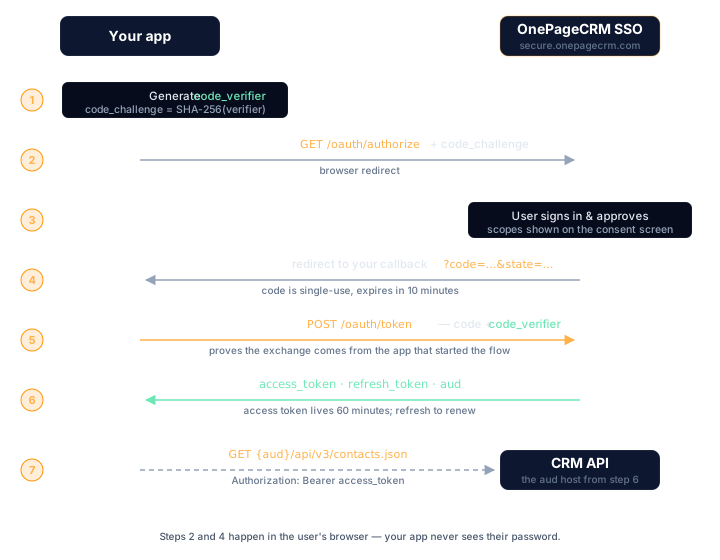
A user authorizing your app follows these steps:
1. On your site, the user clicks a button that redirects them to OnePageCRM.
2. On OnePageCRM, the user logs in and approves the permissions your app requested.
3. OnePageCRM redirects the user back to your app with a short-lived authorization code.
4. Your app exchanges the code for an access token and a refresh token.
5. Your app calls the CRM API using the access token in the `Authorization: Bearer` header.
6. When the access token expires, your app uses the refresh token to get a new one silently, without prompting the user again.
The authorization code is single-use and expires in 10 minutes. The access token is valid for 60 minutes. The refresh token lets your app maintain the session without asking the user to log in again.
---
## Who is involved
| Party | Role |
|-------|------|
| Your application | Requests access and calls the API on the user's behalf |
| Authorization server (`secure.onepagecrm.com`) | Authenticates the user and issues tokens |
| CRM API (`app.onepagecrm.com`) | Validates the token and serves data |
| The user | Logs in and approves what your app can access |
---
## Client types
Before you start, decide whether your app is a public or confidential client.
### Public clients
Apps where the source code is visible to users: browser apps, mobile apps, single-page apps.
- Cannot store a `client_secret` securely
- Use **PKCE** to prove identity instead of a secret
- `token_endpoint_auth_method: none`
- Receive a new refresh token on every use (rotation)
### Confidential clients
Apps that run on a server you control, such as Node.js, Python, or Ruby backends.
- Can store a `client_secret` securely on the server
- Authenticate with `client_secret_basic` (HTTP Basic) or `client_secret_post`
- Refresh tokens are longer-lived
> If your app runs entirely in the browser or on a user's device, it is a public client. If it runs on your own server, it is a confidential client.
---
## How PKCE works
PKCE (Proof Key for Code Exchange) prevents authorization codes from being used by anyone other than the app that requested them.
Before redirecting the user, your app generates a random secret (`code_verifier`) and sends a hash of it (`code_challenge`) to OnePageCRM. When exchanging the code for tokens, your app sends the original `code_verifier`. OnePageCRM hashes it, checks it matches the challenge it received, and only issues tokens if they match.
A stolen authorization code is useless without the `code_verifier` that only ever existed in your app.
PKCE is mandatory in OAuth 2.1. OnePageCRM only supports `S256` (SHA-256).
---
## Scopes and permissions
Scopes define what an access token is permitted to do. You request scopes when redirecting the user. They are shown on the consent screen and can be approved or narrowed by the user.
| Scope | Access |
|-------|--------|
| `crm.readonly` | Read-only access to your CRM data |
| `crm` | Full read and write access to the CRM |
| `mcp` | Access for AI and MCP integrations |
The granted scope is always the most restrictive of: what the server supports, what your client is registered for, what the user approved, and what your app requested. You can request less than your registered scope, never more.
Request the narrowest scope that does the job: `crm.readonly` if your app only reads, `crm` only when it writes. Request `mcp` only if your integration talks to the [OnePageCRM MCP server](/mcp/overview/) — it does nothing for a regular REST integration. A narrow request is also an easier consent screen to approve.
---
## Common questions
**When do I need OAuth instead of an API key?**
When your app acts on behalf of other OnePageCRM users — a SaaS
integration, a public app, or an AI agent using the `mcp` scope. For
scripts and internal tools working against your own account, an
[API key](/getting-started/quickstart/) is simpler.
**How long do tokens last?**
The authorization code is single-use and expires in 10 minutes. The
access token is valid for 60 minutes. The refresh token maintains the
session without asking the user to log in again.
**Is PKCE required?**
Yes — PKCE is mandatory in OAuth 2.1, and OnePageCRM only supports the
`S256` (SHA-256) challenge method. Public clients use it to prove
identity instead of a client secret.
## Next steps
- [Quickstart](/oauth/quickstart/): get credentials and complete your first token exchange with working code.
- [Reference](/oauth/reference/): every endpoint, parameter, error code, and security detail.
---
# OAuth Quickstart
URL: https://developer.onepagecrm.com/oauth/quickstart/
This guide walks through the full Authorization Code + PKCE flow. By the end you will have a working `client_id`, an access token, and a live API call.
**Prerequisites:** Decide whether your app is a [public or confidential client](/oauth/overview/#client-types) before you start. Have your redirect URI ready.
---
## Step 1: Get client credentials
[Request client credentials](/oauth/registration/) from the OnePageCRM
team. You'll need:
- Your application name — users see it on the consent screen
- Your redirect URI(s): the URL OnePageCRM will redirect users to after they approve your app — `https`, or `http://localhost` / `http://127.0.0.1` for development
- Client type: public (browser/mobile app) or confidential (server-side app)
Registration is handled manually and can take a few days — request it
before you plan to build. You'll receive your `client_id` (and
`client_secret` for confidential clients).
---
## Step 2: Generate PKCE values
Before redirecting the user, generate a `code_verifier` and `code_challenge`. These are single-use values that tie the token exchange to this specific login attempt.
**JavaScript**
```javascript
const array = new Uint8Array(64)
crypto.getRandomValues(array)
const codeVerifier = btoa(String.fromCharCode(...array))
.replace(/\+/g, '-').replace(/\//g, '_').replace(/=/g, '')
const encoded = new TextEncoder().encode(codeVerifier)
const digest = await crypto.subtle.digest('SHA-256', encoded)
const codeChallenge = btoa(String.fromCharCode(...new Uint8Array(digest)))
.replace(/\+/g, '-').replace(/\//g, '_').replace(/=/g, '')
// Store for use in the callback
sessionStorage.setItem('code_verifier', codeVerifier)
```
**Python**
```python
import secrets
import hashlib
import base64
code_verifier = secrets.token_urlsafe(64)
digest = hashlib.sha256(code_verifier.encode()).digest()
code_challenge = base64.urlsafe_b64encode(digest).rstrip(b'=').decode()
```
**Ruby**
```ruby
require 'securerandom'
require 'digest'
require 'base64'
code_verifier = Base64.urlsafe_encode64(SecureRandom.random_bytes(64), padding: false)
code_challenge = Base64.urlsafe_encode64(Digest::SHA256.digest(code_verifier), padding: false)
```
**Kotlin**
```kotlin
import java.security.MessageDigest
import java.security.SecureRandom
import android.util.Base64
val bytes = ByteArray(64).also { SecureRandom().nextBytes(it) }
val codeVerifier = Base64.encodeToString(bytes, Base64.URL_SAFE or Base64.NO_WRAP or Base64.NO_PADDING)
val digest = MessageDigest.getInstance("SHA-256").digest(codeVerifier.toByteArray())
val codeChallenge = Base64.encodeToString(digest, Base64.URL_SAFE or Base64.NO_WRAP or Base64.NO_PADDING)
```
**Swift**
```swift
import CryptoKit
import Foundation
import Security
var bytes = [UInt8](repeating: 0, count: 64)
_ = SecRandomCopyBytes(kSecRandomDefault, bytes.count, &bytes)
let codeVerifier = Data(bytes).base64EncodedString()
.replacingOccurrences(of: "+", with: "-")
.replacingOccurrences(of: "/", with: "_")
.replacingOccurrences(of: "=", with: "")
let digest = SHA256.hash(data: Data(codeVerifier.utf8))
let codeChallenge = Data(digest).base64EncodedString()
.replacingOccurrences(of: "+", with: "-")
.replacingOccurrences(of: "/", with: "_")
.replacingOccurrences(of: "=", with: "")
```
---
## Step 3: Redirect the user to OnePageCRM
Send the user to the authorization endpoint. On mobile, use the platform's secure browser API, not a WebView.
**JavaScript**
```javascript
const state = crypto.randomUUID()
sessionStorage.setItem('oauth_state', state)
const params = new URLSearchParams({
response_type: 'code',
client_id: 'YOUR_CLIENT_ID',
redirect_uri: 'https://myapp.example.com/callback',
scope: 'crm.readonly',
state,
code_challenge: codeChallenge,
code_challenge_method: 'S256',
})
window.location.href = `https://secure.onepagecrm.com/oauth/authorize?${params}`
```
**Python**
```python
import secrets
from urllib.parse import urlencode
state = secrets.token_urlsafe(32)
# Store state in session: session['oauth_state'] = state
params = urlencode({
'response_type': 'code',
'client_id': 'YOUR_CLIENT_ID',
'redirect_uri': 'https://myapp.example.com/callback',
'scope': 'crm.readonly',
'state': state,
'code_challenge': code_challenge,
'code_challenge_method': 'S256',
})
# Flask/Django: redirect to this URL
auth_url = f'https://secure.onepagecrm.com/oauth/authorize?{params}'
```
**Ruby**
```ruby
require 'securerandom'
require 'uri'
state = SecureRandom.urlsafe_base64(32)
# Store in session: session[:oauth_state] = state
params = URI.encode_www_form(
response_type: 'code',
client_id: 'YOUR_CLIENT_ID',
redirect_uri: 'https://myapp.example.com/callback',
scope: 'crm.readonly',
state: state,
code_challenge: code_challenge,
code_challenge_method: 'S256'
)
# Rails: redirect_to
auth_url = "https://secure.onepagecrm.com/oauth/authorize?#{params}"
```
**Kotlin**
```kotlin
// Uses AppAuth for Android — recommended for secure mobile OAuth
// Add to build.gradle: implementation 'net.openid:appauth:0.11.1'
import android.net.Uri
import net.openid.appauth.*
val serviceConfig = AuthorizationServiceConfiguration(
Uri.parse("https://secure.onepagecrm.com/oauth/authorize"),
Uri.parse("https://secure.onepagecrm.com/oauth/token")
)
val authRequest = AuthorizationRequest.Builder(
serviceConfig,
"YOUR_CLIENT_ID",
ResponseTypeValues.CODE,
// Must be https (Android App Link) — custom schemes like
// myapp:// are rejected at registration.
Uri.parse("https://myapp.example.com/oauth/callback")
)
.setScope("crm.readonly")
.setCodeVerifier(codeVerifier, codeChallenge, "S256")
.build()
val authService = AuthorizationService(this)
val intent = authService.getAuthorizationRequestIntent(authRequest)
startActivityForResult(intent, RC_AUTH)
```
**Swift**
```swift
// Uses ASWebAuthenticationSession — Apple's secure OAuth browser
import AuthenticationServices
let state = UUID().uuidString
var components = URLComponents(string: "https://secure.onepagecrm.com/oauth/authorize")!
components.queryItems = [
.init(name: "response_type", value: "code"),
.init(name: "client_id", value: "YOUR_CLIENT_ID"),
// Must be https (universal link) — custom schemes like
// myapp:// are rejected at registration.
.init(name: "redirect_uri", value: "https://myapp.example.com/oauth/callback"),
.init(name: "scope", value: "crm.readonly"),
.init(name: "state", value: state),
.init(name: "code_challenge", value: codeChallenge),
.init(name: "code_challenge_method", value: "S256"),
]
let session = ASWebAuthenticationSession(
url: components.url!,
callback: .https(host: "myapp.example.com", path: "/oauth/callback") // iOS 17.4+
) { callbackURL, error in
guard let url = callbackURL, error == nil else { return }
// Extract code and state from url, then exchange for tokens
}
session.presentationContextProvider = self
session.start()
```
---
## Step 4: Exchange the code for tokens
After the user approves, OnePageCRM redirects back with `?code=...&state=...`. Verify the state, then exchange the code immediately. It expires in **10 minutes** and is single-use.
**curl**
```bash
curl -X POST https://secure.onepagecrm.com/oauth/token \
-H "Content-Type: application/x-www-form-urlencoded" \
-d "grant_type=authorization_code" \
-d "code=AUTH_CODE" \
-d "redirect_uri=https://myapp.example.com/callback" \
-d "client_id=YOUR_CLIENT_ID" \
-d "code_verifier=YOUR_CODE_VERIFIER"
```
**JavaScript**
```javascript
const params = new URLSearchParams(window.location.search)
if (params.get('state') !== sessionStorage.getItem('oauth_state')) {
throw new Error('State mismatch — possible CSRF attack')
}
const codeVerifier = sessionStorage.getItem('code_verifier')
sessionStorage.removeItem('code_verifier')
sessionStorage.removeItem('oauth_state')
const response = await fetch('https://secure.onepagecrm.com/oauth/token', {
method: 'POST',
headers: { 'Content-Type': 'application/x-www-form-urlencoded' },
body: new URLSearchParams({
grant_type: 'authorization_code',
code: params.get('code'),
redirect_uri: 'https://myapp.example.com/callback',
client_id: 'YOUR_CLIENT_ID',
code_verifier: codeVerifier,
}),
})
const tokens = await response.json()
```
**Python**
```python
import requests
# Verify state matches what you stored before the redirect
assert request.args['state'] == session['oauth_state'], 'State mismatch'
response = requests.post(
'https://secure.onepagecrm.com/oauth/token',
data={
'grant_type': 'authorization_code',
'code': request.args['code'],
'redirect_uri': 'https://myapp.example.com/callback',
'client_id': 'YOUR_CLIENT_ID',
'code_verifier': session['code_verifier'],
}
)
tokens = response.json()
```
**Ruby**
```ruby
require 'net/http'
require 'json'
# Verify state matches what you stored before the redirect
raise 'State mismatch' unless params[:state] == session[:oauth_state]
uri = URI('https://secure.onepagecrm.com/oauth/token')
response = Net::HTTP.post_form(uri, {
grant_type: 'authorization_code',
code: params[:code],
redirect_uri: 'https://myapp.example.com/callback',
client_id: 'YOUR_CLIENT_ID',
code_verifier: session[:code_verifier]
})
tokens = JSON.parse(response.body)
```
**Kotlin**
```kotlin
import android.net.Uri
import net.openid.appauth.*
import okhttp3.*
// AppAuth handles the callback and code exchange
override fun onActivityResult(requestCode: Int, resultCode: Int, data: Intent?) {
if (requestCode == RC_AUTH) {
val resp = AuthorizationResponse.fromIntent(data!!)
val ex = AuthorizationException.fromIntent(data)
if (resp != null) {
val authService = AuthorizationService(this)
authService.performTokenRequest(resp.createTokenExchangeRequest()) { tokenResp, ex ->
if (tokenResp != null) {
val accessToken = tokenResp.accessToken
val refreshToken = tokenResp.refreshToken
}
}
}
}
}
```
**Swift**
```swift
import Foundation
var request = URLRequest(url: URL(string: "https://secure.onepagecrm.com/oauth/token")!)
request.httpMethod = "POST"
request.setValue("application/x-www-form-urlencoded", forHTTPHeaderField: "Content-Type")
let body = [
"grant_type=authorization_code",
"code=\(authCode)",
"redirect_uri=https://myapp.example.com/oauth/callback",
"client_id=YOUR_CLIENT_ID",
"code_verifier=\(codeVerifier)",
].joined(separator: "&")
request.httpBody = body.data(using: .utf8)
let (data, _) = try await URLSession.shared.data(for: request)
let tokens = try JSONDecoder().decode(TokenResponse.self, from: data)
```
You receive:
```json
{
"access_token": "k2tV5VE1b3...",
"token_type": "Bearer",
"expires_in": 3600,
"scope": "crm.readonly",
"aud": "https://app.onepagecrm.com",
"refresh_token": "dGhpcyBpcyBh..."
}
```
The `aud` field is the CRM API base URL for this user's account — it may be a regional host rather than `app.onepagecrm.com`. Always build API URLs from `aud` instead of hard-coding a host. Store `access_token` in memory and `refresh_token` securely.
---
## Step 5: Make an API request
**curl**
```bash
# Base URL comes from the token response's aud field
curl https://app.onepagecrm.com/api/v3/contacts.json \
-H "Authorization: Bearer YOUR_ACCESS_TOKEN"
```
**JavaScript**
```javascript
const response = await fetch(`${audience}/api/v3/contacts.json`, {
headers: { Authorization: `Bearer ${accessToken}` }
})
const data = await response.json()
```
**Python**
```python
import requests
response = requests.get(
f'{audience}/api/v3/contacts.json',
headers={'Authorization': f'Bearer {access_token}'}
)
data = response.json()
```
**Ruby**
```ruby
require 'net/http'
require 'json'
uri = URI("#{audience}/api/v3/contacts.json")
http = Net::HTTP.new(uri.host, uri.port)
http.use_ssl = true
request = Net::HTTP::Get.new(uri)
request['Authorization'] = "Bearer #{access_token}"
response = http.request(request)
data = JSON.parse(response.body)
```
**Kotlin**
```kotlin
import okhttp3.*
val request = Request.Builder()
.url("$audience/api/v3/contacts.json")
.header("Authorization", "Bearer $accessToken")
.build()
val response = OkHttpClient().newCall(request).execute()
val data = response.body!!.string()
```
**Swift**
```swift
var request = URLRequest(url: URL(string: "\(audience)/api/v3/contacts.json")!)
request.setValue("Bearer \(accessToken)", forHTTPHeaderField: "Authorization")
let (data, _) = try await URLSession.shared.data(for: request)
let contacts = try JSONDecoder().decode(ContactsResponse.self, from: data)
```
---
## Step 6: Renew the access token
Access tokens expire after 60 minutes. Use the refresh token to get a new one silently, with no user interaction required.
**curl**
```bash
curl -X POST https://secure.onepagecrm.com/oauth/token \
-H "Content-Type: application/x-www-form-urlencoded" \
-d "grant_type=refresh_token" \
-d "refresh_token=YOUR_REFRESH_TOKEN" \
-d "client_id=YOUR_CLIENT_ID"
```
**JavaScript**
```javascript
const response = await fetch('https://secure.onepagecrm.com/oauth/token', {
method: 'POST',
headers: { 'Content-Type': 'application/x-www-form-urlencoded' },
body: new URLSearchParams({
grant_type: 'refresh_token',
refresh_token: storedRefreshToken,
client_id: 'YOUR_CLIENT_ID',
}),
})
const tokens = await response.json()
// Always save the new refresh token — the old one is now invalid
storedRefreshToken = tokens.refresh_token
```
**Python**
```python
response = requests.post(
'https://secure.onepagecrm.com/oauth/token',
data={
'grant_type': 'refresh_token',
'refresh_token': stored_refresh_token,
'client_id': 'YOUR_CLIENT_ID',
}
)
tokens = response.json()
stored_refresh_token = tokens['refresh_token'] # always save the new one
```
**Ruby**
```ruby
response = Net::HTTP.post_form(
URI('https://secure.onepagecrm.com/oauth/token'),
grant_type: 'refresh_token',
refresh_token: stored_refresh_token,
client_id: 'YOUR_CLIENT_ID'
)
tokens = JSON.parse(response.body)
stored_refresh_token = tokens['refresh_token'] # always save the new one
```
**Kotlin**
```kotlin
val body = FormBody.Builder()
.add("grant_type", "refresh_token")
.add("refresh_token", storedRefreshToken)
.add("client_id", "YOUR_CLIENT_ID")
.build()
val request = Request.Builder()
.url("https://secure.onepagecrm.com/oauth/token")
.post(body)
.build()
val response = OkHttpClient().newCall(request).execute()
val tokens = JSONObject(response.body!!.string())
storedRefreshToken = tokens.getString("refresh_token") // always save the new one
```
**Swift**
```swift
var request = URLRequest(url: URL(string: "https://secure.onepagecrm.com/oauth/token")!)
request.httpMethod = "POST"
request.setValue("application/x-www-form-urlencoded", forHTTPHeaderField: "Content-Type")
request.httpBody = "grant_type=refresh_token&refresh_token=\(storedRefreshToken)&client_id=YOUR_CLIENT_ID"
.data(using: .utf8)
let (data, _) = try await URLSession.shared.data(for: request)
let tokens = try JSONDecoder().decode(TokenResponse.self, from: data)
storedRefreshToken = tokens.refreshToken // always save the new one
```
> **Public clients:** Every refresh response includes a new refresh token. Always replace the old one. Reusing a rotated token revokes the entire session.
---
## Next steps
- [Reference](/oauth/reference/): every endpoint, parameter, error code, and security detail.
---
# OAuth Reference
URL: https://developer.onepagecrm.com/oauth/reference/
## Base URL
| | URL |
|---|---|
| Authorization server (authorization & tokens) | `https://secure.onepagecrm.com` |
| CRM API | `https://app.onepagecrm.com` |
All OAuth endpoints are on `secure.onepagecrm.com`. The `aud` field in every token response contains the CRM API base URL for that user's account.
---
## Discovery
```
GET /.well-known/oauth-authorization-server
```
Returns server capabilities: endpoint URLs, supported scopes, and grant types. No authentication required. Open CORS, safe to call from a browser.
```bash
curl https://secure.onepagecrm.com/.well-known/oauth-authorization-server
```
**Response:**
```json
{
"issuer": "https://secure.onepagecrm.com",
"registration_endpoint": "https://secure.onepagecrm.com/oauth/register",
"authorization_endpoint": "https://secure.onepagecrm.com/oauth/authorize",
"token_endpoint": "https://secure.onepagecrm.com/oauth/token",
"response_types_supported": ["code"],
"grant_types_supported": ["authorization_code", "refresh_token"],
"token_endpoint_auth_methods_supported": ["client_secret_basic", "client_secret_post", "none"],
"code_challenge_methods_supported": ["S256"],
"scopes_supported": ["crm.readonly", "crm", "mcp"]
}
```
Although the metadata advertises a `registration_endpoint`, self-service registration isn't open during the closed beta; clients are approved by the OnePageCRM team — see [Client registration](/oauth/registration/).
---
## Client registration
Client registration is handled by the OnePageCRM team while OAuth is
in closed beta — see [Client registration](/oauth/registration/) for
how to get credentials and the redirect URI rules.
---
## Authorization
```
GET /oauth/authorize
```
Redirects the user to the OnePageCRM login and consent screen.
```
https://secure.onepagecrm.com/oauth/authorize
?response_type=code
&client_id=YOUR_CLIENT_ID
&redirect_uri=https://myapp.example.com/callback
&scope=crm.readonly
&state=RANDOM_VALUE
&code_challenge=BASE64URL_SHA256_OF_VERIFIER
&code_challenge_method=S256
```
**Parameters:**
| Parameter | Required | Description |
|-----------|----------|-------------|
| `response_type` | Yes | Always `code` |
| `client_id` | Yes | Your registered client ID |
| `redirect_uri` | Conditional | Required if you registered more than one |
| `scope` | No | Space-separated. Defaults to client's registered scope |
| `state` | Recommended | Random value; verify it in the callback to prevent CSRF |
| `code_challenge` | Yes | `BASE64URL(SHA256(code_verifier))` |
| `code_challenge_method` | Yes | Must be `S256` |
**Success response:** redirect to your `redirect_uri`:
```
https://myapp.example.com/callback?code=AUTH_CODE&state=YOUR_STATE&iss=https://secure.onepagecrm.com
```
**Error response:** redirect with error parameters:
```
https://myapp.example.com/callback?error=access_denied&error_description=...&state=YOUR_STATE
```
| `error` | When it happens |
|---------|----------------|
| `access_denied` | User clicked Decline on the consent screen |
| `invalid_request` | Missing or invalid parameter: no PKCE, bad redirect URI |
| `invalid_client` | `client_id` is not registered |
| `unauthorized_client` | Client not allowed this grant type |
| `invalid_scope` | Scope not registered for this client |
| `server_error` | Internal server error |
---
## Authorization code grant
```
POST /oauth/token
Content-Type: application/x-www-form-urlencoded
```
Exchanges an authorization code for an access token and refresh token. The code is **single-use** and expires in **10 minutes**.
```bash
curl -X POST https://secure.onepagecrm.com/oauth/token \
-H "Content-Type: application/x-www-form-urlencoded" \
-d "grant_type=authorization_code" \
-d "code=AUTH_CODE" \
-d "redirect_uri=https://myapp.example.com/callback" \
-d "client_id=YOUR_CLIENT_ID" \
-d "code_verifier=YOUR_CODE_VERIFIER"
```
For confidential clients, authenticate with HTTP Basic instead of `client_id` in the body:
```bash
curl -X POST https://secure.onepagecrm.com/oauth/token \
-u "YOUR_CLIENT_ID:YOUR_CLIENT_SECRET" \
-H "Content-Type: application/x-www-form-urlencoded" \
-d "grant_type=authorization_code" \
-d "code=AUTH_CODE" \
-d "redirect_uri=https://myapp.example.com/callback" \
-d "code_verifier=YOUR_CODE_VERIFIER"
```
**Parameters:**
| Parameter | Description |
|-----------|-------------|
| `grant_type` | `authorization_code` |
| `code` | The authorization code from the callback |
| `redirect_uri` | Must match the one used in the authorization request |
| `client_id` | Your client ID (public clients only; omit if using HTTP Basic) |
| `code_verifier` | The original random string generated before login |
**Response:**
```json
{
"access_token": "k2tV5VE1b3...",
"token_type": "Bearer",
"expires_in": 3600,
"scope": "crm.readonly",
"aud": "https://app.onepagecrm.com",
"refresh_token": "dGhpcyBpcyBh..."
}
```
| Field | Description |
|-------|-------------|
| `access_token` | Use in `Authorization: Bearer` header. Valid for 60 minutes |
| `token_type` | Always `Bearer` |
| `expires_in` | Seconds until the access token expires |
| `scope` | The granted scope; may be narrower than requested |
| `aud` | The CRM API base URL for this user's account |
| `refresh_token` | Use to get a new access token silently |
**Errors:**
| `error` | HTTP | When it happens |
|---------|------|----------------|
| `invalid_grant` | 400 | Code expired, already used, or `code_verifier` doesn't match |
| `invalid_client` | 401 | Wrong `client_id` or `client_secret` |
| `invalid_request` | 400 | Missing parameter, wrong content type, or mixed auth methods |
| `unauthorized_client` | 400 | Client not allowed this grant type |
---
## Refresh token grant
```
POST /oauth/token
Content-Type: application/x-www-form-urlencoded
```
Gets a new access token using a refresh token. No user interaction required.
```bash
curl -X POST https://secure.onepagecrm.com/oauth/token \
-H "Content-Type: application/x-www-form-urlencoded" \
-d "grant_type=refresh_token" \
-d "refresh_token=YOUR_REFRESH_TOKEN" \
-d "client_id=YOUR_CLIENT_ID"
```
**Parameters:**
| Parameter | Required | Description |
|-----------|----------|-------------|
| `grant_type` | Yes | `refresh_token` |
| `refresh_token` | Yes | Your current refresh token |
| `client_id` | Yes | Your client ID |
| `scope` | No | Can request the same or a narrower scope |
**Response:** Same format as the authorization code response. For public clients, a **new refresh token** is always returned. Replace the old one immediately.
**Errors:**
| `error` | HTTP | When it happens |
|---------|------|----------------|
| `invalid_grant` | 400 | Refresh token expired, revoked, or already rotated |
| `invalid_client` | 401 | Wrong `client_id` |
| `invalid_request` | 400 | Missing parameter |
---
## Client authentication
| Method | How | When to use |
|--------|-----|-------------|
| `none` | `client_id` in the POST body, no secret | Public clients (browser/mobile) |
| `client_secret_basic` | `Authorization: Basic base64(id:secret)` header | Confidential clients (recommended) |
| `client_secret_post` | `client_id` + `client_secret` in the POST body | Confidential clients (alternative) |
Only one method per request. Sending both a Basic header and body credentials is rejected with `invalid_request`.
---
## Scopes
| Scope | Access |
|-------|--------|
| `crm.readonly` | Read-only access to your CRM data |
| `crm` | Full read and write access |
| `mcp` | Access for AI / MCP integrations |
Scopes are layered. The final token scope is the most restrictive of: server-supported → client-registered → user-approved → app-requested. You can always request less than your registered scope, never more.
---
## Token lifetimes
| Token | Lifetime |
|-------|---------|
| Authorization code | 10 minutes, single-use |
| Access token | 60 minutes |
| Refresh token (public client) | 7-day idle TTL, 90-day absolute max |
| Refresh token (confidential client) | 30-day idle TTL, 365-day absolute max |
Idle TTL resets on every use. Absolute max never resets. After 90 days (public) or 365 days (confidential), the user must log in again.
Lifetimes are policy, not physics — they can change. Drive your
refresh logic off `expires_in` from the token response instead of
hard-coding any of these numbers.
---
## Token rotation
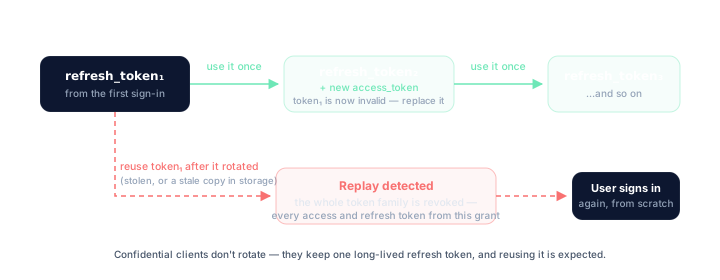
Public clients receive a **new refresh token on every use**. The old one is immediately invalidated.
If an already-rotated token is reused, the server detects a replay attack and revokes the entire token family: all access tokens and refresh tokens from that authorization.
---
## Storing tokens
| What | Where | Why |
|------|-------|-----|
| Access token | Memory (JS variable) | Not persisted, invisible to other tabs and scripts |
| Refresh token | `sessionStorage` | Survives page reloads; gone on tab close |
| `code_verifier` | `sessionStorage` | Single-use; delete immediately after the callback |
| `state` | `sessionStorage` | Single-use; delete immediately after the callback |
Avoid `localStorage`. Tokens persist forever and are accessible to any script on the page.
---
## CORS policy
The token endpoint adds CORS headers for **public clients only** (`token_endpoint_auth_method: none`). Your app's origin must match the scheme, host, and port of a registered redirect URI.
Example: registering `https://myapp.example.com/callback` allows requests from `https://myapp.example.com`.
Confidential clients never receive CORS headers — the browser blocks the response. Call the token endpoint from your backend instead.
The discovery endpoint has open CORS (`Access-Control-Allow-Origin: *`).
---
## Troubleshooting
### `invalid_grant` on the token endpoint
Three causes account for almost every case:
| Cause | Check |
|-------|-------|
| Code expired or already used | Authorization codes live 10 minutes and work once. Retrying a token request replays the code — don't |
| `code_verifier` mismatch | The verifier must be the exact string whose SHA-256 you sent as `code_challenge`. A new verifier generated on the callback page is the classic bug |
| `redirect_uri` mismatch | The `redirect_uri` in the token request must equal the one in the authorization request, character-for-character |
### Refresh suddenly fails and API calls return `401`
This applies to **public clients only**. If a refresh token is used
twice — because of a race between tabs, a retry on timeout, or a
restored backup — the server treats it as a replay attack and revokes
the **entire token family**: every access token and refresh token from
that authorization. From your side it looks like a working integration
that abruptly gets `invalid_grant` on refresh and `401` on API calls.
There is no partial recovery. Send the user through the full
`/oauth/authorize` flow again. To avoid it: serialize refresh calls
behind a single lock, and always replace the stored refresh token the
moment a new one arrives.
Confidential clients are different: they keep one long-lived refresh
token, its idle TTL resets on every use, and reuse is expected — no
rotation, no family revocation.
### CORS errors calling the token endpoint from a browser
The token endpoint adds CORS headers only for **public clients**
(`token_endpoint_auth_method: none`), and only for origins that match
the scheme, host, and port of a registered redirect URI. If your page
is served from an origin you never registered (a preview deploy, a
different port), the preflight fails. Register a redirect URI on that
origin, or proxy the token call through your backend.
Confidential clients never receive CORS headers on the token endpoint
— that's by design. Call it from your backend, not the browser.
The discovery endpoint is open CORS — if discovery works but the token
call doesn't, it's an origin mismatch, not a network problem.
### How do I revoke a token?
There is no `/oauth/revoke` endpoint. To "log out", discard the tokens
on your side — the access token expires within 60 minutes and the
refresh token expires when its TTL runs out. Server-side revocation
happens automatically on replay detection, or by OnePageCRM admin
action.
### Where's the userinfo endpoint?
There isn't one. The `aud` field in every token response carries the
user's CRM API base URL — use it to route API calls. For anything else
about who authorized, keep your own session state from before the
redirect.
---
## Security checklist
- [ ] PKCE used on every authorization request (`code_challenge_method: S256`)
- [ ] `state` verified in the callback before processing the code
- [ ] Authorization code exchanged within 10 minutes
- [ ] Each authorization code used only once
- [ ] Refresh token replaced on every use (public clients)
- [ ] Access token kept in memory, not `localStorage`
- [ ] `401` from the API triggers re-login, not a silent failure
- [ ] `redirect_uri` uses HTTPS in production
- [ ] `error` parameter in callback URL handled and shown to the user
---
# Client registration
URL: https://developer.onepagecrm.com/oauth/registration/
Before your app can request tokens, it needs a `client_id`. While
OAuth is in closed beta, client registration is handled by the
OnePageCRM team — there is no self-service registration. To request
access, get in touch through the [support page](/support/).
## What you receive
- **`client_id`** — the public identifier. Safe to embed in client
code.
- **`client_secret`** — confidential clients only. Keep it in your
server's secret store, never in client code or source control. There
is no self-serve recovery — if you lose it, contact the team.
- **Public clients get no secret.** `client_id` plus
[PKCE](/oauth/quickstart/) at authorization time is the whole model.
## Redirect URI rules
Redirect URIs are matched **exactly** at authorization time — no
wildcards, no prefix matching, no "close enough". Register every URI
you'll use, including different ports and paths.
| Rule | Detail |
|------|--------|
| Exact match | The `redirect_uri` in the authorization request must equal a registered URI character-for-character |
| Absolute | Relative URIs are rejected |
| No fragments | `https://app.example.com/cb#section` is rejected |
| HTTPS | Required, except `http://localhost` and `http://127.0.0.1` loopback — any port, any path |
| Custom schemes | Not supported — `myapp://callback` is rejected. Native apps must use an http loopback redirect (`http://localhost` or `http://127.0.0.1`) or an https URL |
| Maximum | 20 redirect URIs per client |
## What to read next
- **[Quickstart](/oauth/quickstart/)** — go from credentials to your first token.
- **[Reference](/oauth/reference/)** — every endpoint, parameter, scope, and error code.
---
# Webhooks overview
URL: https://developer.onepagecrm.com/webhooks/overview/
Webhooks push CRM changes to you. Instead of polling the API to ask
"did anything change?", you register a URL and OnePageCRM sends a
`POST` to it shortly after a contact, deal, action, note,
call, meeting, or company changes.
That means less traffic on both sides, and your integration reacts
when the change happens — not when your next poll runs.
> **No retries.** Delivery is at-most-once — a failed delivery is
> not re-sent. Pair webhooks with a reconciliation poll. See
> [Delivery](/webhooks/delivery/).
## Webhooks, polling, or OQL?
| You want to | Use |
| --- | --- |
| React to changes as they happen | **Webhooks** |
| Guarantee you have every record, even if a delivery was missed | **Polling** the [REST API](/api/reference/) |
| Ask questions about current state ("won deals this quarter") | **[OQL](/oql/overview/)** via the [MCP server](/mcp/overview/) |
These aren't exclusive. Webhook delivery is
[at-most-once](/webhooks/delivery/) — a failed delivery is not
retried — so the reliable pattern is webhooks for freshness plus a
periodic reconciliation poll for completeness.
## Activate webhooks
An account **administrator** opens **Apps** in OnePageCRM and
activates the **Webhooks** app, then configures a name, a target URL,
a format (`json`), and a secret key. See
[Manage webhooks](/webhooks/manage/).
Use an HTTPS URL, and set a secret key — it's how your endpoint
verifies a request really came from OnePageCRM. See
[Security](/webhooks/security/).
## The payload at a glance
Every webhook is a `POST` with exactly five top-level keys:
```json
{
"type": "contact",
"reason": "updated",
"timestamp": 1781426730,
"secretkey": "your-configured-secret",
"data": {
"contact": { "id": "5aba31ea9007ba0f570c92d4", "first_name": "Jane", "...": "..." },
"next_actions": ["..."],
"...": "..."
}
}
```
| Key | What it is |
| --- | --- |
| `type` | The entity that changed: `contact`, `company`, `deal`, `action`, `note`, `call`, `meeting` |
| `reason` | What happened: `created`, `updated`, `deleted`, `changed_to_won`, ... |
| `timestamp` | Unix time in seconds (integer) |
| `secretkey` | Your configured secret |
| `data` | The changed resource, **nested under its entity key** (`data.contact`, `data.deal`, ...) — same shape as the API v3 response. Deleted events are the exception: `data` is just `{ "id": "..." }` |
Full details, encodings, and realistic samples are on the
[Payloads](/webhooks/payloads/) page.
## Common questions
**Do webhooks retry failed deliveries?**
No. Delivery is [at-most-once](/webhooks/delivery/) — a failed
delivery is not re-sent. Treat webhooks as a freshness signal and
pair them with a periodic reconciliation poll against the REST API.
**How do I verify a webhook came from OnePageCRM?**
Every delivery carries your configured secret in the `secretkey`
body field. Compare it against your stored secret with a
[constant-time comparison](/webhooks/security/), reject requests
that don't match, and always use an HTTPS endpoint.
**Which events are covered?**
Created, updated, and deleted events for all seven core entities, plus
action completions and deal status changes to pending, won, or
lost. The full matrix is on [Events](/webhooks/events/).
## What's in this section
- [Events](/webhooks/events/). The full entity × reason matrix,
dynamic deal status events, what triggers webhooks and what
doesn't, and privacy exclusions.
- [Payloads](/webhooks/payloads/). The envelope, sample payloads,
and the deleted-event rule.
- [Delivery](/webhooks/delivery/). Dispatch timing, how fast to
respond, at-most-once semantics, and how to
build around them.
- [Security](/webhooks/security/). Verifying the secret key with a
constant-time compare, and an honest look at the threat model.
- [Manage webhooks](/webhooks/manage/). Setting up webhook configs
in the Apps page, and the fields each one takes.
New here? Start with the
[webhooks tutorial](/tutorials/webhooks/) — activate the app, catch
your first event, and build a verified receiver.
---
# Delivery
URL: https://developer.onepagecrm.com/webhooks/delivery/
Knowing exactly how delivery works is what separates a receiver that
holds up in production from one that silently drifts out of sync.
Here are the rules.
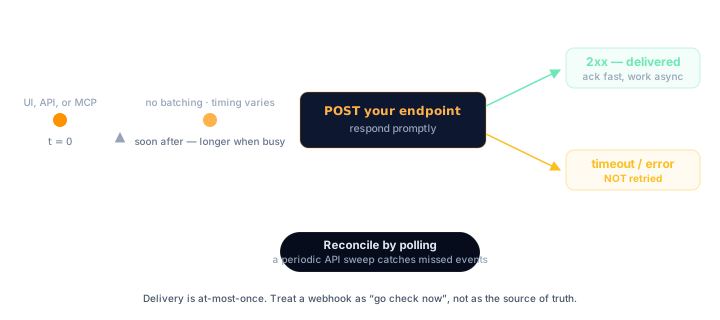
## Timing
| Behavior | Value |
| --- | --- |
| Dispatch after a change | Usually within seconds — can lag behind during busy periods |
| Response window for your endpoint | Respond promptly; slow responses count as failed |
| Retries on failure | **None** |
## Dispatch timing
Events are usually dispatched within seconds of the change — but
there is no guaranteed upper bound. Deliveries go through a queue,
and during busy periods or maintenance that queue can back up, so an
event may arrive minutes (occasionally longer) after the change it
describes. There is no batching either way: three edits in quick
succession produce three separate deliveries.
Don't build anything that assumes prompt delivery. For a sync
dashboard or a Zapier-style automation, the usual latency is
invisible. For anything that needs a hard real-time guarantee,
webhooks are the wrong tool.
## Respond fast
Slow responses count as failed deliveries — OnePageCRM won't wait
on your endpoint indefinitely. The safe pattern:
1. Read the body.
2. [Verify the secret](/webhooks/security/).
3. Queue the work.
4. Return `200` immediately.
Do the actual processing — API calls, database writes, downstream
notifications — after you've responded, not before.
## Delivery is at-most-once
If a delivery fails — your endpoint returns a non-2xx status, times
out, or the connection drops — **it is not retried**. The event is gone. The response
status is not used to re-send anything.
## Build for it
Webhooks are a **freshness signal**, not a transaction log.
### Treat webhooks as "go check now"
The reliable pattern is to use the event as a trigger, not as the
source of truth. When a `contact` / `updated` event arrives, you can
trust the payload — but when an event *doesn't* arrive, you know
nothing.
### Reconcile with polling
For any sync where missing a change matters, pair webhooks with a
periodic reconciliation poll against the
[REST API](/api/reference/): fetch the records you mirror, compare
`modified_at` against your copy, and repair the differences. Run it
hourly or daily depending on how much drift you can tolerate. The
poll catches whatever webhooks missed — failed deliveries, downtime
on your side, and [imports, which never fire webhooks](/webhooks/events/#what-triggers-webhooks).
### Be idempotent
There is no dedupe on the sending side, and rapid consecutive edits
each produce an event. Make your processing idempotent so handling
the same logical change twice is harmless. A practical dedupe key:
```text
type + ":" + entityId + ":" + timestamp
```
where `entityId` is `data..id` (`data.contact.id`,
`data.deal.id`, ...) — or `data.id` for `deleted` events, where
`data` is flat.
Skip events whose key you've already processed. The
[tutorial](/tutorials/webhooks/) shows this in a working receiver.
### Expect bursts
Bulk operations fire one event per affected record. A bulk tag
update on 500 contacts is 500 POSTs to your endpoint. Queue first,
process later — and make sure your queue absorbs spikes without
slowing your responses down.
---
# Events
URL: https://developer.onepagecrm.com/webhooks/events/
Every webhook carries a `type` (the entity that changed) and a
`reason` (what happened to it). This page lists every combination.
## The event matrix
| `reason` | contact | company | deal | action | note | call | meeting |
| --- | :-: | :-: | :-: | :-: | :-: | :-: | :-: |
| `created` | ✓ | ✓ | ✓ | ✓ | ✓ | ✓ | ✓ |
| `updated` | ✓ | ✓ | ✓ | ✓ | ✓ | ✓ | ✓ |
| `deleted` | ✓ | ✓ | ✓ | ✓ | ✓ | ✓ | ✓ |
| `undeleted` | ✓ | — | ✓ | ✓ | ✓ | ✓ | ✓ |
| `completed` | — | — | — | ✓ | — | — | — |
| `uncompleted` | — | — | — | ✓ | — | — | — |
| `expected_close_date_updated` | — | — | ✓ | — | — | — | — |
| `changed_to_` | — | — | ✓ | — | — | — | — |
Reasons are lowercase plain strings, exactly as shown.
Note the one asymmetry: **companies have no `undeleted` event**.
Every other entity sends one when a deleted record is restored.
## Reason reference
| `reason` | Fires when |
| --- | --- |
| `created` | The record is created. |
| `updated` | The record is edited. |
| `deleted` | The record is deleted. `data` contains only the `id` — see [Payloads](/webhooks/payloads/#deleted-events). |
| `undeleted` | A deleted record is restored. |
| `completed` | An action is marked done. |
| `uncompleted` | A completed action is reopened. |
| `expected_close_date_updated` | A pending deal's expected close date changes. |
| `changed_to_` | A deal's status changes — see below. |
## Dynamic deal status events
`changed_to_` fires when a deal's status changes, with the
new status substituted in. Deal status is constrained to exactly
three values — `pending`, `won`, `lost` — so the possible reasons
are:
- `changed_to_won` — deal marked won
- `changed_to_lost` — deal marked lost
- `changed_to_pending` — deal moved back to pending
Pipeline stages are a separate concept and do not produce
`changed_to_` events. Matching on the `changed_to_` prefix and
treating the suffix as data is still a reasonable way to
future-proof your receiver — but today the suffix is always one of
those three.
## What triggers webhooks
Changes fire the same events no matter where they come from:
| Source | Fires webhooks? |
| --- | --- |
| The OnePageCRM web app | Yes |
| The [REST API v3](/api/reference/) | Yes |
| The [MCP server](/mcp/overview/) | Yes |
| Bulk operations (bulk status, tag, or owner updates) | Yes — **one event per affected record** |
| CSV, Google Contacts, or Highrise imports | **No** |
Two things to plan for:
- A bulk update of 500 contacts means 500 `contact` / `updated`
events arriving at your endpoint.
- Imports are silent. If your integration needs imported records,
reconcile with a periodic API poll — see
[Delivery](/webhooks/delivery/).
## No deduplication
There is no dedupe window. Three rapid edits to the same contact
produce three `updated` events. Build your receiver to be
idempotent — `type` + the entity id + `timestamp` makes a good
deduplication key. The entity id lives at `data..id`
(`data.contact.id`, `data.deal.id`, ...), or `data.id` for
`deleted` events. See [Delivery](/webhooks/delivery/) for the
pattern.
## Privacy exclusions
Webhooks respect contact privacy:
- No `created`, `updated`, or other full-payload webhook is sent
for a **private contact**, or for any record (deal, note, action,
call, meeting) belonging to a private contact.
- **Company** events are skipped if the company has no contacts, or
if any of its contacts is private.
- **`deleted` events are the exception** — they are still sent for
private contacts. The privacy check never runs for deletes because
`data` carries only the `id`, nothing private.
If you're testing and an event never arrives, check whether the
record's contact is private before debugging your endpoint.
---
# Manage webhooks
URL: https://developer.onepagecrm.com/webhooks/manage/
A webhook config is four fields: a name, a target URL, a format, and
a secret. You manage configs from the **Apps** page in OnePageCRM.
## In the app
An account **administrator** opens **Apps** in OnePageCRM and
activates the **Webhooks** app. From there you can add, edit, and
remove configs. Each one takes:
- **Name** — a label for you
- **Target URL** — where OnePageCRM POSTs; use HTTPS
- **Format** — `json` (see [Payloads](/webhooks/payloads/))
- **Secret key** — the form lets you leave this blank, but set one
anyway; it's how your endpoint tells a genuine event from a forged
one (see [Security](/webhooks/security/))
Only an administrator can activate the app or change its configs.
Adding a config starts delivery to that URL right away. Removing one
stops delivery to it immediately.
## Next
- [Payloads](/webhooks/payloads/) — what each delivery contains.
- [Security](/webhooks/security/) — why the secret key should never
be empty in production.
---
# Payloads
URL: https://developer.onepagecrm.com/webhooks/payloads/
Every webhook is a `POST` with exactly five top-level keys. No more,
no less.
## The envelope
| Key | Type | Description |
| --- | --- | --- |
| `type` | string | The entity that changed: `contact`, `company`, `deal`, `action`, `note`, `call`, `meeting` |
| `reason` | string | What happened: `created`, `updated`, `deleted`, `changed_to_won`, ... — see [Events](/webhooks/events/) |
| `timestamp` | integer | Unix time in seconds |
| `secretkey` | string | The secret you configured, or empty if the in-app form left it blank |
| `data` | object | The changed resource, nested under its entity key |
`data` is the resource serialized exactly like the API v3 response
for that resource — the same nested shape you get from
`GET /api/v3/contacts/{id}.json`, `GET /api/v3/deals/{id}.json`, and
so on. If you already parse API responses, you already parse webhook
payloads.
> **`data` is nested.** The resource sits under its entity key:
> `data.contact.first_name`, not `data.first_name`. The record's id
> is `data.contact.id`, `data.deal.id`, and so on — matching the
> `type` field. Contact events also carry sibling keys
> (`next_actions`, `next_action`, `queued_actions`,
> `most_urgent_action`) alongside `data.contact`, just like the API.
> The one exception is [deleted events](#deleted-events), where
> `data` is flat: `{ "id": "..." }`.
## Encoding
Webhooks are delivered as JSON. `Content-Type: application/json`, and
the body is the envelope as a JSON object:
```json
{
"type": "note",
"reason": "created",
"timestamp": 1781426730,
"secretkey": "your-configured-secret",
"data": {
"note": {
"id": "5afc1b69d556730b580596cb",
"author": "Jane D.",
"contact_id": "5ae06ef9d55673108fe8877f",
"text": "Met Jane at the Eco Conference. Wants a quote for 40 panels.",
"date": "2026-06-10",
"linked_deal_id": "",
"linked_deal_name": "",
"attachments": [],
"created_at": "2026-06-10T08:46:10Z",
"modified_at": "2026-06-10T08:46:10Z"
}
}
}
```
## Sample payloads
The samples below are built from the current API v3 schemas and
abridged for readability (`"...": "..."` marks omitted fields). The
authoritative field list for each resource is the
[API reference](/api/reference/).
### `contact`
The contact sits under `data.contact`, with its actions as sibling
keys — the same shape as `GET /api/v3/contacts/{id}.json`:
```json
{
"type": "contact",
"reason": "updated",
"timestamp": 1781426730,
"secretkey": "your-configured-secret",
"data": {
"contact": {
"id": "5aba31ea9007ba0f570c92d4",
"title": "Ms",
"first_name": "Jane",
"last_name": "Doe",
"job_title": "Operations Lead",
"starred": false,
"company_id": "5aba31ea9007ba0f570c92d5",
"company_name": "Acme Solar",
"emails": [{ "type": "work", "value": "jane.doe@acmesolar.example" }],
"phones": [{ "type": "work", "value": "(912) 644-1770" }],
"urls": [{ "type": "website", "value": "https://acmesolar.example" }],
"address_list": [],
"status_id": "5e31e030849d781e837b6ba1",
"status": "Prospect",
"lead_source_id": "email_web",
"lead_source": "Email or Web",
"background": "",
"owner_id": "5aba31e99007ba0f570c92a5",
"tags": ["solar", "q3-pipeline"],
"custom_fields": [],
"created_at": "2026-05-12T09:14:02Z",
"modified_at": "2026-06-10T08:45:30Z"
},
"next_actions": [
{
"id": "5aeac8789007ba56ffca92b9",
"assignee_id": "5aaa9b009007ba08c9ebaef7",
"contact_id": "5aba31ea9007ba0f570c92d4",
"text": "Email Jane the revised quote",
"status": "date",
"date": "2026-06-12",
"done": false,
"...": "..."
}
],
"next_action": { "...": "..." },
"queued_actions": [],
"most_urgent_action": { "...": "..." }
}
}
```
### `deal`
A status change uses the dynamic `changed_to_` reason — see
[Events](/webhooks/events/#dynamic-deal-status-events):
```json
{
"type": "deal",
"reason": "changed_to_won",
"timestamp": 1781426741,
"secretkey": "your-configured-secret",
"data": {
"deal": {
"id": "5aaa9b059007ba08c9ebaf58",
"contact_id": "5aba31ea9007ba0f570c92d4",
"owner_id": "5aba31e99007ba0f570c12f7",
"name": "Solar panels — 40 units",
"text": "Signed PO received.",
"status": "won",
"last_stage": 75,
"close_date": "2026-06-10",
"amount": 4500.0,
"months": 1,
"total_amount": 4500.0,
"cost": 0.0,
"date": "2026-05-20",
"author": "Jane D.",
"contact_info": {
"contact_name": "Jane Doe",
"company": "Acme Solar",
"...": "..."
},
"created_at": "2026-05-20T16:10:45Z",
"modified_at": "2026-06-10T08:45:41Z",
"...": "..."
}
}
}
```
The stage and date keys depend on the deal's status:
- **Pending** deals carry `stage` and `expected_close_date`.
- **Won and lost** deals carry `last_stage` (the stage the deal
closed from) and `close_date` instead.
### `action`
Completed actions serialize with `status: "done"`, `done: true`,
and a `done_at` date. There is no `date` key on a completed action:
```json
{
"type": "action",
"reason": "completed",
"timestamp": 1781426755,
"secretkey": "your-configured-secret",
"data": {
"action": {
"id": "5aeac8789007ba56ffca92b9",
"assignee_id": "5aaa9b009007ba08c9ebaef7",
"contact_id": "5aba31ea9007ba0f570c92d4",
"text": "Email Jane the revised quote",
"status": "done",
"done": true,
"done_at": "2026-06-10",
"created_at": "2026-06-09T11:52:09Z",
"modified_at": "2026-06-10T08:45:55Z"
}
}
}
```
### `note`
```json
{
"type": "note",
"reason": "created",
"timestamp": 1781426770,
"secretkey": "your-configured-secret",
"data": {
"note": {
"id": "5afc1b69d556730b580596cb",
"author": "Jane D.",
"contact_id": "5aba31ea9007ba0f570c92d4",
"text": "Met Jane at the Eco Conference. Wants a quote for 40 panels.",
"date": "2026-06-10",
"linked_deal_id": "",
"linked_deal_name": "",
"attachments": [],
"created_at": "2026-06-10T08:46:10Z",
"modified_at": "2026-06-10T08:46:10Z"
}
}
}
```
When no deal is linked, `linked_deal_id` is `""` — an empty string,
never `null`.
`call`, `meeting`, and `company` events nest the same way:
`data.call`, `data.meeting`, `data.company`.
## Deleted events
When `reason` is `deleted`, `data` contains **only the `id`**, flat —
no entity key:
```json
{
"type": "contact",
"reason": "deleted",
"timestamp": 1781426790,
"secretkey": "your-configured-secret",
"data": {
"id": "5aba31ea9007ba0f570c92d4"
}
}
```
This is always the case — it doesn't matter whether the delete is
still undoable. If you need the record's last state, keep your
own copy keyed by `id`, or treat the delete as a tombstone.
## Next
- [Delivery](/webhooks/delivery/) — when payloads arrive and what
happens when delivery fails.
- [Security](/webhooks/security/) — verifying `secretkey` correctly.
---
# Security
URL: https://developer.onepagecrm.com/webhooks/security/
Anyone who discovers your webhook URL can POST to it. Verification
is how you tell a genuine OnePageCRM event from a forged one.
## The threat model, honestly
OnePageCRM webhooks do **not** carry a signature header. There is no
HMAC of the body and no timestamp signature. The shared secret you
configure is sent in the body as the `secretkey` field, on every
delivery.
That means:
- The `secretkey` field is the **only** authenticity signal. If it
matches your stored secret, the request knew the secret; if not,
reject it.
- The secret travels with every payload, so transport security does
the heavy lifting. **Always use an HTTPS URL**.
- A matching secret proves knowledge of the secret, not integrity
of the payload. For anything high-stakes, treat the event as a
trigger and re-fetch the record from the
[API](/api/reference/) before acting on it — and rotate the secret
on any suspicion of exposure.
## Verify with a constant-time compare
Compare the received `secretkey` against your stored secret using a
constant-time comparison, not `==`. A plain equality check returns
early on the first differing byte, which leaks timing information an
attacker can use to recover the secret byte by byte.
### Node
```js
import crypto from "node:crypto";
const SECRET = process.env.OPCRM_WEBHOOK_SECRET;
function verifySecret(received) {
const a = Buffer.from(received ?? "", "utf8");
const b = Buffer.from(SECRET, "utf8");
return a.length === b.length && crypto.timingSafeEqual(a, b);
}
```
`timingSafeEqual` throws on unequal lengths, so check the length first.
### Python
```python
import hmac
import os
SECRET = os.environ["OPCRM_WEBHOOK_SECRET"]
def verify_secret(received: str | None) -> bool:
return hmac.compare_digest(received or "", SECRET)
```
## Checklist
- [ ] Webhook URL uses HTTPS
- [ ] A secret key is configured on the webhook
([in the Apps page](/webhooks/manage/))
- [ ] `secretkey` verified with `crypto.timingSafeEqual` /
`hmac.compare_digest`, never `==`
- [ ] Requests with a missing or wrong secret are rejected before
any processing
- [ ] The secret lives in your environment or secret store, not in
source control
- [ ] The URL path is unguessable (e.g. includes a random segment) —
cheap defense in depth
- [ ] High-stakes actions re-fetch the record from the API instead
of trusting the payload alone
Rotate the secret from the Webhooks app — see
[Manage webhooks](/webhooks/manage/). Update your receiver first so
it accepts both the old and new secret, then change the config.
## Common questions
**Does OnePageCRM sign webhook payloads?**
No. There is no HMAC signature header and no timestamp signature. The
shared secret travels in the body as the `secretkey` field on every
delivery — matching it against your stored secret is the only
authenticity check.
**How should I compare the secret?**
With a constant-time comparison — `crypto.timingSafeEqual` in Node,
`hmac.compare_digest` in Python — never `==`. A plain equality check
returns early on the first differing byte, which leaks timing
information an attacker can use to recover the secret.
**How do I rotate a webhook secret?**
Update your receiver first so it accepts both the old and new secret,
then change the config in the Webhooks app — see
[Manage webhooks](/webhooks/manage/).
---
# OQL
URL: https://developer.onepagecrm.com/oql/overview/
OQL (OnePageCRM Query Language) is a JSON query language over the
CRM. Where a REST API exposes one endpoint per shape of question, OQL
exposes one query language that handles them all: contacts, companies,
deals, actions, notes, calls, and meetings.
```json
{
"from": "deals",
"where": { "status": "won", "close_date": "LAST_QUARTER()" },
"select": ["name", "amount", "owner_id"],
"order_by": [{ "amount": "desc" }],
"limit": 25
}
```
OQL is available through the OnePageCRM
[MCP server](/mcp/overview/). There is no REST endpoint for OQL.
## What's in this section
- [Concepts](/oql/concepts/). The query shape, how the schema acts as
an allowlist, AND-only filters, sorting, limits, lookups across
related records, and how aggregates and `group_by` work.
- Entities. Field references for every queryable record type:
[contacts](/oql/entities/contacts/),
[companies](/oql/entities/companies/),
[deals](/oql/entities/deals/),
[actions](/oql/entities/actions/),
[notes](/oql/entities/notes/),
[calls](/oql/entities/calls/), and
[meetings](/oql/entities/meetings/).
- [Operators](/oql/operators/). `=`, `!=`, `<`, `>`, `in`, `between`,
`like`, null checks, with the type compatibility matrix.
- [Functions](/oql/functions/). `ME()`, `TODAY()`, `LAST_QUARTER()`,
`DAYS_AGO`, and the date bucketing functions used in `group_by`.
- [Limits and errors](/oql/limits-and-errors/). The timeout, row cap,
and the error categories you can expect.
- [Recipes](/oql/recipes/). Copy-paste examples for the most common
CRM questions.
New here? Start with the [OQL tutorial](/tutorials/oql/) for a
hands-on walkthrough.
---
# Concepts
URL: https://developer.onepagecrm.com/oql/concepts/
OQL queries are plain JSON objects. There is no string parser and no
SQL dialect to learn. Every query is a hash with one required key,
`from`, plus optional `select`, `where`, `order_by`, `limit`,
`group_by`, `having`, and `distinct`.
```json
{
"from": "contacts",
"select": ["first_name", "last_name", "company"],
"where": { "status_id": "lead", "owner_id": "ME()" },
"order_by": [{ "created_at": "desc" }],
"limit": 25
}
```
## The clauses
### `from` (required)
The entity you are querying, plural: `contacts`, `companies`, `deals`,
`actions`, `notes`, `calls`, `meetings` (singular works too). See
[Entities](/oql/entities/contacts/) for the field reference for each.
### `select`
Which fields to return. Three shapes:
```jsonc
"select": "*" // every exposed field
"select": ["first_name", "last_name"] // named fields
"select": ["count()", {"sum": ["amount"]}] // aggregates
```
`select` is optional. Omitting it is equivalent to `"*"`. Some fields
are output only and cannot be selected by name (display labels resolved
from an `_id`, for example `status` and `lead_source` on contacts); the
entity reference flags these.
### `where`
Filter conditions. All sibling keys are AND'd together — there is no
OR. Use `in` for several values of one field
(`{ "status": { "in": ["won", "lost"] } }`). When the alternatives
span different fields, run separate queries and combine the results.
```jsonc
"where": {
"status": "won",
"amount": { ">": 1000 },
"close_date": "LAST_QUARTER()"
}
```
Bare values mean equality. Operators only when you need them. The
full operator reference and the type compatibility matrix are on the
[Operators](/oql/operators/) page.
### `order_by`
Sort order. Bare string for ascending, single-key hash for descending:
```jsonc
"order_by": ["created_at", { "last_name": "desc" }]
```
When omitted, contacts and actions return in [Action Stream priority
order](/getting-started/data-model/#how-the-stream-sorts) (the same
order the OnePageCRM app uses). Other entities return in document
order. Only fields marked sortable can appear in `order_by`.
### `limit`
Maximum rows to return. Capped at `1000`; values above that are
rejected, not silently clamped. See
[Limits](/oql/limits-and-errors/).
### `group_by`
Group rows by one or more scalar fields, with aggregates per group.
Pairs with aggregate expressions in `select`.
```json
{
"from": "deals",
"select": ["status", "count()", { "sum": ["amount"] }],
"where": { "close_date": "THIS_QUARTER()" },
"group_by": ["status"]
}
```
Up to 3 group fields. Date and time fields require a date bucketing
function (`DAY`, `WEEK`, `MONTH`, `QUARTER`, `YEAR`); raw timestamp
grouping is rejected. Full rules on the
[Functions](/oql/functions/) page.
### `having`
Filters grouped results *after* aggregation. Keys refer to aggregate
output columns (`count`, `sum_amount`, `avg_amount`, ...) or fields
listed in `group_by`, not to entity fields. Only valid alongside
`group_by`.
```json
{
"from": "deals",
"select": ["owner_id", "count()", { "sum": ["amount"] }],
"where": { "status": "won" },
"group_by": ["owner_id"],
"having": { "count": { ">": 5 }, "sum_amount": { ">=": 10000 } }
}
```
Same operators as `where`, except `like` (aggregate columns are
numeric). Date functions like `TODAY()` are not resolved inside
`having`: filter dates in `where`, which runs before grouping.
### `distinct`
Set `distinct: true` to return each unique combination of the
selected fields once, without aggregating:
```json
{
"from": "contacts",
"select": ["status_id", "owner_id"],
"distinct": true
}
```
Requires a `select` of named fields (`"*"` and aggregates are
rejected), and every selected field must be groupable. Cannot be
combined with `group_by` (distinct over a set of fields *is* a
group_by with no aggregates). Date and time fields need a bucketing
function, so use `group_by` for those instead.
## Aggregates
Seven aggregate functions: `count`, `sum`, `avg`, `min`, `max`,
`median`, `percentile`.
```json
{
"from": "deals",
"select": [{ "sum": ["amount"] }, { "avg": ["amount"] }, "count()"],
"where": { "owner_id": "ME()", "status": "won" }
}
```
- `count()` takes no field and counts every matching row. With a field
argument it counts non-null values.
- `sum`, `avg`, `min`, `max`, `median`, and `percentile` require a
numeric field with the aggregatable trait. `min` and `max` also
accept sortable date and time fields (earliest and latest value).
- `percentile` takes the percentile as a required second argument in
`(0, 1)`: `{ "percentile": ["amount", 0.9] }` returns a `p90_amount`
column. `median` is shorthand for the 0.5 percentile; its column is
`median_amount`.
- Append `"distinct"` as the last argument to dedupe the field's
values before aggregating: `{ "count": ["owner_id", "distinct"] }`
returns `count_distinct_owner_id`.
- Without `group_by`, aggregates apply to the whole result set and
return a single row.
- With `group_by`, every plain field in `select` must also appear in
`group_by`. Mixing plain fields and aggregates without grouping is
rejected. Grouped results can be filtered after aggregation with
[`having`](#having).
## Lookups (related fields)
Several entities reference a parent record by ID — a deal has a
`contact_id`, a note has a `contact_id` and an optional `deal_id`. A
lookup pulls fields off that related record inline, without a second
query, by naming them `.` in `select`, `where`, and
`order_by`.
```json
{
"from": "deals",
"select": ["name", "amount", "contact.last_name", "contact.company"],
"where": { "status": "pending", "contact.country_code": "US" },
"order_by": ["contact.last_name"]
}
```
Deals, actions, calls, and meetings look up their `contact`; notes
look up both `contact` and `deal`. Contacts and companies have no
lookups — nothing references *out* from them, so query the child
entity and filter by its foreign key (`contact_id`, `company_id`)
instead. Each entity page lists the lookups it exposes.
Two rules:
- **`group_by` and aggregates do not apply to lookup fields.** Group by
the foreign key you already hold (`contact_id`), and filter the
lookup field in `where`.
- Lookup fields obey the same allowlist. `contact.` followed by an
unknown or non-filterable contact field fails with a `ValidationError`
that names the lookup.
## The schema is an allowlist
OQL only sees fields declared in the public schema. A query that
references an unknown entity, an unknown field, or a field that does
not support the requested trait is rejected up front with a clear
validation error. There is no silent fallback to `null`.
```text
ValidationError: Unknown field 'foo' on entity 'contacts'
ValidationError: Field 'background' is not filterable
ValidationError: Operator '<' is not compatible with type 'string'
on field 'first_name'
```
This means a typo or schema change surfaces immediately. The
[entity reference](/oql/entities/contacts/) lists every field and
every trait it supports.
## Timezone
OnePageCRM resolves dates in your user profile's timezone. Date and time
values in `where` are interpreted in that timezone; date and time
values in results are returned in that timezone with an ISO 8601
offset. The same timezone is used on both sides so reasoning stays
consistent.
`TODAY()`, `THIS_WEEK()`, `LAST_QUARTER()`, and `DAYS_AGO` all resolve
in your profile's timezone. See [Functions](/oql/functions/) for the
full list.
## Results
Every query returns a structured result:
```json
{
"rows": [
{ "first_name": "Alice", "company": "Acme" },
{ "first_name": "Bob", "company": "Globex" }
],
"row_count": 2
}
```
`truncated: true` is added (the key is omitted otherwise) when the requested limit was hit and more
rows exist beyond it. Aggregate queries with no `group_by` always
return exactly one row.
---
# Functions
URL: https://developer.onepagecrm.com/oql/functions/
OQL ships with a small set of named functions for common dynamic
values: the current user, relative time anchors, and date bucketing
for `group_by`. All function names use uppercase by convention and
always carry parentheses.
## Identity
### `ME()`
Resolves to the ID of the calling user. Valid on `:object_id` fields
such as `owner_id`, `assignee_id`, and `author_id`.
```json
{ "from": "contacts", "where": { "owner_id": "ME()" } }
```
```json
{ "from": "actions", "where": { "assignee_id": "ME()", "completed": false } }
```
## Relative dates
Date functions resolve in the requesting user's profile timezone, and each
one denotes a **period — a range, not an instant**. `TODAY()` is the whole of
today; `THIS_WEEK()` is the whole week. What the range means in a filter
depends on the operator:
- **Equality matches *during* the period.**
`{ "date": "TODAY()" }` returns anything dated today.
- **Comparisons project the period's endpoint.**
`{ "date": { "<": "TODAY()" } }` → before today (yesterday or earlier);
`{ "date": { ">": "TODAY()" } }` → after today (tomorrow onwards). `>=`
starts at the period, `<=` runs through the end of it.
### Available functions
| Function | Period |
|----------|--------|
| `TODAY()` | Today |
| `YESTERDAY()` | Yesterday |
| `OVERDUE()` | Everything dated before today |
| `THIS_WEEK()` · `THIS_MONTH()` · `THIS_QUARTER()` · `THIS_YEAR()` | The current week / month / quarter / year |
| `LAST_WEEK()` · `LAST_MONTH()` · `LAST_QUARTER()` · `LAST_YEAR()` | The previous week / month / quarter / year |
| `NEXT_WEEK()` · `NEXT_MONTH()` · `NEXT_QUARTER()` · `NEXT_YEAR()` | The next week / month / quarter / year |
| `LAST_7_DAYS()` · `LAST_14_DAYS()` · `LAST_30_DAYS()` | The last N calendar days, **including today** |
| `NEXT_7_DAYS()` · `NEXT_14_DAYS()` · `NEXT_30_DAYS()` | The next N calendar days, **including today** |
| `{"DAYS_AGO": [n]}` | The single day `n` days ago |
`OVERDUE()` is purely a date predicate ("dated before today"). Pair it with a
state filter to scope by task status:
```json
{ "from": "actions", "where": { "date": "OVERDUE()", "completed": false } }
```
`DAYS_AGO` is the only function that takes an argument and therefore
uses object form. `n` is an integer; negative values resolve to a date
in the future.
```json
{ "from": "contacts", "where": { "created_at": { ">=": { "DAYS_AGO": [7] } } } }
```
```json
{ "from": "deals", "where": { "close_date": "LAST_QUARTER()" } }
```
Because each function is a range, it also pairs with `between` — a function
endpoint uses its period's half-open range (exclusive of the first instant
after the period), while a literal endpoint is taken exactly. See
[Operators › between](/oql/operators/).
```json
{
"from": "calls",
"where": {
"call_time": { "between": [{ "DAYS_AGO": [30] }, "TODAY()"] }
}
}
```
## Date bucketing (for `group_by`)
When grouping by a date or time field, you must specify a bucket
function. Raw timestamp grouping is rejected because it would key on
the millisecond.
| Function | Bucket |
|----------|--------|
| `DAY` | Calendar day |
| `WEEK` | Calendar week |
| `MONTH` | Calendar month |
| `QUARTER` | Calendar quarter |
| `YEAR` | Calendar year |
Each takes a single field argument and uses object form:
```json
{
"from": "deals",
"select": ["close_date", "count()", { "sum": ["amount"] }],
"where": { "status": "won" },
"group_by": [{ "MONTH": ["close_date"] }]
}
```
Bucket boundaries resolve in the requesting user's profile timezone. The bucket field
returned in each row is the start of the bucket, in ISO 8601 with the
account's offset.
Date bucketing functions are case insensitive (`MONTH`, `Month`, and
`month` all work), but uppercase is the convention and is what the
errors quote back to you.
## Where functions can appear
| Function | In `where` | In `group_by` |
|----------|:----------:|:-------------:|
| `ME()` | Y | — |
| Date functions (`TODAY()`, `OVERDUE()`, `THIS_*()`, `LAST_*()`, `NEXT_*()`, `*_DAYS()`) | Y | — |
| `DAYS_AGO` | Y | — |
| `DAY` / `WEEK` / `MONTH` / `QUARTER` / `YEAR` | — | Y |
Mixing them across roles is rejected. For example, a date bucketing
function in `where`, or `ME()` against a non-id field, fails
validation with a clear error.
---
# Limits and errors
URL: https://developer.onepagecrm.com/oql/limits-and-errors/
OQL has a small set of hard limits, enforced before a query runs. When
your query exceeds one, you get a typed error message instead of a
partial or truncated result.
## Limits
| Limit | Value | Notes |
|-------|-------|-------|
| Query timeout | Long-running queries are cut off | Server-enforced; returns `ExecutionError` |
| Max `limit` | 1000 rows | Values above are rejected, not clamped |
| Max `group_by` fields | 3 | Duplicate fields are rejected |
| `like` wildcards per pattern | 3 | `%` and `_` both count |
| `like` pattern length | 100 characters | Null bytes are rejected |
| `DAYS_AGO` argument | ±36500 | Roughly ±100 years |
| Distinct value set | 16 MB per group | Distinct aggregates and `distinct: true` collect unique values in memory (roughly 700k IDs) |
### Why limits are strict, not soft
A silently truncated result looks complete, so anything you compute
from it is quietly wrong. OQL never does that. An over-limit query
raises a validation error, and hitting the row cap sets
`truncated: true` on the result:
```jsonc
{
"rows": [ /* up to your limit */ ],
"row_count": 100,
"truncated": true
}
```
`truncated: true` means more rows exist beyond the requested limit.
Raise `limit` (up to 1000) or refine `where`.
## Error categories
OQL raises two kinds of error.
### `ValidationError`
The query is malformed or references something that does not exist.
Caught before the query runs. Examples:
```text
Unknown entity 'widgets'
Unknown field 'foo' on entity 'contacts'
Field 'background' is not filterable
Field 'first_name' is not sortable
Operator '<' is not compatible with type 'string' on field 'first_name'
'limit' must be <= 1000, got 5000
'like' pattern has 5 wildcards, max is 3
'group_by' has 4 fields, max is 3
Invalid date '2026-13-99' for 'created_at' (expected ISO 8601)
'between' value must be a 2-element array
Multi-operator condition on field 'amount' is not supported
```
Reference resolution failures are also `ValidationError`s and point
you to where to look up valid values:
```text
Invalid status_id 'foo'. Valid values: lead, prospect, customer, ...
Invalid owner_id '507f...'. Must be a valid user ID.
Invalid pipeline_id '507f...'. Use context() to see valid pipelines.
```
### `ExecutionError`
The query was well-formed but failed at runtime. Almost always a
timeout:
```text
Query timed out (10000ms limit)
```
Timeouts usually indicate a `where` that returns far too many rows
before filtering kicks in. Add a more selective filter (a date range,
an `owner_id`, a `status`), or reduce the scope by querying a
narrower entity.
Grouping or distinct-collecting over too many unique values can also
exceed the aggregation memory limit:
```text
Query exceeded the aggregation memory limit. Narrow it with a where
filter or fewer groups before aggregating.
```
For high-cardinality fields like `id` or `contact_id` over large
collections, prefer `count()` (a plain row count) over
`count(distinct id)`, or scope the query with `where` first.
## Reducing the chance of timeouts
- Filter on selective fields first. `owner_id`, `assignee_id`,
`contact_id`, `status`, `status_id`, `pipeline_id`, and the timestamp
fields (`created_at`, `modified_at`, `close_date`, `date`) narrow the
result set quickly and are good starting points.
- Prefer `=` and `in` over `like` for known values.
- Use date functions (`THIS_QUARTER()`, `DAYS_AGO`) to bound time
ranges; running over an unbounded history is the most common
source of slow queries.
- When aggregating, narrow with `where` first. `group_by` works on
whatever survives the filter.
---
# Operators
URL: https://developer.onepagecrm.com/oql/operators/
OQL operators live inside `where` clauses. A bare value means equality;
operators are only required for everything else.
```jsonc
"where": {
"status": "won", // implicit =
"amount": { ">": 1000 }, // explicit operator
"owner_id": { "in": ["abc...", "def..."] }
}
```
## Reference
| Operator | Example |
|----------|---------|
| `=` (implicit) | `{ "status": "active" }` |
| `=` (explicit) | `{ "status": { "=": "active" } }` |
| `!=` | `{ "status": { "!=": "lost" } }` |
| `<`, `>`, `<=`, `>=` | `{ "amount": { ">": 1000 } }` |
| `in` | `{ "status": { "in": ["won", "lost"] } }` |
| `between` | `{ "amount": { "between": [100, 500] } }` |
| `like` | `{ "first_name": { "like": "Al%" } }` |
| `is` (null check) | `{ "owner_id": { "is": null } }` |
| `is not` (null check) | `{ "owner_id": { "is not": null } }` |
## Type compatibility
Not every operator works on every type. OQL enforces these rules and
rejects incompatible combinations with a clear error.
| Operator | string | number | boolean | date | time | id | string[] | array |
|----------|:------:|:------:|:-------:|:----:|:----:|:--:|:--------:|:-----:|
| `=` | Y | Y | Y | Y | Y | Y | Y | Y |
| `!=` | Y | Y | Y | Y | Y | Y | Y | — |
| `<` `>` `<=` `>=` | — | Y | — | Y | Y | — | — | — |
| `in` | Y | Y | — | — | — | Y | Y | — |
| `between` | — | Y | — | Y | Y | — | — | — |
| `like` | Y | — | — | — | — | — | — | — |
| `is` / `is not` (null) | Y | Y | Y | Y | Y | Y | — | Y |
`array` covers embedded arrays such as `emails`, `phones`, and `urls`
on contacts. Each exposes string subfields you can filter against;
see below.
## Notes per operator
### Equality
Bare values imply `=`. The two forms below are equivalent.
```jsonc
// bare value
{ "status": "won" }
// explicit operator
{ "status": { "=": "won" } }
```
### `!=` keeps null and missing
`!=` excludes records where the field equals the given value, but it
**keeps** records where the field is null or missing — an absent value
counts as "not equal" to anything. So `!=` is not the same as "has
some other value." When you also need the field present, add a null
check:
```jsonc
{ "company_id": { "!=": "507f..." } } // not that company — also matches contacts with no company
{ "company_id": { "is not": null } } // linked to some company
{ "company_id": { "is": null } } // no linked company
```
### `between`
Lower bound inclusive. The upper bound depends on what you pass:
- A **literal** upper bound is taken **exactly** and inclusively (`<=` the
value given). On a `:date` field that covers the whole day; on a `:time`
field it's that precise instant — pass an explicit end instant if you want
a full day.
- A **date-function** upper bound (e.g. `TODAY()`) uses that period's
half-open range, so it stops just before the first instant *after* the
period. See [Functions](/oql/functions/).
Keeping literal bounds exact stops sub-day ranges from over-returning, while
calendar ranges stay natural.
```jsonc
{ "amount": { "between": [100, 500] } } // 100–500 inclusive
{ "close_date": { "between": ["2026-01-01", "2026-03-31"] } } // Q1, both days included
{ "call_time": { "between": [{ "DAYS_AGO": [30] }, "TODAY()"] } } // last 30 days, through end of today
```
### `like`
String-only pattern match. Use `%` for any-length wildcard and `_` for
a single character. Anchored on both ends. Case insensitive.
```jsonc
{ "first_name": { "like": "Al%" } } // starts with "Al"
{ "company": { "like": "%Ltd" } } // ends with "Ltd"
{ "phones.number": { "like": "+353%" } } // Irish phone numbers
```
Constraints:
- Maximum 3 wildcards (`%` or `_`) per pattern.
- Maximum 100 characters per pattern.
- Empty patterns are rejected; use `= ""` or `{"is": null}` instead.
### `in`
Membership against a list. The list must be non-empty.
```jsonc
{ "status": { "in": ["won", "pending"] } }
{ "tags": { "in": ["VIP", "Hot"] } } // matches if any tag overlaps
```
### `is null` / `is not null`
Explicit null checks, separate from `!=`. For embedded array fields
(emails, phones, urls), `is null` matches records with an empty or
missing array; `is not null` matches records with at least one
element.
```jsonc
{ "owner_id": { "is": null } }
{ "emails": { "is not": null } }
```
## Filtering on embedded arrays
`emails`, `phones`, and `urls` on contacts are arrays of objects.
Filter using dotted subfield syntax. The match is satisfied if any
element matches.
```jsonc
{ "emails.address": "alice@example.com" }
{ "phones.number": { "like": "+353%" } }
{ "urls.type": "linkedin" }
```
Each entity page lists the subfields available on its array fields.
Filtering by the bare field name (without subfield) only works with
`is null` / `is not null`.
---
# Recipes
URL: https://developer.onepagecrm.com/oql/recipes/
Practical examples organized by the question they answer. Run them
through the OnePageCRM [MCP server](/mcp/overview/) from any connected
AI client. New to OQL? The [tutorial](/tutorials/oql/) builds queries
like these step by step.
## Sales pipeline
### Top 10 open deals by amount
A lookup pulls the contact's name and company in alongside each deal,
so the list reads without a second query:
```json
{
"from": "deals",
"select": ["name", "amount", "contact.last_name", "contact.company"],
"where": { "status": "pending" },
"order_by": [{ "amount": "desc" }],
"limit": 10
}
```
### Won revenue this quarter, by owner
```json
{
"from": "deals",
"select": ["owner_id", "count()", { "sum": ["amount"] }],
"where": { "status": "won", "close_date": "THIS_QUARTER()" },
"group_by": ["owner_id"]
}
```
### Owners with meaningful won revenue this quarter
Filter groups after aggregation with `having`: only owners with more
than 5 wins and at least 10,000 in revenue survive.
```json
{
"from": "deals",
"select": ["owner_id", "count()", { "sum": ["amount"] }],
"where": { "status": "won", "close_date": "THIS_QUARTER()" },
"group_by": ["owner_id"],
"having": { "count": { ">": 5 }, "sum_amount": { ">=": 10000 } }
}
```
### Typical deal size (outlier-proof)
`median` and `percentile` resist the one whale deal that skews `avg`.
```json
{
"from": "deals",
"select": [{ "median": ["amount"] }, { "percentile": ["amount", 0.9] }],
"where": { "status": "won", "close_date": "THIS_YEAR()" }
}
```
### Monthly closed-won trend over the last year
```json
{
"from": "deals",
"select": ["close_date", "count()", { "sum": ["amount"] }],
"where": {
"status": "won",
"close_date": { ">=": { "DAYS_AGO": [365] } }
},
"group_by": [{ "MONTH": ["close_date"] }]
}
```
### Win rate by owner this quarter
```json
{
"from": "deals",
"select": ["owner_id", "status", "count()"],
"where": {
"status": { "in": ["won", "lost"] },
"close_date": "THIS_QUARTER()"
},
"group_by": ["owner_id", "status"]
}
```
The caller computes the rate from the per-status counts.
### Stuck deals (in pipeline more than 90 days)
```json
{
"from": "deals",
"select": ["name", "amount", "contact.last_name", "created_at"],
"where": {
"status": "pending",
"created_at": { "<": { "DAYS_AGO": [90] } }
},
"order_by": [{ "amount": "desc" }]
}
```
### Deal pipeline by stage (live)
```json
{
"from": "deals",
"select": ["stage", "count()", { "sum": ["amount"] }],
"where": { "status": "pending" },
"group_by": ["stage"]
}
```
Filtering by `stage` implicitly restricts to pending deals. Use
`last_stage` to slice closed deals by where they ended up.
## Action stream
### My open actions for today
```json
{
"from": "actions",
"where": {
"assignee_id": "ME()",
"completed": false,
"date": "TODAY()"
}
}
```
### My overdue actions
```json
{
"from": "actions",
"where": {
"assignee_id": "ME()",
"completed": false,
"date": { "<": "TODAY()" }
}
}
```
### Top of my Action Stream
```json
{ "from": "actions", "where": { "assignee_id": "ME()", "completed": false }, "limit": 25 }
```
Omitting `order_by` uses the [Action Stream priority order](/getting-started/data-model/#how-the-stream-sorts).
### Team completion this week
```json
{
"from": "actions",
"select": ["assignee_id", "count()"],
"where": {
"completed": true,
"completed_at": { ">=": "THIS_WEEK()" }
},
"group_by": ["assignee_id"]
}
```
## Contact management
### New leads this week
```json
{
"from": "contacts",
"where": {
"status_id": "lead",
"created_at": { ">=": "THIS_WEEK()" }
},
"order_by": [{ "created_at": "desc" }]
}
```
### Stale contacts (no activity in 30+ days)
```json
{
"from": "contacts",
"where": {
"owner_id": "ME()",
"last_activity_date": { "<": { "DAYS_AGO": [30] } }
},
"order_by": ["last_activity_date"]
}
```
### Contact breakdown by status
```json
{
"from": "contacts",
"select": ["status_id", "count()"],
"group_by": ["status_id"]
}
```
### Contacts at a specific company
```json
{
"from": "contacts",
"where": { "company_id": "507f1f77bcf86cd799439011" },
"order_by": ["last_name"]
}
```
### VIP contacts I haven't called this quarter
OQL [lookups](/oql/concepts/#lookups-related-fields) pull related
fields *forward* — a call can read its `contact` — but they can't
express "contacts with *no* matching call," an anti-join. So this
stays a client-side join in two queries. First, the contact IDs who
*have* been called this quarter:
```json
{
"from": "calls",
"select": ["contact_id"],
"where": { "call_time": { ">=": "THIS_QUARTER()" } }
}
```
Then your VIPs, carrying the `id` you'll match on:
```json
{
"from": "contacts",
"select": ["id", "first_name", "last_name"],
"where": { "owner_id": "ME()", "tags": "VIP" }
}
```
Client-side, keep the VIPs whose `id` isn't in the first query's
`contact_id` set — those are the ones you haven't called this quarter.
## Activity reporting
### Recent calls by user, this week
```json
{
"from": "calls",
"select": ["author_id", "count()"],
"where": { "call_time": { ">=": "THIS_WEEK()" } },
"group_by": ["author_id"]
}
```
### Call outcomes this quarter
```json
{
"from": "calls",
"select": ["call_result_id", "count()"],
"where": { "call_time": { ">=": "THIS_QUARTER()" } },
"group_by": ["call_result_id"]
}
```
### Daily call volume over the last 30 days
```json
{
"from": "calls",
"select": ["call_time", "count()"],
"where": { "call_time": { ">=": { "DAYS_AGO": [30] } } },
"group_by": [{ "DAY": ["call_time"] }]
}
```
### Meetings I held this month
```json
{
"from": "meetings",
"where": {
"author_id": "ME()",
"meeting_time": { ">=": "THIS_MONTH()" }
},
"order_by": [{ "meeting_time": "desc" }]
}
```
## Missing a recipe?
If you have a CRM question that doesn't map cleanly to a recipe here,
the [Concepts page](/oql/concepts/) covers the full query shape, and
the [entity reference](/oql/entities/contacts/) lists every field you
can filter, sort, aggregate, or group by.
---
# Actions
URL: https://developer.onepagecrm.com/oql/entities/actions/
Actions are the tasks and next actions linked to contacts. They are
core to the Action Stream methodology that OnePageCRM is built around.
**Default sort:** `weight` descending. When you omit `order_by`,
actions return in [Action Stream priority
order](/getting-started/data-model/#how-the-stream-sorts), the same
order the OnePageCRM app uses.
## Fields
Legend: **F** filterable, **S** sortable, **A** aggregatable, **G** groupable.
| Field | Type | F | S | A | G | Description |
|-------|------|:-:|:-:|:-:|:-:|-------------|
| `id` | ID | Y | — | — | — | Action ID |
| `text` | string | Y | — | — | — | Action text (max 140 chars) |
| `contact_id` | ID | Y | — | — | Y | Associated contact ID |
| `assignee_id` | ID | Y | — | — | Y | Assigned user ID |
| `completed` | boolean | Y | — | — | Y | Whether the action is completed |
| `status` | string | Y | Y | — | Y | One of `asap`, `date`, `date_time`, `waiting`, `queued` |
| `date` | date | Y | Y | — | Y | Due date (in assignee's timezone) |
| `exact_time` | time | Y | Y | — | — | Exact time on time-scheduled actions |
| `waiting_since` | time | Y | Y | — | — | When a `waiting` action started waiting (auto-set; read-only) |
| `completed_at` | time | Y | Y | — | Y | When the action was completed |
| `weight` | number | — | Y | — | — | Action Stream priority weight. Default sort field. |
| `created_at` | time | Y | Y | — | Y | Record creation timestamp |
| `modified_at` | time | Y | Y | — | Y | Last modification timestamp |
## Notes
- **`status`** controls how the action behaves in the Action Stream:
- `asap`: do immediately, top of stream.
- `date`: scheduled for `date`.
- `date_time`: scheduled for `date` at an `exact_time`.
- `waiting`: waiting on the contact, below dated actions.
- `queued`: in the queue with no specific date.
- **`waiting_since`** is stamped automatically the moment `status`
becomes `waiting`; it is read-only. Sort or filter by it to surface
the actions that have been waiting longest.
- Completed actions have `completed: true` and a `completed_at`
timestamp.
- **Lookups:** `contact` (via `contact_id`). Pull the contact's fields
inline as `contact.` — for example `contact.last_name` or
`contact.owner_id`. See [Concepts › Lookups](/oql/concepts/#lookups-related-fields).
## Example queries
Today's open actions for me:
```json
{
"from": "actions",
"where": {
"assignee_id": "ME()",
"completed": false,
"date": "TODAY()"
}
}
```
Overdue actions:
```json
{
"from": "actions",
"where": {
"assignee_id": "ME()",
"completed": false,
"date": { "<": "TODAY()" }
}
}
```
How many actions did the team complete this week:
```json
{
"from": "actions",
"select": ["assignee_id", "count()"],
"where": {
"completed": true,
"completed_at": { ">=": "THIS_WEEK()" }
},
"group_by": ["assignee_id"]
}
```
All open actions on a specific contact:
```json
{
"from": "actions",
"where": {
"contact_id": "507f1f77bcf86cd799439011",
"completed": false
}
}
```
---
# Calls
URL: https://developer.onepagecrm.com/oql/entities/calls/
Calls are logged phone calls with outcome tracking, attached to a
contact.
## Fields
Legend: **F** filterable, **S** sortable, **A** aggregatable, **G** groupable.
| Field | Type | F | S | A | G | Description |
|-------|------|:-:|:-:|:-:|:-:|-------------|
| `id` | ID | Y | — | — | — | Call ID |
| `text` | string | — | — | — | — | Call notes (select only) |
| `contact_id` | ID | Y | — | — | Y | Associated contact ID |
| `author` | string | — | — | — | — | Author display name (select only) |
| `author_id` | ID | Y | — | — | Y | User who logged the call |
| `phone_number` | string | Y | — | — | — | Phone number called |
| `call_result` | string (output only) | — | — | — | — | Call result display name |
| `call_result_id` | string | Y | Y | — | Y | Call result system_id |
| `call_time` | time | Y | Y | — | Y | When the call occurred |
| `recording_link` | string | — | — | — | — | URL to the call recording (select only) |
| `created_at` | time | Y | Y | — | Y | Record creation timestamp |
| `modified_at` | time | Y | Y | — | Y | Last modification timestamp |
## Notes
- **`call_result_id`** values are account-configurable. Common ones
include `interested`, `not_interested`, `left_message`, and
`no_answer`, but the exact list depends on the account's call
result configuration.
- **`call_result`** is the display label resolved from
`call_result_id`. Output only; filter and sort by `call_result_id`.
- **Lookups:** `contact` (via `contact_id`). Reference the contact's
fields inline as `contact.` in `select`, `where`, and
`order_by`. See [Concepts › Lookups](/oql/concepts/#lookups-related-fields).
## Example queries
My calls this week:
```json
{
"from": "calls",
"where": {
"author_id": "ME()",
"call_time": { ">=": "THIS_WEEK()" }
},
"order_by": [{ "call_time": "desc" }]
}
```
Call outcomes by user this quarter:
```json
{
"from": "calls",
"select": ["author_id", "call_result_id", "count()"],
"where": { "call_time": { ">=": "THIS_QUARTER()" } },
"group_by": ["author_id", "call_result_id"]
}
```
Calls to Irish numbers in the last 30 days:
```json
{
"from": "calls",
"where": {
"phone_number": { "like": "+353%" },
"call_time": { ">=": { "DAYS_AGO": [30] } }
}
}
```
---
# Companies
URL: https://developer.onepagecrm.com/oql/entities/companies/
A company groups its contacts. Companies aren't standalone: one is
created automatically from a contact's company name, and a contact
references its company via `company_id`.
## Fields
Legend: **F** filterable, **S** sortable, **A** aggregatable, **G** groupable.
| Field | Type | F | S | A | G | Description |
|-------|------|:-:|:-:|:-:|:-:|-------------|
| `id` | ID | Y | — | — | — | Company ID |
| `name` | string | Y | Y | — | — | Company name |
| `description` | string | — | — | — | — | Description (select only) |
| `phone` | string | Y | — | — | — | Phone number |
| `url` | string | — | — | — | — | Website URL (select only) |
| `address` | string | Y | — | — | — | Street address |
| `city` | string | Y | Y | — | Y | City |
| `state` | string | Y | Y | — | Y | State or province |
| `zip_code` | string | Y | — | — | — | ZIP or postal code |
| `country_code` | string | Y | Y | — | Y | ISO 3166-1 alpha-2 country code |
| `created_at` | time | Y | Y | — | Y | Record creation timestamp |
| `modified_at` | time | Y | Y | — | Y | Last modification timestamp |
## Notes
- Companies are linked to contacts through the `company_id` field on
the contact, not through any field on the company itself. To find a
company's contacts, query `contacts` with
`where: { "company_id": "..." }`.
- **Custom fields** are queryable by name as `custom_fields.` in
`select`, `where`, and `order_by`; select `custom_fields.*` (or `*`)
to return all of them. Filterability and sortability depend on the
field's type. Numeric custom fields can also be aggregated
(`{ "sum": ["custom_fields."] }`), and `min`/`max` work on date
custom fields. `group_by` and `distinct` on custom fields are not
supported: group by a top-level field and filter on the custom field
in `where` instead. Use [`describe`](/mcp/tools/describe/) to
discover an account's custom-field names and types.
## Example queries
Companies in the US, alphabetically:
```json
{
"from": "companies",
"where": { "country_code": "US" },
"order_by": ["name"]
}
```
Companies in each country:
```json
{
"from": "companies",
"select": ["country_code", "count()"],
"group_by": ["country_code"]
}
```
All contacts at a specific company:
```json
{
"from": "contacts",
"where": { "company_id": "507f1f77bcf86cd799439011" }
}
```
---
# Contacts
URL: https://developer.onepagecrm.com/oql/entities/contacts/
Contacts are the people in your CRM and their associated company,
communication details, and metadata.
**Default sort:** `weight` descending. When you omit `order_by`,
contacts return in [Action Stream priority
order](/getting-started/data-model/#how-the-stream-sorts) (the same
order the OnePageCRM app uses).
## Fields
Legend: **F** filterable, **S** sortable, **A** aggregatable, **G** groupable.
| Field | Type | F | S | A | G | Description |
|-------|------|:-:|:-:|:-:|:-:|-------------|
| `id` | ID | Y | — | — | — | Contact ID |
| `first_name` | string | Y | Y | — | — | First name |
| `last_name` | string | Y | Y | — | — | Last name |
| `company` | string | Y | Y | — | — | Company name (display text) |
| `company_id` | ID | Y | — | — | Y | Linked company record ID |
| `job_title` | string | Y | Y | — | — | Job title |
| `status` | string (output only) | — | — | — | — | Status display name. Filter and sort by `status_id` instead. |
| `status_id` | string | Y | Y | — | Y | Status system_id (e.g. `lead`, `prospect`, `customer`) |
| `owner_id` | ID | Y | — | — | Y | Owner user ID |
| `lead_source` | string (output only) | — | — | — | — | Lead source display name |
| `lead_source_id` | string | Y | Y | — | Y | Lead source system_id |
| `tags` | string[] | Y | — | — | Y | Tag names |
| `starred` | boolean (virtual) | Y | — | — | — | Starred by the current user |
| `background` | string | — | — | — | — | Background text (select only) |
| `address` | string | Y | — | — | — | Primary street address |
| `city` | string | Y | Y | — | Y | Primary address city |
| `state` | string | Y | Y | — | Y | Primary address state or region |
| `zip_code` | string | Y | — | — | — | Primary address postal code |
| `country_code` | string | Y | Y | — | Y | ISO 3166-1 alpha-2 country code |
| `address_type` | string | Y | — | — | Y | One of `work`, `home`, `billing`, `delivery`, `other` |
| `created_at` | time | Y | Y | — | Y | Record creation timestamp |
| `modified_at` | time | Y | Y | — | Y | Last modification timestamp |
| `last_activity_date` | time | Y | Y | — | Y | Most recent activity (note, call, meeting, deal) |
| `weight` | number (virtual) | — | Y | — | — | Action Stream sort weight. Default sort field. |
| `emails` | array | Y | — | — | — | `{address, type}` objects |
| `phones` | array | Y | — | — | — | `{number, type}` objects |
| `urls` | array | Y | — | — | — | `{url, type}` objects |
## Notes
- **Virtual fields** (`status`, `lead_source`) are display labels
resolved from their underlying `_id` field at query time. You
cannot select, filter, or sort by them directly; use the `_id`
field instead.
- **`tags`** uses bare-string equality for single-tag membership
(`{"tags": "VIP"}`) and `in` for multi-tag overlap
(`{"tags": {"in": ["VIP", "Hot"]}}`). Grouping by `tags` gives a
per-tag breakdown: each tag is its own bucket, so a contact tagged
both `VIP` and `Hot` is counted under each. `count()` per tag is
exact; summing an unrelated field double-counts multi-tag contacts.
- **`starred`** is per-user. The value reflects whether the calling
user has starred the contact, not whether anyone has.
- **`emails`, `phones`, `urls`** are arrays of objects. Filter using
dotted subfields:
- `emails.address`, `emails.type` (`work`, `home`, `other`)
- `phones.number`, `phones.type` (`work`, `mobile`, `home`, `direct`, `fax`, `other`)
- `urls.url`, `urls.type` (`website`, `blog`, `twitter`, `linkedin`, `facebook`, `instagram`, `xing`, `other`)
- **Custom fields** are queryable by name as `custom_fields.` in
`select`, `where`, and `order_by`; select `custom_fields.*` (or `*`)
to return all of them. Filterability and sortability depend on the
field's type. Numeric custom fields can also be aggregated
(`{ "sum": ["custom_fields."] }`), and `min`/`max` work on date
custom fields. `group_by` and `distinct` on custom fields are not
supported: group by a top-level field and filter on the custom field
in `where` instead. Use [`describe`](/mcp/tools/describe/) to
discover an account's custom-field names and types.
## Example queries
Open leads owned by me, top of stream:
```json
{
"from": "contacts",
"where": { "owner_id": "ME()", "status_id": "lead" },
"limit": 25
}
```
Contacts I've starred:
```json
{
"from": "contacts",
"where": { "starred": true }
}
```
Contacts at an Irish phone number, with no activity in the last 30 days:
```json
{
"from": "contacts",
"where": {
"phones.number": { "like": "+353%" },
"last_activity_date": { "<": { "DAYS_AGO": [30] } }
}
}
```
Contacts by country:
```json
{
"from": "contacts",
"select": ["country_code", "count()"],
"where": { "country_code": { "is not": null } },
"group_by": ["country_code"]
}
```
---
# Deals
URL: https://developer.onepagecrm.com/oql/entities/deals/
Deals are sales opportunities linked to contacts and tracked through
pipeline stages. The financial fields are aggregatable, which makes
deals the natural entity for revenue reporting.
## Fields
Legend: **F** filterable, **S** sortable, **A** aggregatable, **G** groupable.
| Field | Type | F | S | A | G | Description |
|-------|------|:-:|:-:|:-:|:-:|-------------|
| `id` | ID | Y | — | — | — | Deal ID |
| `name` | string | Y | Y | — | — | Deal name |
| `text` | string | — | — | — | — | Deal description / notes (free text; writable via `create`/`update`) |
| `contact_id` | ID | Y | — | — | Y | Associated contact ID |
| `owner_id` | ID | Y | — | — | Y | Deal owner user ID |
| `status` | string | Y | Y | — | Y | One of `pending`, `won`, `lost` |
| `amount` | number | Y | Y | Y | — | Deal value |
| `total_amount` | number | Y | Y | Y | — | Total amount including recurring months |
| `cost` | number | Y | Y | Y | — | Deal cost (if cost tracking is enabled) |
| `total_cost` | number | Y | Y | Y | — | Total cost including recurring months |
| `margin` | number | Y | Y | Y | — | Profit margin (`amount - cost`) |
| `commission` | number | Y | Y | Y | — | Commission amount |
| `commission_percentage` | number | Y | — | Y | — | Commission percentage |
| `commission_type` | string | Y | — | — | Y | How commission is expressed: `none`, `percentage`, or `absolute` |
| `commission_base` | string | Y | — | — | Y | What percentage commission is calculated from: `amount` or `margin` |
| `pipeline_id` | ID | Y | — | — | Y | Pipeline ID |
| `stage` | number | Y | Y | — | Y | Pipeline stage number. Live for pending deals only. |
| `last_stage` | number (virtual) | Y | Y | — | — | Final stage for closed deals (won, lost, and every delivery-pipeline deal) |
| `expected_close_date` | date | Y | Y | — | Y | Expected close date (when `status` is `pending`) |
| `close_date` | date | Y | Y | — | Y | Actual close date (when `status` is `won` or `lost`) |
| `months` | number | Y | — | — | — | Number of recurring months |
| `reason_lost` | string (output only) | — | — | — | — | Reason lost display name |
| `reason_lost_id` | ID | Y | — | — | Y | Reason lost ID |
| `has_deal_items` | boolean | Y | — | — | — | Whether the deal has line items |
| `archived` | boolean | Y | — | — | Y | Whether the deal is archived |
| `created_at` | time | Y | Y | — | Y | Record creation timestamp |
| `modified_at` | time | Y | Y | — | Y | Last modification timestamp |
## Notes
- **`stage` vs `last_stage`** map to the same underlying value but are
scoped by deal status. Pending deals expose `stage`; closed deals
(won, lost, and every deal in a delivery pipeline) expose
`last_stage`. The non-applicable one is `null` in projections, and
filtering by `stage` implicitly restricts the result set to pending
deals.
- Stage values are integers but **not sequential**. A typical pipeline
uses values like `10`, `20`, `40`. Stage numbers and their labels
are account-configurable.
- **Sales vs delivery pipelines.** A pipeline is either a *sales*
pipeline (deals run pending → won/lost) or a *delivery* pipeline
(post-sales project tracking, where every deal is won and the stages
track delivery progress). Deals in a delivery pipeline are always
`won`, so their position lives in `last_stage`, not `stage`. Use
[`context()`](/mcp/tools/context/) to see each pipeline's type.
- **Financial fields** (`amount`, `total_amount`, `cost`, `total_cost`,
`margin`, `commission`, `commission_percentage`) are all aggregatable
and valid as the argument to `sum`, `avg`, `min`, `max`, `median`,
and `percentile`.
- **`close_date` is writable** via the MCP `create`/`update` tools, but
only on won or lost deals (or together with `status: "won"`/`"lost"`
in the same call). Pending deals have no close date; setting it on
one is rejected with a hint to use `expected_close_date` instead.
- **Lookups:** `contact` (via `contact_id`). Pull the contact's fields
inline as `contact.` — for example `contact.last_name`,
`contact.company`, or `contact.country_code` — in `select`, `where`,
and `order_by`. See [Concepts › Lookups](/oql/concepts/#lookups-related-fields).
- **Custom fields** are queryable by name as `custom_fields.` in
`select`, `where`, and `order_by`; select `custom_fields.*` (or `*`)
to return all of them. Filterability and sortability depend on the
field's type. Numeric custom fields can also be aggregated
(`{ "sum": ["custom_fields."] }`), and `min`/`max` work on date
custom fields. `group_by` and `distinct` on custom fields are not
supported: group by a top-level field and filter on the custom field
in `where` instead. Use [`describe`](/mcp/tools/describe/) to
discover an account's custom-field names and types.
## Example queries
Top 25 open deals by amount, each with its contact's company (a lookup):
```json
{
"from": "deals",
"select": ["name", "amount", "contact.company"],
"where": { "status": "pending" },
"order_by": [{ "amount": "desc" }],
"limit": 25
}
```
Deals I own that closed last quarter:
```json
{
"from": "deals",
"where": {
"owner_id": "ME()",
"status": "won",
"close_date": "LAST_QUARTER()"
}
}
```
Won revenue this quarter, by owner:
```json
{
"from": "deals",
"select": ["owner_id", "count()", { "sum": ["amount"] }],
"where": { "status": "won", "close_date": "THIS_QUARTER()" },
"group_by": ["owner_id"]
}
```
Monthly closed-won trend over the last year:
```json
{
"from": "deals",
"select": ["close_date", "count()", { "sum": ["amount"] }],
"where": {
"status": "won",
"close_date": { ">=": { "DAYS_AGO": [365] } }
},
"group_by": [{ "MONTH": ["close_date"] }]
}
```
Stuck deals (in pipeline more than 90 days):
```json
{
"from": "deals",
"where": {
"status": "pending",
"created_at": { "<": { "DAYS_AGO": [90] } }
},
"order_by": [{ "amount": "desc" }]
}
```
---
# Meetings
URL: https://developer.onepagecrm.com/oql/entities/meetings/
Meetings are logged meetings with contacts, including location and
free-text notes.
## Fields
Legend: **F** filterable, **S** sortable, **A** aggregatable, **G** groupable.
| Field | Type | F | S | A | G | Description |
|-------|------|:-:|:-:|:-:|:-:|-------------|
| `id` | ID | Y | — | — | — | Meeting ID |
| `text` | string | — | — | — | — | Meeting notes (select only) |
| `contact_id` | ID | Y | — | — | Y | Associated contact ID |
| `author` | string | — | — | — | — | Author display name (select only) |
| `author_id` | ID | Y | — | — | Y | Author user ID |
| `place` | string | Y | — | — | — | Meeting location (max 100 chars) |
| `meeting_time` | time | Y | Y | — | Y | When the meeting occurred |
| `created_at` | time | Y | Y | — | Y | Record creation timestamp |
| `modified_at` | time | Y | Y | — | Y | Last modification timestamp |
## Notes
- **`text`** is select-only — OQL has no full-text search over meeting
notes.
- **`place`** is freeform. There is no enum or place lookup.
- **Lookups:** `contact` (via `contact_id`). Reference the contact's
fields inline as `contact.` in `select`, `where`, and
`order_by`. See [Concepts › Lookups](/oql/concepts/#lookups-related-fields).
## Example queries
My meetings this week:
```json
{
"from": "meetings",
"where": {
"author_id": "ME()",
"meeting_time": { ">=": "THIS_WEEK()" }
},
"order_by": [{ "meeting_time": "asc" }]
}
```
Meeting count by author this quarter:
```json
{
"from": "meetings",
"select": ["author_id", "count()"],
"where": { "meeting_time": { ">=": "THIS_QUARTER()" } },
"group_by": ["author_id"]
}
```
All meetings on a specific contact:
```json
{
"from": "meetings",
"where": { "contact_id": "507f1f77bcf86cd799439011" },
"order_by": [{ "meeting_time": "desc" }]
}
```
---
# Notes
URL: https://developer.onepagecrm.com/oql/entities/notes/
Notes are free-text notes attached to contacts. They can optionally
be linked to a deal.
## Fields
Legend: **F** filterable, **S** sortable, **A** aggregatable, **G** groupable.
| Field | Type | F | S | A | G | Description |
|-------|------|:-:|:-:|:-:|:-:|-------------|
| `id` | ID | Y | — | — | — | Note ID |
| `text` | string | — | — | — | — | Note text (select only) |
| `contact_id` | ID | Y | — | — | Y | Associated contact ID |
| `author` | string | — | — | — | — | Author display name (select only) |
| `author_id` | ID | Y | — | — | Y | Author user ID |
| `deal_id` | ID | Y | — | — | Y | Linked deal ID (optional) |
| `date` | date | Y | Y | — | Y | Note date |
| `created_at` | time | Y | Y | — | Y | Record creation timestamp |
| `modified_at` | time | Y | Y | — | Y | Last modification timestamp |
## Notes
- **`text`** is select-only — OQL has no full-text search over note
bodies.
- **`author`** is a display name and is select-only; filter and sort
by `author_id` instead.
- **Lookups:** `contact` (via `contact_id`) and `deal` (via `deal_id`).
Reference their fields inline as `contact.` or `deal.`
in `select`, `where`, and `order_by`. See
[Concepts › Lookups](/oql/concepts/#lookups-related-fields).
## Example queries
Most recent 25 notes I wrote:
```json
{
"from": "notes",
"where": { "author_id": "ME()" },
"order_by": [{ "created_at": "desc" }],
"limit": 25
}
```
All notes on a specific contact:
```json
{
"from": "notes",
"where": { "contact_id": "507f1f77bcf86cd799439011" },
"order_by": [{ "date": "desc" }]
}
```
Notes tied to a specific deal:
```json
{
"from": "notes",
"where": { "deal_id": "507f1f77bcf86cd799439011" }
}
```
---
# MCP Server
URL: https://developer.onepagecrm.com/mcp/overview/
The OnePageCRM MCP server exposes CRM data and actions to AI agents
through the [Model Context Protocol](https://modelcontextprotocol.io).
Once connected, the agent can read your contacts, deals, actions, notes,
calls, and meetings — and create or update them on your behalf.
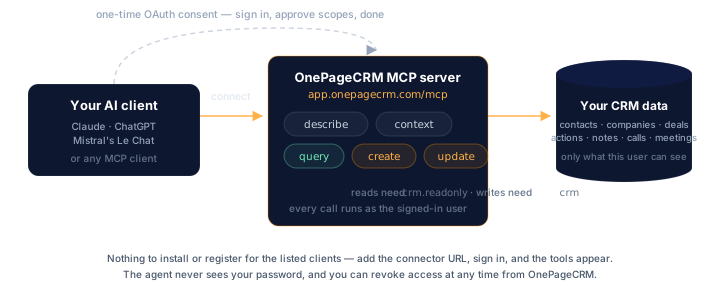
## Endpoint
```
https://app.onepagecrm.com/mcp
```
The server speaks MCP over HTTP and uses **OAuth 2.1** for authorization.
You never paste an API key into the AI client — instead the client
redirects you to OnePageCRM, you sign in, you approve the connection,
and tokens flow back to the client behind the scenes.
## Tools the server exposes
| Tool | Purpose |
| ----------------------------------------------------- | -------------------------------------------------------- |
| [`describe`](/mcp/tools/describe/)`(entity)` | Per-field schema — types, query traits (filter/sort/group/aggregate), writable/required flags, lookups, and examples. |
| [`context`](/mcp/tools/context/)`()` | Account-specific reference data — statuses, pipelines, users, tags, custom fields. |
| [`query`](/mcp/tools/query/)`(oql)` | Read data via [OQL](/oql/overview/) — filters, ordering, aggregates. |
| [`create`](/mcp/tools/create/)`(entity, data)` | Create a contact, deal, action, note, call, or meeting. |
| [`update`](/mcp/tools/update/)`(entity, id, data)` | Update an existing object. |
## Supported AI clients
These AI clients connect out of the box — every OnePageCRM user can wire
them up straight away, with no registration step on your end:
- **ChatGPT** (OpenAI)
- **Claude** (Anthropic — claude.ai, Claude Code)
- **Mistral** (Le Chat)
- **Grok** (xAI)
- **Perplexity**
Add the MCP endpoint URL as a connector, sign in, approve the consent
screen, and you're connected. The
[help-center guide](https://help.onepagecrm.com/article/1017-mcp) has
step-by-step screenshots for each client.
> **Don't see your client?** If it speaks MCP but doesn't connect out of
> the box, [get in touch](/support/) — we'll get it set up.
## First prompts to try
Once connected, the agent has a small toolbox: `describe`, `context`,
`query`, `create`, `update`. Drive it in plain language — it picks the
right tools for you, and it will chain several in one request.
- *"What's on my Action Stream today?"*
- *"Show me the deals I closed last quarter, grouped by owner."*
- *"Turn this call transcript into a note for Jane Doe and add a
follow-up action."*
- *"Reschedule my overdue actions across next week, by priority."*
- *"Add this as a contact, tag them Trade Show, and set an action to
call Tuesday."*
## Permissions
You pick the connection's permission level on the consent screen. The
`mcp` scope gates access to the server and its schema and reference
tools (`describe`, `context`); the data scope you approve alongside
it — `crm.readonly` or `crm` — decides whether the agent can read or
write your records:
| You approve | The agent can use |
| ---------------------- | --------------------------------- |
| `mcp` only | `describe`, `context` |
| `mcp` + `crm.readonly` | …plus `query` |
| `mcp` + `crm` | …plus `create` and `update` |
A connection never gains scope later — refreshed tokens keep exactly
what you approved. To move from read-only to read-write (or back),
disconnect the client and connect again with the scope you want.
Within the approved scope, the agent acts as the user who authorized
it. If you can see a contact, the agent can see it; if you can edit a
deal, the agent can edit it.
---
# context
URL: https://developer.onepagecrm.com/mcp/tools/context/
`context` returns the account-specific reference data an agent needs
before it can build a valid `create` or `update` payload. `describe`
tells the agent *which fields exist*; `context` tells it *which values
are valid for this account right now* — the user list, the pipeline
stages, the contact statuses, the custom fields defined on this CRM.
## Signature
```json
{
"type": "object",
"properties": {}
}
```
`context` takes no arguments.
## What it returns
| Key | Contents |
| --------------- | --------------------------------------------------------------------- |
| `statuses` | Contact statuses configured for this account. |
| `lead_sources` | Lead sources available when creating or updating a contact. |
| `call_results` | Outcomes that can be set on a `call` (e.g. "Reached", "Left voicemail"). |
| `pipelines` | Deal pipelines and their stages, with a `default: true` flag on the default pipeline. |
| `users` | All users on the account: id, name, role. |
| `tags` | Tags currently in use on the account. |
| `reasons_lost` | Configured reasons for losing a deal (when enabled). |
| `predefined_actions` | Saved action templates — name and a `days` offset for scheduling. |
| `predefined_items` | Saved deal line-items — name, description, `cost`, `price`. |
| `schema` | Custom-field definitions per entity — `name`, `type`, `choices`, and whether each is `mandatory` on create. |
| `account` | Account metadata: subscription plan, timezone, seat count. |
| `user` | The current user's defaults — e.g. `default_deal_commission_percentage`. |
The shape of each entry mirrors what's used elsewhere in the API.
Statuses, lead sources, and call results expose a `system_id` /
`display_name`; reasons lost, predefined actions, and predefined items
expose an `id` / `name`. Users expose `id`, `first_name`, `last_name`,
`role`. Pipelines expose `id`, `name`, `type` (`sales` or `delivery`),
`default`, and nested `stages` — each stage a `{ stage, label }` pair,
where `stage` is the integer you filter and group deals on.
These same custom fields are on
[`describe(entity)`](/mcp/tools/describe/) too — as writable
`custom_fields.` fields with their query types, filter/sort flags,
and dropdown choices, which is the view to use for querying and writing.
The one thing `context().schema` adds is the `mandatory` flag.
## Example
Calling `context()` from the agent returns something like:
```jsonc
{
"statuses": [
{ "system_id": "lead", "display_name": "Lead" },
{ "system_id": "customer", "display_name": "Customer" }
],
"pipelines": [
{
"id": "65f...",
"name": "Sales",
"type": "sales",
"default": true,
"stages": [
{ "stage": 10, "label": "Qualified" },
{ "stage": 20, "label": "Demo scheduled" }
]
}
],
"users": [ { "id": "...", "first_name": "Sam", "last_name": "Lee", "role": "owner" } ],
"tags": [ "VIP", "Newsletter" ],
"reasons_lost": [ { "id": "...", "name": "Price too high" } ],
"predefined_actions": [ { "id": "...", "name": "Follow up with [Firstname]", "days": 2 } ],
"schema": { "contacts": [{ "name": "Birthday", "type": "anniversary", "choices": [], "mandatory": false }] },
"account": { "plan": "Business", "timezone": "Europe/Dublin", "seats": 8 },
"user": { "default_deal_commission_percentage": 10 }
}
```
## When the agent should call it
Once per session before the first write, and again after the user
mentions a stage, status, user, or tag that wasn't in the previous
context payload. This reference data changes only when an account
admin edits settings, so there's no need to refresh it every turn.
## Errors
- **Missing server context** — the tool requires a resolved
account and user. In a properly authorized MCP session this is
always populated; an error here usually means the OAuth token has
been revoked or expired.
## Scope
`mcp`. `context` returns account reference data, not records, so it's
available on every authorized MCP session.
---
# create
URL: https://developer.onepagecrm.com/mcp/tools/create/
`create` is the write tool for new records.
## Signature
```json
{
"type": "object",
"properties": {
"entity": {
"type": "string",
"description": "One of: contact, deal, action, note, call, meeting."
},
"data": {
"type": "object",
"description": "Field values keyed by field name."
}
},
"required": ["entity", "data"]
}
```
Both fields are required.
## Supported entities
`contact`, `deal`, `action`, `note`, `call`, `meeting`. (Note the
singular form — `create` takes one entity at a time.)
Companies are created indirectly: set `company` (the company name) on a
contact and the matching company record is created if it doesn't already
exist, with its `company_id` linked automatically.
## Discovering valid fields
The agent should call [`describe`](/mcp/tools/describe/) once per
session to learn which fields are writable and which are required:
```json
{ "entity": "contact" }
```
The returned schema flags each field `writable`, and a top-level
`required_for_create` rule states what a new record needs — for a
contact, at least a `last_name` or a `company`; for a deal, a
`contact_id` and a `name`. Anything not flagged `writable: true` is
rejected.
For account-specific values (statuses, pipelines, users, tags, custom
fields) the agent calls [`context`](/mcp/tools/context/).
## Example
```json
{
"entity": "contact",
"data": {
"first_name": "Jane",
"last_name": "Doe",
"emails": [{ "type": "work", "address": "jane.doe@acmesolar.example" }],
"company": "Acme",
"tags": ["lead", "demo-requested"]
}
}
```
Response:
```json
{
"entity": "contact",
"id": "65f1b3c2a4d8e9f0c1234567",
"data": {
"id": "65f1b3c2a4d8e9f0c1234567",
"first_name": "Jane",
"last_name": "Doe",
"emails": [{ "type": "work", "address": "jane.doe@acmesolar.example" }],
"company": "Acme",
"company_id": "65f1...",
"tags": ["lead", "demo-requested"],
"created_at": "2025-..."
}
}
```
## Custom fields
Pass custom fields as a `custom_fields` object inside `data`, keyed by
the field's name exactly as [`describe`](/mcp/tools/describe/) returns
it:
```json
{
"entity": "deal",
"data": {
"contact_id": "65f1b3c2a4d8e9f0c1234567",
"name": "Enterprise deal",
"amount": 5000,
"custom_fields": { "Renewal Date": "2026-09-01", "Tier": "Gold" }
}
}
```
Values are validated against each custom field's type (dropdown values
must match a configured choice, dates must be ISO 8601, and so on),
and custom fields marked mandatory in the account settings are
enforced on create.
## Errors
- **Validation errors** — missing required fields, value out of range,
invalid enum value, malformed email/phone. Returned as a structured
error message naming the field and the problem.
- **Unknown entity** — the response includes the list of valid entity
names; agents that send plurals (`"contacts"` instead of `"contact"`)
get a hint pointing at the singular form.
- **Unknown fields** — fields not present on the schema, or fields
flagged read-only, are rejected.
## Scope
`crm` — the write scope. `crm.readonly` is **not** sufficient.
All writes are attributed to the authenticated user. Records are
created in that user's account and respect their per-user permissions.
---
# describe
URL: https://developer.onepagecrm.com/mcp/tools/describe/
`describe` is the schema introspection tool. AI agents call it first to
learn which entities exist, which fields each entity has, and which
fields they're allowed to write — without that, the agent would be
guessing at field names.
## Signature
```json
{
"type": "object",
"properties": {
"entity": {
"description": "Entity name or array of names. Omit for a summary of all entities.",
"oneOf": [
{ "type": "string" },
{ "type": "array", "items": { "type": "string" } }
]
}
}
}
```
All arguments are optional.
## What it returns
| Input | Output |
| --------------------------- | ------------------------------------------------------------------------ |
| `describe()` | A summary of every entity (names, one-line descriptions). |
| `describe("contacts")` | Full schema for `contacts`: every field with its type and traits (filterable, sortable, writable, …), the `required_for_create` rule, and a `create_example`. |
| `describe(["contacts","deals"])` | Full schema for both, returned as a map keyed by entity name. |
The writable flags here are the same ones `create` and `update`
enforce, so a field marked `writable: true` is one the agent can
actually set.
## Entities
`contacts`, `companies`, `deals`, `actions`, `notes`, `calls`,
`meetings`. Custom fields are included on the entities they're defined
for.
## Example
```json
{
"entity": "contacts"
}
```
Truncated response:
```jsonc
{
"name": "contacts",
"description": "CRM contacts — people and their company, contact details, and metadata.",
"fields": {
"first_name": { "type": "string", "writable": true, "max_length": 50, "filterable": true, "sortable": true },
"status": { "type": "string_virtual", "writable": false, "description": "Output only — resolved from status_id." },
"status_id": { "type": "string", "writable": true, "groupable": true },
"emails": { "type": "embedded_array", "writable": true, "valid_types": ["work", "home", "other"] },
"created_at": { "type": "time", "writable": false }
},
"required_for_create": { "one_of": ["last_name", "company"] },
"create_example": {
"first_name": "Alice",
"last_name": "Smith",
"company": "Acme",
"emails": [{ "type": "work", "address": "alice@acme.com" }]
}
}
```
Two things worth noting from that shape: `required_for_create` is a
top-level rule, not a per-field flag — here it means a contact needs at
least a `last_name` **or** a `company`. And display fields like `status`
are `*_virtual` and output-only; you write the underlying id
(`status_id`) instead.
## Errors
- **Unknown entity** — `describe("foo")` returns an error response naming
the valid entities. The tool never raises silently.
## Scope
`mcp`. `describe` returns schema, not records, so it's available on
every authorized MCP session.
---
# query
URL: https://developer.onepagecrm.com/mcp/tools/query/
`query` is the primary **read** tool. It accepts a JSON query object
that the OnePageCRM Query Language ([OQL](/oql/overview/)) understands
and runs it. Everything OQL can
express — filters, ordering, field projection, aggregates, date
helpers — is available here.
## Signature
```json
{
"type": "object",
"properties": {
"query": {
"type": "object",
"properties": {
"select": { "description": "Field array, [\"*\"], or aggregates." },
"from": { "type": "string", "description": "Entity name." },
"where": { "type": "object", "description": "Filter conditions (AND'd)." },
"order_by": { "type": "array", "description": "Sort order." },
"group_by": { "type": "array", "description": "Group fields (max 3)." },
"having": { "type": "object", "description": "Post-aggregation filter (requires group_by)." },
"distinct": { "type": "boolean", "description": "Unique combinations of the selected fields." },
"limit": { "type": "integer" }
}
}
},
"required": ["query"]
}
```
The `query` argument is a [JSON OQL query](/oql/concepts/) — the same
shape shown throughout the [OQL docs](/oql/overview/).
## Entities you can query
`contacts`, `companies`, `deals`, `actions`, `notes`, `calls`,
`meetings`. See [OQL Entities](/oql/entities/contacts/) for the fields
each one exposes.
## Examples
**Today's open actions:**
```json
{
"query": {
"from": "actions",
"select": ["*"],
"where": { "date": "TODAY()", "completed": false },
"limit": 50
}
}
```
**Won deals this quarter, by owner:**
```json
{
"query": {
"from": "deals",
"select": ["count()", { "sum": ["amount"] }],
"where": { "status": "won", "close_date": "THIS_QUARTER()" },
"group_by": ["owner_id"],
"order_by": [{ "sum_amount": "desc" }]
}
}
```
**A specific contact by email:**
```json
{
"query": {
"from": "contacts",
"select": ["id", "first_name", "last_name", "emails"],
"where": { "emails.address": "jane.doe@acmesolar.example" }
}
}
```
For more patterns, see [OQL Recipes](/oql/recipes/).
## Response shape
```jsonc
{
"rows": [ /* one object per result row */ ],
"row_count": 17
}
```
When a result set is clipped to the response cap, a `"truncated": true`
flag is added — it is omitted otherwise. If you see it, ask for a
tighter filter or a smaller `select`.
## Operators and functions
OQL supports `=`, `!=`, `<`, `>`, `<=`, `>=`, `in`, `between`, `like`,
`{"is": null}`, and `{"is not": null}`. Date helpers (`TODAY()`,
`THIS_QUARTER()`, `LAST_QUARTER()`, `DAYS_AGO(n)`, …) and the aggregate
functions `count()`, `sum`, `avg`, `min`, `max`, `median`, and
`percentile` are available, each with an optional `distinct` modifier.
Grouped results can be filtered after aggregation with `having`, and
`distinct: true` returns unique combinations of the selected fields.
The authoritative references are:
- [OQL Operators](/oql/operators/)
- [OQL Functions](/oql/functions/)
- [OQL Limits & errors](/oql/limits-and-errors/)
## Errors
- **Schema errors** — unknown entity or unknown field on the entity.
- **Syntax errors** — malformed `where` clauses, unsupported operators.
- **Execution errors** — limit exceeded, type mismatch, etc.
Each error comes back as a structured response (not an exception) so
the agent can correct itself and retry on the next turn.
## Scope
`crm.readonly` is sufficient. `crm` also works (write scope includes
read).
Results are always filtered to records the **authenticated user** can
see — `query` doesn't bypass per-user permissions, even when the
account has multiple users.
---
# update
URL: https://developer.onepagecrm.com/mcp/tools/update/
`update` modifies an existing record. Only the fields you send are
changed; everything else is left alone.
## Signature
```json
{
"type": "object",
"properties": {
"entity": { "type": "string", "description": "Entity type." },
"id": { "type": "string", "description": "The record id — a 24-character hex string." },
"data": { "type": "object", "description": "Fields to change." }
},
"required": ["entity", "id", "data"]
}
```
All three fields are required.
## Supported entities
`contact`, `company`, `deal`, `action`, `note`, `call`, `meeting`.
Companies are *updatable* through `update` even though they're not
directly creatable through `create`.
## Finding the id
Use [`query`](/mcp/tools/query/) to look the record up first. For
example:
```json
{
"query": {
"from": "contacts",
"select": ["id", "first_name", "last_name"],
"where": { "emails.address": "jane.doe@acmesolar.example" }
}
}
```
Then pass the `id` straight into `update`.
## Example
```json
{
"entity": "contact",
"id": "65f1b3c2a4d8e9f0c1234567",
"data": {
"status_id": "prospect",
"tags": ["lead", "demo-requested", "qualified"]
}
}
```
Response:
```jsonc
{
"entity": "contact",
"id": "65f1b3c2a4d8e9f0c1234567",
"data": { /* the contact, after the update */ }
}
```
## Array fields are full replacements
Fields that contain arrays — `emails`, `phones`, `urls`, `tags` — are
**replaced wholesale**, not merged. `tags` is a list of strings;
`emails`, `phones`, and `urls` are lists of objects (`{ type, address }`,
`{ type, number }`, `{ type, url }`). To add one entry rather than
overwrite the list, query the current value first and send the combined
array:
```json
{
"entity": "contact",
"id": "65f1...",
"data": { "tags": ["lead", "demo-requested", "qualified"] }
}
```
## Custom fields
Send a `custom_fields` object inside `data`, keyed by field name as
returned by [`describe`](/mcp/tools/describe/). Only the custom fields
you include are changed:
```json
{
"entity": "deal",
"id": "65f1b3c2a4d8e9f0c1234567",
"data": { "custom_fields": { "Tier": "Platinum" } }
}
```
## Errors
- **Not found / not accessible** — both cases return the same generic
"not found" response. The MCP server doesn't distinguish "this id
doesn't exist" from "this id exists but is on a record you can't see"
by design, to avoid leaking the existence of records outside the
user's access scope.
- **Validation errors** — same surface as `create`: each rejected
field is named with the reason.
- **Unknown entity** — response lists the valid entity names and
hints at the singular form if a plural was sent.
## Scope
`crm` — the write scope. `crm.readonly` is not sufficient.
Access checks run on every call. A contact, deal, or linked record
must be accessible to the authenticated user (private records they
don't own, or records belonging to other users on a permission-scoped
account, will be invisible).
---
# Extension points
URL: https://developer.onepagecrm.com/integrations/overview/
OnePageCRM connects to many tools out of the box, and you can build your
own integration on top of its API, webhooks, and MCP server.
## Platform APIs
Full programmatic access to the CRM:
- **[REST API](/api/reference/)** — create, read, and update contacts,
companies, deals, actions, notes, calls, and meetings. Authenticate
with an [API key](/api/authentication/) for your own account, or
[OAuth 2.1](/oauth/overview/) for an app acting on behalf of other
OnePageCRM users.
- **[Webhooks](/webhooks/overview/)** — get notified the moment a record
changes, so you sync in real time instead of polling.
- **[MCP server](/mcp/overview/)** — let AI agents read, write, and
[query](/oql/overview/) the CRM over the Model Context Protocol.
## Lightweight extension points
Purpose-built ways to connect without a full integration:
- **[External ID](/integrations/external-id/)** — store your own stable
identifier against contacts, companies, and deals so you can sync
between systems without a separate lookup table.
- **[Custom Button](/integrations/custom-button/)** *(beta)* — place a
contextual action button in the OnePageCRM UI that opens your app with
record context as parameters.
- **[Create a contact via URL](/integrations/quick-create-contact-url/)** —
the lowest-friction option: a link that opens OnePageCRM with the Add
Contact form pre-filled. Great for "Save to OnePageCRM" buttons in your
own app.
## Prebuilt connectors
For no-code integrations, browse the
[OnePageCRM marketplace](https://www.onepagecrm.com/marketplace/) — 40+
prebuilt connectors for tools like Gmail, Mailchimp, Xero, and QuickBooks.
---
# Custom Buttons
URL: https://developer.onepagecrm.com/integrations/custom-button/
Custom Buttons let you add your own links to the **3-dots menu** on
contact and deal views. Each button opens a URL you define, with
template variables resolved from the current record — so one click
lands the user in your app, on the right customer.
Use it to:
- Deep-link into your app preloaded with the right context
("Open in Acme" → your customer page for that contact).
- Trigger an external workflow next to the record it relates to
(create an invoice, start a call, open a booking form).
- Bridge to internal tools that key off an email, phone number, or
[External ID](/integrations/external-id/).
> Custom Buttons is currently in **beta**. If you don't see it on your
> Apps page, contact OnePageCRM support to get it enabled.
## Set it up
Buttons are configured in the OnePageCRM web app — there's no public
API for managing them.
1. In OnePageCRM, open **Apps** and install **Custom Buttons**
(`app.onepagecrm.com/app/custom_buttons`).
2. Create a button and fill in the fields below. You need to be an
**account admin** to create, edit, or delete buttons.
3. Open any contact (or deal) and check the 3-dots menu — your button
is there for every user on the account.
### Button fields
| Field | Required | Notes |
| --- | --- | --- |
| Name | yes | The label shown in the menu. |
| URL template | yes | Must start with `http://` or `https://`. May contain template variables. |
| Context | yes | `contact` or `deal` — which 3-dots menu the button appears in. Add two buttons to cover both. |
| Icon | no | One of `default`, `call`, `mail`, `money`, `profile`, `tool`. |
| Enabled | — | Toggle a button off without deleting it. |
You can create up to **25 buttons per context** (25 for contacts, 25
for deals).
## Template variables
Variables use the form `[entity.field]`. When a user clicks the
button, each variable is replaced with the value from the current
record and **URL-encoded** automatically.
### Contact variables
| Variable | Value |
| --- | --- |
| `[contact.id]` | OnePageCRM contact ID |
| `[contact.firstname]` | First name |
| `[contact.lastname]` | Last name |
| `[contact.fullname]` | Full name |
| `[contact.title]` | Title (Mr, Mrs, Ms) |
| `[contact.jobtitle]` | Job title |
| `[contact.email]` | First email address |
| `[contact.phone]` | First phone number |
| `[contact.address]` | First address, formatted as one line |
### Organization variables
| Variable | Value |
| --- | --- |
| `[organization.id]` | OnePageCRM company ID |
| `[organization.name]` | Company name |
### Deal variables
| Variable | Value |
| --- | --- |
| `[deal.id]` | OnePageCRM deal ID |
| `[deal.name]` | Deal name |
| `[deal.amount]` | Deal amount |
| `[deal.totalamount]` | Total amount (amount × months) |
### Custom field variables
Every custom field is available as
`[contact.cf.]`, `[organization.cf.]`, or
`[deal.cf.]`, where `` is the field's name lowercased with
spaces replaced by underscores. A field named **Acme ID** becomes:
```
[contact.cf.acme_id]
```
The configuration screen lists every available variable for your
account, including your custom fields — pick from the list rather than
typing them by hand.
### Fallbacks
Provide a default with the `fallback` option:
```
[contact.cf.acme_id, fallback=unknown]
```
The fallback fires only when a variable resolves to **no value at
all** — not an empty string. In practice it works for: custom field
variables with no value, unset name and title fields,
`organization.*` variables when the contact has no company, an unset
`deal.name`, and any variable whose linked record is missing. It does
**not** fire for `[contact.email]`, `[contact.phone]`, or
`[contact.address]` — those resolve to an empty string when absent.
IDs and deal amounts always have a value, so a fallback on them never
fires.
## Example: open your app at the right customer
Say you sync customers with an
[External ID](/integrations/external-id/) custom field named
**Acme ID**. Add a contact-context button:
| Field | Value |
| --- | --- |
| Name | `Open in Acme` |
| Context | `contact` |
| URL template | `https://app.acme.com/customers/[contact.cf.acme_id]` |
A contact whose Acme ID is `cus_8c1ab2` gets a menu item that opens:
```
https://app.acme.com/customers/cus_8c1ab2
```
No External ID yet? Key off email instead and resolve it on your side:
```
https://app.acme.com/lookup?email=[contact.email]&name=[contact.fullname]
```
## Behavior notes
- Buttons open in a **new browser tab** (`target="_blank"` with
`rel="noopener noreferrer"`).
- Contact-context buttons resolve `contact.*` and `organization.*`
variables. Deal-context buttons resolve `deal.*` plus the linked
contact's `contact.*` and `organization.*` variables.
- Variables are resolved when the record view loads. Your
endpoint receives a plain GET from the user's browser — there is no
signature or auth handoff. Treat incoming parameters as hints and
authenticate the user in your own app as usual.
- Buttons are account-wide: every user sees enabled buttons, but only
admins can manage them.
## See also
- [External ID](/integrations/external-id/) — give every record a
stable ID in your system, then link straight to it.
---
# External ID
URL: https://developer.onepagecrm.com/integrations/external-id/
External ID lets your integration store its own stable identifier
against OnePageCRM records. Use it to:
- Keep a bidirectional mapping between OnePageCRM IDs and IDs in your
system without maintaining a separate lookup table.
- Find the right CRM record from a webhook, an API response, or a
support ticket in a single lookup.
- Avoid duplicates when syncing: upsert by your ID instead of guessing
by name or email.
## How it works
An External ID is a **custom field type** (`external_id`), available on
**contacts**, **companies**, and **deals**. You define one External ID
field per external system, then store one string value per record.
Two properties make it different from a plain text field:
- **Unique** — a value can exist on only one record per field. Writing
a duplicate is rejected.
- **Exact lookup** — because values are unique, filtering by External ID
returns exactly one record or none, never a list to disambiguate.
| Constraint | Value |
| --- | --- |
| Resources | contacts, companies, deals |
| Value type | string |
| Max value length | 312 characters (longer values are truncated) |
| Values per record per field | 1 |
| Uniqueness | one record per (field, value) pair |
| Field name length | up to 35 characters |
## 1. Create the field (one-time, admin)
Creating the field is a one-time setup step, done by an account admin
**in the app**: open **Contact Fields** (or Company / Deal Fields) in
your account settings and click **+ Add**. Set a **Field name**, choose
**External ID** as the **Field type**, and optionally paste a
**Third-party app URL template** — your app's record URL with the
unique identifier replaced by `[ID]` (see
[linking back](#link-back-to-your-system)). **Mandatory** works like
any other custom field and defaults to *Not required*.
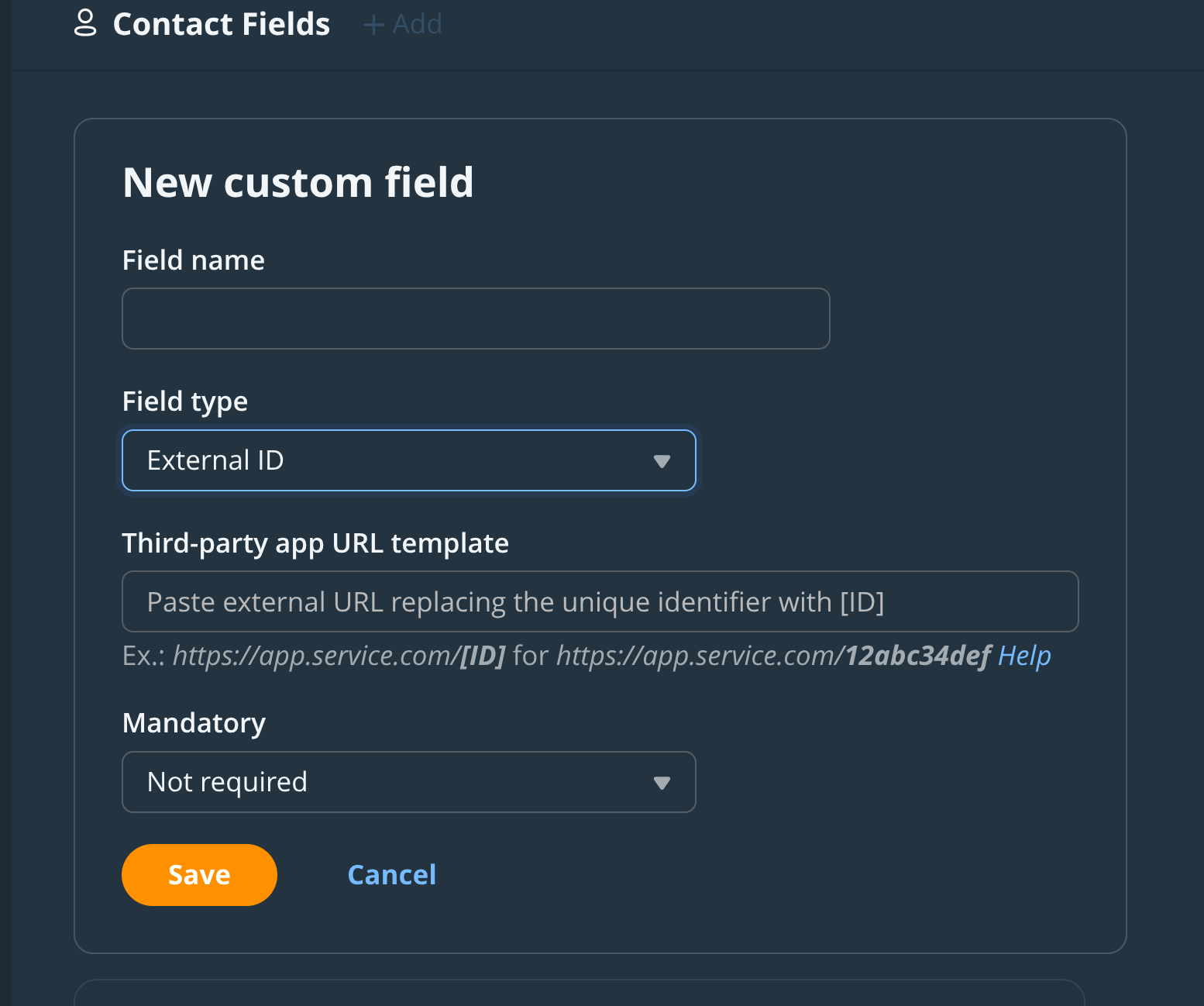
If you're scripting account setup with an admin's API key, the field
can also be created via the API — `POST /api/v3/custom_fields.json`
(`company_fields` / `deal_fields` for the other resources) with
`{ "name": "Acme ID", "type": "external_id" }`. Two caveats:
- **Not available to OAuth apps.** Field management requires API-key
auth from an admin user; an OAuth token gets `403` regardless of
scope. If you're building a third-party integration, make field
creation part of your customer's onboarding instructions instead.
- **No URL template.** The API accepts only `name` and `type`; the
template can only be set in the in-app form above.
A field's `type` cannot be changed after creation.
## 2. Find the field's id
Everything else your integration does works with either auth method.
List the fields and find yours by `name` — do this once at install
time and store the `id`:
```bash
curl -H "Authorization: Bearer ACCESS_TOKEN" \
https://app.onepagecrm.com/api/v3/custom_fields.json
```
## 3. Set a value
Pass the field and value in the `custom_fields` array when creating or
updating a contact (use `company_fields` on companies and `deal_fields`
on deals). The flat item shape works on all three resources:
```bash
curl -u "USER_ID:API_KEY" \
-X PUT "https://app.onepagecrm.com/api/v3/contacts/CONTACT_ID.json?partial=true" \
-H "Content-Type: application/json" \
-d '{
"custom_fields": [
{ "id": "FIELD_ID", "value": "cus_8c1ab2" }
]
}'
```
There's also a nested item shape, where the field reference is wrapped
in a **resource-specific** key — `custom_field` on contacts,
`company_field` on companies, `deal_field` on deals — with `value`
alongside the wrapper:
```json
{ "custom_field": { "id": "FIELD_ID" }, "value": "cus_8c1ab2" }
```
Prefer the flat shape: it's identical on every resource.
You can reference the field by `name` instead of `id` if you prefer.
To clear a value, send an empty string.
If the value already exists on another record, the write fails with a
validation error:
```
External ID value='cus_8c1ab2' for custom field ID=FIELD_ID is already taken
```
That's your duplicate detection. Treat it as "this record is already
mapped" and look the existing record up instead.
## 4. Look up a record by External ID
Filter any list endpoint with `custom_field_id` + `custom_field_value`:
```bash
curl -u "USER_ID:API_KEY" \
"https://app.onepagecrm.com/api/v3/contacts.json?custom_field_id=FIELD_ID&custom_field_value=cus_8c1ab2"
```
The same pair of parameters works on `/companies.json` and
`/deals.json`. Because values are unique, the result contains either
exactly one record or none.
## 5. Read it back
Custom field values come back on every record read, with the full field
definition alongside the value:
```json
{
"custom_fields": [
{
"custom_field": {
"id": "5aad9b039007ba28c9ebad56",
"name": "Acme ID",
"type": "external_id"
},
"value": "cus_8c1ab2"
}
]
}
```
Responses use the same resource-specific wrapper keys: `custom_field`
on contacts, `company_field` on companies, `deal_field` on deals.
## Sync pattern: idempotent upsert
That uniqueness makes upserts safe to retry. For each record in your
system:
1. **Look up** by External ID
(`?custom_field_id=...&custom_field_value=...`).
2. **Found?** Update that record by its OnePageCRM `id`.
3. **Not found?** Create the record with the External ID set in the
same request.
4. **Create failed with "already taken"?** Another worker beat you to
it — go back to step 1.
Running the same sync twice produces the same result. No duplicate
contacts, no separate mapping table to keep consistent.
For the reverse direction, [webhook payloads](/webhooks/payloads/)
include the record's custom field values — read your External ID
straight out of the event to find the matching record on your side.
## Link back to your system
An External ID field can carry a **URL template**. Set one and
OnePageCRM renders the value as a clickable link on the record — one
click from a contact to the same customer in your app:
```
https://billing.example.com/customers/[ID]
```
`[ID]` is replaced with the field's value — for example,
`https://app.service.com/[ID]` renders the value `12abc34def` as a link
to `https://app.service.com/12abc34def`.
Set the template in the **Third-party app URL template** input when an
admin creates or edits the field in the OnePageCRM web app; the API
returns it as a read-only `url_template` attribute on the field.
## See also
- [Custom Button](/integrations/custom-button/) — deep-link from a
contact or deal into your app using template variables, including
custom field values.
- [Webhook payloads](/webhooks/payloads/) — events carry the record's
custom field values, so you can read your External ID straight out of
the payload.
---
# Create a contact via URL parameters
URL: https://developer.onepagecrm.com/integrations/quick-create-contact-url/
You can use URL parameters to pre-fill the **Add Contact** form in
your OnePageCRM account. Click the link and OnePageCRM opens on the
Add Contact page with the form already filled in.
For example, this URL adds Jane Doe to your contact list:
```
https://app.onepagecrm.com/add_new_contact?firstname=Jane&lastname=Doe&company=Acme%20Solar&tags[]=solar
```
Nothing is saved automatically — the user reviews the prefilled form,
edits if needed, and clicks save. They need to be signed in to
OnePageCRM.
## When to use this
This is a low-friction way to bridge your own app or internal tools
into OnePageCRM without writing a full integration. Useful for:
- Adding "Save to OnePageCRM" buttons next to records in your own
database — your support team can save customers as contacts in one
click.
- Bookmarklets for sales teams pulling contacts off other websites.
- Generated email signatures or invoice PDFs that include a
one-click "save sender" link.
## Sample
| First name | Last name | Company | |
| ---------- | --------- | ---------- | --- |
| Jane | Doe | Acme Solar | [Add to OnePageCRM](https://app.onepagecrm.com/add_new_contact?firstname=Jane&lastname=Doe&company=Acme%20Solar) |
| Alice | Smith | Acme | [Add to OnePageCRM](https://app.onepagecrm.com/add_new_contact?firstname=Alice&lastname=Smith&company=Acme) |
Clicking a link opens OnePageCRM in a new tab with the Add Contact form
filled in.
## Supported parameters
| Parameter | Example | Notes |
| --- | --- | --- |
| `firstname` | `Jane` | |
| `lastname` | `Doe` | |
| `company` | `Acme Solar` | Matched to an existing company by name, or shown as a new one. |
| `job_title` | `Operations Lead` | |
| `background` | `Met at conference` | Background notes on the contact. |
| `address` | `123 Main St` | Street address. |
| `city` | `Galway` | |
| `state` | `Connacht` | |
| `zip_code` | `H91 ABC1` | |
| `country` | `IE` or `Ireland` | Two-letter country code or full country name. Invalid values are ignored. |
| `status` | `prospect` | Lowercase status name. Unrecognized values fall back to `lead`. |
| `phone[]` | `%2B353 91 555555` | Repeatable. Added as work numbers. |
| `email[]` | `jane.doe@acmesolar.example` | Repeatable. |
| `web[]` | `acmesolar.example` | Repeatable. |
| `tags[]` | `solar` | Repeatable. |
> If `company` matches an existing company (case-insensitive), the new
> contact inherits that company's status — and, when the account has
> tag sync enabled, its tags. Both override the `status` and `tags[]`
> parameters in the URL.
**Not supported:** custom fields. A `lead_source` parameter is
accepted but ignored — lead source can't be prefilled this way.
> Older versions of these docs said address fields weren't supported.
> They are now: `address`, `city`, `state`, `zip_code`, and `country`
> all prefill the form.
### Repeatable parameters
`phone`, `email`, `web`, and `tags` accept multiple values. Pass each
value as a separate `[]` parameter:
```
https://app.onepagecrm.com/add_new_contact?firstname=Jane&tags[]=solar&tags[]=q3-pipeline&email[]=jane.doe@acmesolar.example&email[]=jane@example.com
```
A single bare value (`phone=555555`) works too.
### Full example
```
https://app.onepagecrm.com/add_new_contact?firstname=Jane&lastname=Doe&company=Acme%20Solar&job_title=Operations%20Lead&background=Met%20at%20conference&address=123%20Main%20St&city=Galway&country=IE&status=prospect&phone[]=555555&email[]=jane.doe@acmesolar.example&web[]=https%3A%2F%2Facmesolar.example&tags[]=solar
```
URL-encode the values you pass in (spaces become `%20`, ampersands
become `%26`, `+` in phone numbers becomes `%2B`) and you're good.
## Need more than a prefilled form?
To create contacts programmatically — no form, no signed-in user — use
`POST /contacts` on the [REST API](/api/reference/). Start with the
[quickstart](/getting-started/quickstart/).
---
# Tutorials
URL: https://developer.onepagecrm.com/tutorials/
Learn how to build with OnePageCRM. Step-by-step walkthroughs for OAuth,
webhooks, OQL, MCP, and integrations.
## Get started
**Make your first API call** — authenticate, list your contacts, and parse the
response in under five minutes.
## Webhooks
**Subscribe to webhook events** — react to CRM changes in real time. Register a
webhook, receive a payload, and respond correctly.
## Build & extend
**Query CRM data with OQL** — use OQL to read contacts, deals, actions, and
notes with filters, aggregates, and date helpers.
---
# Make your first API call
URL: https://developer.onepagecrm.com/tutorials/first-api-call/
By the end of this tutorial you'll have a small script that pages
through your deals and prints your open pipeline with a total. You'll
get there in steps that each teach one thing: prove your credentials
work, read the response envelope, page through a list, create a
record, and see what errors actually look like.
Everything up to the final script is plain `curl`, so you can follow
along in any terminal. The script itself comes in Node 22 and Python
flavors — pick one.
## What you'll need
- A OnePageCRM account you can sign in to.
- `curl`.
- Node 22 **or** Python 3 with [`requests`](https://requests.readthedocs.io/) for the final script.
## 1. Get your credentials
Sign in to OnePageCRM and open the API settings page:
[https://app.onepagecrm.com/app/api](https://app.onepagecrm.com/app/api)
On the **Configuration** tab you'll find the two values the API uses
for HTTP Basic auth:
| Value | Used as |
| --------- | ------------------- |
| `user_id` | HTTP Basic username |
| `api_key` | HTTP Basic password |
The `api_key` grants full access to your account — treat it like a
password. Export both as environment variables so they never end up in
your shell history or your code:
```bash
export ONEPAGECRM_USER_ID="your-user-id"
export ONEPAGECRM_API_KEY="your-api-key"
```
## 2. Prove they work
The base URL for the REST API is `https://app.onepagecrm.com/api/v3`.
The best smoke test is `GET /bootstrap.json` — it returns account-wide
reference data (statuses, deal stages, custom field schemas) and
confirms your credentials in one call:
```bash
curl -u "$ONEPAGECRM_USER_ID:$ONEPAGECRM_API_KEY" \
https://app.onepagecrm.com/api/v3/bootstrap.json
```
If you get JSON back, you're authenticated. If you get a `401`, jump
ahead to [break it on purpose](#6-break-it-on-purpose) — that section
shows you exactly what a `401` looks like and how to fix it.
## 3. List your contacts
```bash
curl -u "$ONEPAGECRM_USER_ID:$ONEPAGECRM_API_KEY" \
https://app.onepagecrm.com/api/v3/contacts.json
```
Every response — this one and every other — arrives in the same
envelope:
```json
{
"status": 0,
"message": "OK",
"timestamp": 1781100000,
"data": {
"contacts": [
{ "id": "5f...", "first_name": "Ada", "last_name": "Lovelace", "...": "..." }
],
"total_count": 34,
"page": 1,
"per_page": 10,
"max_page": 4
}
}
```
Three things to internalize now, because every later step relies on
them:
- `status: 0` means success. Non-zero means an error.
- `data` carries the payload, shaped per endpoint.
- List endpoints add pagination metadata: `total_count`, `page`,
`per_page`, `max_page`.
## 4. Page through
In the response above, `total_count` is 34 but only 10 contacts came
back. That's the default page size. Pagination is controlled with two
query parameters:
| Parameter | Default | Max |
| ---------- | ------- | --- |
| `per_page` | 10 | 100 |
| `page` | 1 | — |
So to fetch everything with the fewest requests, ask for 100 per page
and walk `page` from 1 to `max_page`:
```bash
curl -u "$ONEPAGECRM_USER_ID:$ONEPAGECRM_API_KEY" \
"https://app.onepagecrm.com/api/v3/contacts.json?page=2&per_page=100"
```
When `page` equals `max_page`, you've seen everything. That loop —
fetch, append, check `max_page` — is the heart of the final script.
## 5. Create a contact
Reads use `GET`; writes use `POST` with a JSON body:
```bash
curl -u "$ONEPAGECRM_USER_ID:$ONEPAGECRM_API_KEY" \
-X POST https://app.onepagecrm.com/api/v3/contacts.json \
-H "Content-Type: application/json" \
-d '{"first_name": "Ada", "last_name": "Lovelace"}'
```
The response uses the same envelope, and `data` echoes the new contact
back — including the `id` the server assigned. Save that `id` if you
want to update or delete the record later. (Ada is now a real contact
in your account — feel free to delete her in the app when you're
done.)
## 6. Break it on purpose
You'll hit errors in real integrations, so let's meet the two most
common ones now, while the stakes are zero.
**A `401` — bad credentials.** Re-run the contacts call with a
deliberately wrong key:
```bash
curl -i -u "$ONEPAGECRM_USER_ID:wrong-key" \
https://app.onepagecrm.com/api/v3/contacts.json
```
The `-i` flag shows the HTTP status line: `401 Unauthorized`. The body
carries five fields:
```json
{
"status": 400,
"message": "Invalid auth token",
"error_name": "invalid_auth_token",
"error_message": "Authorization token is invalid",
"errors": {}
}
```
Notice the body says `"status": 400` while the HTTP status line says
`401`. The body's `status` is an API error code, and it can differ
from the HTTP status — trust the HTTP status line for control flow.
Of the five fields, `error_name` is the stable identifier to branch on
in code, `error_message` is the human-readable text to log, and
`errors` holds per-field details on validation failures. The full
catalog is on [API errors](/api/errors/).
When you see a `401`, the fix is almost always the same: re-copy
`user_id` and `api_key` from the
[API settings page](https://app.onepagecrm.com/app/api).
**A validation error — bad write.** Now send a contact with no fields
at all:
```bash
curl -i -u "$ONEPAGECRM_USER_ID:$ONEPAGECRM_API_KEY" \
-X POST https://app.onepagecrm.com/api/v3/contacts.json \
-H "Content-Type: application/json" \
-d '{}'
```
The request is well-formed and authenticated, but the payload fails
validation, so the API rejects it — again with `error_name` and
`error_message` telling you what to fix. The lesson for your code:
check the HTTP status, and when it's not a 2xx, surface
`error_message` instead of swallowing the body.
## 7. The script: print your pipeline
Time to assemble the pieces. The script below pages through
`GET /deals.json` (the same loop from step 4, same envelope from
step 3, same error handling from step 6), keeps the deals whose
`status` is `pending`, and prints them with a total.
**Node 22** — save as `pipeline.mjs`, no dependencies needed:
```js
// pipeline.mjs — prints every open deal in your pipeline
const { ONEPAGECRM_USER_ID: user, ONEPAGECRM_API_KEY: key } = process.env;
const auth = "Basic " + Buffer.from(`${user}:${key}`).toString("base64");
const base = "https://app.onepagecrm.com/api/v3";
async function getPage(page) {
const res = await fetch(`${base}/deals.json?page=${page}&per_page=100`, {
headers: { Authorization: auth },
});
const body = await res.json();
if (!res.ok) {
throw new Error(
`HTTP ${res.status}: ${body.error_name} — ${body.error_message}`,
);
}
return body.data;
}
const deals = [];
let page = 1;
let maxPage = 1;
do {
const data = await getPage(page);
deals.push(...data.deals);
maxPage = data.max_page;
page += 1;
} while (page <= maxPage);
const open = deals.filter((d) => d.status === "pending");
for (const d of open) {
console.log(`${d.name.padEnd(40)} ${d.amount}`);
}
const total = open.reduce((sum, d) => sum + (d.amount ?? 0), 0);
console.log(`\n${open.length} open deals worth ${total}`);
```
```bash
node pipeline.mjs
```
**Python** — the same loop with `requests`:
```python
# pipeline.py — prints every open deal in your pipeline
import os
import requests
auth = (os.environ["ONEPAGECRM_USER_ID"], os.environ["ONEPAGECRM_API_KEY"])
base = "https://app.onepagecrm.com/api/v3"
deals, page, max_page = [], 1, 1
while page <= max_page:
res = requests.get(
f"{base}/deals.json",
auth=auth,
params={"page": page, "per_page": 100},
)
body = res.json()
if not res.ok:
raise SystemExit(
f"HTTP {res.status_code}: {body.get('error_name')} — {body.get('error_message')}"
)
deals += body["data"]["deals"]
max_page = body["data"]["max_page"]
page += 1
open_deals = [d for d in deals if d["status"] == "pending"]
for d in open_deals:
print(f"{d['name']:<40} {d['amount']}")
print(f"\n{len(open_deals)} open deals worth {sum(d['amount'] or 0 for d in open_deals)}")
```
```bash
python pipeline.py
```
Either way, the output is your live pipeline:
```text
Acme renewal 12000
Globex onboarding 8500
Initech expansion 20000
3 open deals worth 40500
```
If it prints nothing, you have no pending deals — create one in the
app and run it again.
## Where to go next
- **[Query CRM data with OQL](/tutorials/oql/)** — the whole script
above collapses into one JSON query (`from: deals`,
`where: { status: "pending" }`), with sorting and aggregates built
in — via the MCP server.
- **[Subscribe to webhook events](/tutorials/webhooks/)** — get told
when a deal changes instead of re-running the script.
- **[API reference](/api/reference/)** — every endpoint, parameter,
and response shape, with try-it-now requests in the browser.
- **[Get started with OAuth](/oauth/quickstart/)** — when your
integration needs to act on behalf of users other than yourself,
swap Basic auth for OAuth 2.1.
---
# Query CRM data with OQL
URL: https://developer.onepagecrm.com/tutorials/oql/
It's Monday morning and you have questions. What's in the pipeline?
How much is it worth? Where is it stuck? How did last quarter actually
go? This tutorial answers all of them with OQL — OnePageCRM's JSON
query language — one question at a time, building from a simple
filter to grouped aggregates with date helpers.
## Where OQL runs today
OQL is available through the OnePageCRM
[MCP server](/mcp/overview/), via its
[`query` tool](/mcp/tools/query/). There is no public REST endpoint
for OQL.
So to follow along, connect an AI client (Claude, ChatGPT, or your
favorite agent) to `https://app.onepagecrm.com/mcp`. The
[MCP overview](/mcp/overview/) covers the endpoint and the supported
clients — for those, there's nothing to register.
Normally you'd just ask the agent a question in plain language and let
it write the OQL itself. In this tutorial we write the queries by
hand, because knowing the language lets you check the agent's work,
debug its misses, and reuse the same queries in your own integration
later. To run a query verbatim, prompt the agent like this:
> Run this exact OQL query with your query tool and show me the raw
> result:
> `{ "from": "deals", "where": { "status": "pending" } }`
Now, the questions.
## "What's in my pipeline?"
Start with the open deals, biggest first. Every OQL query is a JSON
object with one required key — `from`, the entity — plus optional
clauses:
```json
{
"from": "deals",
"select": ["name", "amount", "stage"],
"where": { "status": "pending" },
"order_by": [{ "amount": "desc" }],
"limit": 10
}
```
Reading it clause by clause: `where` filters (a bare value means
equals), `select` picks fields, `order_by` sorts (a single-key hash
names the direction explicitly; a bare string field sorts ascending),
`limit` caps the rows. The result:
```json
{
"rows": [
{ "name": "Initech expansion", "amount": 20000, "stage": 40 },
{ "name": "Acme renewal", "amount": 12000, "stage": 20 },
{ "name": "Globex onboarding", "amount": 8500, "stage": 20 }
],
"row_count": 3
}
```
Every query returns this envelope: `rows` and `row_count`, plus a
`"truncated": true` key that appears only when more rows exist beyond
your `limit` — so you can never mistake a clipped answer for a
complete one.
## "How much is that worth?"
You don't need the deal list to answer this — ask for aggregates
instead of fields. OQL has seven (`count()`, `sum`, `avg`, `min`,
`max`, `median`, `percentile`), and the workhorses are the first
three:
```json
{
"from": "deals",
"select": ["count()", { "sum": ["amount"] }, { "avg": ["amount"] }],
"where": { "status": "pending" }
}
```
Without grouping, aggregates collapse the whole result set into
exactly one row:
```json
{
"rows": [{ "_id": null, "count": 14, "sum_amount": 187500, "avg_amount": 13392.86 }],
"row_count": 1
}
```
Aggregate columns are named `_` — `sum_amount`,
`avg_amount` — and a bare `count()` is just `count`. The `"_id": null`
is the ungrouped row's group key; ignore it.
Fourteen open deals, 187,500 in play. Next question.
## "What's due to close this quarter — and which are mine?"
Two new tools here. Date helpers like `THIS_QUARTER()` resolve in your
profile's timezone, so "this quarter" means *your* quarter. And `ME()`
resolves to your own user ID, so the same query works for whoever runs
it. Conditions in `where` are always ANDed together — there is no OR
(use `in` for a set of values, or run separate queries):
```json
{
"from": "deals",
"select": ["name", "amount", "expected_close_date"],
"where": {
"status": "pending",
"owner_id": "ME()",
"expected_close_date": "THIS_QUARTER()"
},
"order_by": ["expected_close_date"]
}
```
```json
{
"rows": [
{ "name": "Acme renewal", "amount": 12000, "expected_close_date": "2026-06-19" },
{ "name": "Initech expansion", "amount": 20000, "expected_close_date": "2026-06-30" }
],
"row_count": 2
}
```
One subtlety worth knowing: pending deals carry an
`expected_close_date`; once a deal is won or lost, its actual
`close_date` is set instead. The
[deals entity reference](/oql/entities/deals/) flags which field
applies when.
## "Where is the pipeline sitting?"
For a breakdown rather than a list, add `group_by`. Pair it with
aggregates, and remember the rule: every plain field in `select` must
also appear in `group_by`:
```json
{
"from": "deals",
"select": ["stage", "count()", { "sum": ["amount"] }],
"where": { "status": "pending" },
"group_by": ["stage"]
}
```
```json
{
"rows": [
{ "stage": 10, "count": 6, "sum_amount": 42000 },
{ "stage": 20, "count": 5, "sum_amount": 65500 },
{ "stage": 40, "count": 3, "sum_amount": 80000 }
],
"row_count": 3
}
```
Stage numbers are account-configurable integers (and not necessarily
sequential) — your agent can call the MCP `context` tool to map them
to their labels.
## "How did last quarter actually go?"
Switch the filter from open deals to closed ones and group by owner.
`LAST_QUARTER()` does the date math for you:
```json
{
"from": "deals",
"select": ["owner_id", "count()", { "sum": ["amount"] }],
"where": { "status": "won", "close_date": "LAST_QUARTER()" },
"group_by": ["owner_id"]
}
```
```json
{
"rows": [
{ "owner_id": "5417f36d1da4171227000001", "count": 9, "sum_amount": 96000 },
{ "owner_id": "5417f36d1da4171227000002", "count": 4, "sum_amount": 51500 }
],
"row_count": 2
}
```
## "Is that trend up or down?"
One quarter is a data point; a year is a trend. Two new pieces here.
`DAYS_AGO` is the only date helper that takes an argument, so it uses
object form: `{ "DAYS_AGO": [365] }`. And grouping by a date field
requires a bucketing function (`DAY`, `WEEK`, `MONTH`, `QUARTER`,
`YEAR`) — OQL won't group on a raw timestamp:
```json
{
"from": "deals",
"select": ["close_date", "count()", { "sum": ["amount"] }],
"where": {
"status": "won",
"close_date": { ">=": { "DAYS_AGO": [365] } }
},
"group_by": [{ "MONTH": ["close_date"] }]
}
```
Each row comes back keyed on the start of its month, with the count
and revenue for that month — a closed-won trend line in one query.
Note the operator syntax that appeared in `where`: when equality isn't
enough, wrap the value in a single-operator hash like
`{ ">=": ... }`. The full set (`!=`, `<`, `>`, `in`, `between`,
`like`, null checks) is on the [Operators page](/oql/operators/).
## "Fine — who do I chase today?"
Analysis done, time to act. Actions are queryable too, and this is
where `ME()` and `TODAY()` earn their keep — everything due today or
overdue, assigned to you, still open:
```json
{
"from": "actions",
"where": {
"assignee_id": "ME()",
"completed": false,
"date": { "<=": "TODAY()" }
}
}
```
No `order_by` — that's deliberate. When you omit it, actions come back
in Action Stream priority order, the same order the OnePageCRM app
shows you. Your Monday list, pre-sorted.
## One join without the joins
So far you've pulled raw IDs like `owner_id` and `contact_id`. Often
you want the *related* record's fields instead — the deal's contact
name, their company, their country. A lookup does that inline:
reference a related entity's field as `.` in `select`,
`where`, or `order_by`.
```json
{
"from": "deals",
"select": ["name", "amount", "contact.last_name", "contact.company"],
"where": { "status": "pending", "contact.country_code": "US" },
"order_by": [{ "amount": "desc" }]
}
```
Open US deals, each row carrying the deal *and* its contact's name and
company — no second query, no stitching IDs together afterwards.
`deals`, `actions`, `calls`, and `meetings` look up their `contact`;
`notes` look up both `contact` and `deal`. Grouping
and aggregates stay on the entity's own fields, so group by
`contact_id`, not `contact.company`.
## The guardrails
OQL's limits are strict by design: a query that exceeds one fails with
a clear error instead of silently returning a partial answer.
| Limit | Value |
| --- | --- |
| Max `limit` | 1,000 rows — higher values are rejected, not clamped |
| `group_by` fields | 3 max |
| `like` patterns | 3 wildcards and 100 characters max |
| `where` logic | AND only — no OR |
The schema works the same way: it's an allowlist, so a typo'd field or
an unsupported operator fails fast with a message that says exactly
what's wrong:
```text
Unknown field 'foo' on entity 'contacts'
Operator '<' is not compatible with type 'string' on field 'first_name'
```
That strictness is what makes OQL safe to hand to an AI agent — it
either gets a correct answer or an error it can read and fix. The full
list is on [Limits and errors](/oql/limits-and-errors/).
## Where to go next
- **[OQL recipes](/oql/recipes/)** — copy-paste queries for win rates,
stuck deals, stale contacts, call volumes, and more.
- **[Entity reference](/oql/entities/contacts/)** — every field on all
seven core entities (`contacts`, `companies`, `deals`, `actions`,
`notes`, `calls`, `meetings`), with filter/sort/aggregate flags.
- **[Concepts](/oql/concepts/)** — the full query shape and the rules
behind aggregates and grouping.
- **[MCP overview](/mcp/overview/)** — the endpoint, the five tools, and
how to connect a client that isn't pre-registered.
---
# Subscribe to webhook events
URL: https://developer.onepagecrm.com/tutorials/webhooks/
By the end of this tutorial you'll have caught a live OnePageCRM
webhook, read its payload, and built a small Node receiver that
verifies the secret key and handles duplicate events. No prior
webhook experience needed.
Webhooks push changes to you: register a URL, and OnePageCRM POSTs
to it shortly after a contact, deal, action, note, call,
meeting, or company changes. No polling loop, no "did anything
change?" requests.
## 1. Get a URL you can watch
You need somewhere for OnePageCRM to POST. Before writing any code,
use a request-capture service:
- [**webhook.site**](https://webhook.site) — open it and you get an
instant unique URL with a live request inspector. We'll use this.
- [**ngrok**](https://ngrok.com) — for later, when you want to hit a
real handler on your laptop.
Open [webhook.site](https://webhook.site) and copy **"Your unique
URL"**. Keep the tab open — requests appear there live.
## 2. Activate the Webhooks app
You need to be an **administrator** on your OnePageCRM account.
1. In OnePageCRM, open **Apps**.
2. Find **Webhooks** and activate it.
3. Configure the webhook:
- **Name**: `Webhook test`
- **Target URL**: your webhook.site URL
- **Format**: `json`
- **Secret key**: `tutorial-secret` (we'll verify it in step 5)
That's it. Every change in the account now POSTs to your URL.
## 3. Trigger an event
Open any contact in OnePageCRM and edit something — change the job
title, add a tag. Save.
Now watch the webhook.site tab. A POST request appears shortly
after the change — usually within seconds, longer when the queue is
busy.
> Nothing arriving? Check the contact isn't **private** — webhooks
> are never sent for private contacts. See
> [privacy exclusions](/webhooks/events/#privacy-exclusions).
## 4. Read the payload
The request body has exactly five top-level keys:
```json
{
"type": "contact",
"reason": "updated",
"timestamp": 1781426730,
"secretkey": "tutorial-secret",
"data": {
"contact": {
"id": "5aba31ea9007ba0f570c92d4",
"first_name": "Jane",
"last_name": "Doe",
"job_title": "Operations Lead",
"...": "..."
},
"next_actions": ["..."],
"next_action": { "...": "..." },
"...": "..."
}
}
```
- `type` is the entity (`contact`), `reason` is what happened
(`updated`). The full matrix is on the
[Events](/webhooks/events/) page.
- `secretkey` is the secret you configured in step 2, echoed back
in every payload. There is no signature header — this field is
how you authenticate the request.
- `data` nests the resource under its entity key — the contact's id
is `data.contact.id`, not `data.id`. It's the same shape as the
[API v3](/api/reference/) `GET` response, sibling keys like
`next_actions` included. Details on the
[Payloads](/webhooks/payloads/) page.
Try one more trigger: delete a test contact. The `deleted` event's
`data` contains only `{"id": "..."}` — flat, no entity key, always.
## 5. Build a verified receiver
Time to replace webhook.site with real code. This receiver does the
three things every production receiver must do: verify the secret
with a constant-time compare, deduplicate, and respond fast.
```bash
mkdir opcrm-hooks && cd opcrm-hooks
npm init -y && npm install express
```
Create `server.mjs` (the `.mjs` extension lets Node run the
`import` syntax without any config):
```js
import express from "express";
import crypto from "node:crypto";
const SECRET = process.env.OPCRM_WEBHOOK_SECRET ?? "tutorial-secret";
const seen = new Set(); // use a real store in production
const app = express();
app.use(express.json());
function verifySecret(received) {
const a = Buffer.from(received ?? "", "utf8");
const b = Buffer.from(SECRET, "utf8");
return a.length === b.length && crypto.timingSafeEqual(a, b);
}
app.post("/hooks/onepagecrm", (req, res) => {
const { type, reason, timestamp, secretkey, data } = req.body;
// 1. Authenticate — constant-time, never ==
if (!verifySecret(secretkey)) {
return res.status(401).end();
}
// 2. Extract the entity id — nested under the entity key,
// except deleted events, where data is just { id }
const entity = data[type];
const id = entity?.id ?? data.id;
// 3. Deduplicate — replays of the same delivery are skipped
const key = `${type}:${id}:${timestamp}`;
if (seen.has(key)) {
return res.status(200).end();
}
seen.add(key);
// 4. Respond promptly, process after
res.status(200).end();
console.log(`[${new Date().toISOString()}] ${type} ${reason} ${id}`);
});
app.listen(3000, () => console.log("Listening on :3000"));
```
Run it, and expose it with ngrok:
```bash
node server.mjs
ngrok http 3000
```
Update your webhook's target URL in the Apps page to
`https://YOUR-NGROK-HOST/hooks/onepagecrm`. Edit a contact again —
shortly after, your terminal logs the event.
Why each piece matters:
- **`timingSafeEqual`**, not `==`: a plain comparison leaks timing
information. See [Security](/webhooks/security/).
- **The id extraction**: payloads nest the resource under its
entity key (`data.contact.id`), but `deleted` events carry a flat
`data.id`. `data[type]?.id ?? data.id` handles both.
- **The dedupe key**: `type:id:timestamp` makes processing the same
delivery twice harmless. It deliberately does *not* collapse
distinct events — three quick edits are three real changes, each
with its own timestamp.
- **Respond, then process**: slow responses count as failed, and a
bulk update can send one event per affected record. Queue first.
## 6. Test the failure modes
Three experiments worth running before you ship anything real.
**Kill the server.** Stop `node server.mjs`, edit a contact, wait,
then restart. The event never arrives — and never will. Delivery is
**at-most-once**: failed deliveries are not retried, and nothing
alerts you when one is missed. This is why real syncs pair webhooks
with a periodic reconciliation poll — see
[Delivery](/webhooks/delivery/).
**Send a wrong secret.** Forge a request yourself:
```bash
curl -X POST http://localhost:3000/hooks/onepagecrm \
-H "Content-Type: application/json" \
-d '{"type":"contact","reason":"updated","timestamp":1,"secretkey":"wrong","data":{"contact":{"id":"x"}}}'
```
You should get a `401` and no log line. If you get anything else,
fix the verification before going further.
**Replay a delivery.** Every genuine delivery has its own timestamp,
so the way to test the dedupe is to send the *same* request twice:
```bash
BODY='{"type":"contact","reason":"updated","timestamp":1781426730,"secretkey":"tutorial-secret","data":{"contact":{"id":"5aba31ea9007ba0f570c92d4"}}}'
curl -X POST http://localhost:3000/hooks/onepagecrm \
-H "Content-Type: application/json" -d "$BODY"
curl -X POST http://localhost:3000/hooks/onepagecrm \
-H "Content-Type: application/json" -d "$BODY"
```
The first request logs the event; the second returns `200` with no
log line. That's the idempotency working. Note what it does *not*
do: three rapid edits to a contact produce three distinct events
with distinct timestamps — those are real changes and your receiver
processes all of them.
## Where to go next
- [Webhooks overview](/webhooks/overview/) — the section index.
- [Events](/webhooks/events/) — every entity × reason combination,
including dynamic `changed_to_` deal events.
- [Payloads](/webhooks/payloads/) — the payload envelope and full
sample payloads.
- [Delivery](/webhooks/delivery/) — the semantics your architecture
must respect.
- [Security](/webhooks/security/) — the threat model and a Python
version of the verification code.
- [Manage webhooks](/webhooks/manage/) — set up configs in the Apps page.
---
# Platform
URL: https://developer.onepagecrm.com/platform/
Everything you can build on. Start with the data model, then the surfaces you
build against it — query language, events, auth, agents, and extension points.
## The data model
The seven core entities — contacts, companies, deals, actions, notes, calls,
and meetings — and how they relate. The foundation every other surface is built
on. See .
## OQL
JSON query language over contacts, deals, actions, notes, calls, and meetings.
Concepts, operators, functions, entities, recipes. See
.
## Webhooks
Real-time event delivery. Full reference: event matrix, payload encodings,
delivery semantics, secret verification, config management. See
.
## Extension points
External ID, Quick-create URL, and Custom Button (beta) — small ways to connect
without a full integration, and how partners combine them. See
.
## OAuth 2.1
Authorization-code flow for third-party apps acting on behalf of a OnePageCRM
user. Scopes, refresh tokens, PKCE. Client registration is reviewed by the
OnePageCRM team — request access. See
.
## MCP
Model Context Protocol server. Surfaces describe, context, query, create, and
update tools to AI agents. See .
## Where to start
New here? Start with the quickstart
(). Every endpoint
is in the API reference (), and
step-by-step walkthroughs live in Tutorials
().
---
# Status
URL: https://developer.onepagecrm.com/status/
Application status. This page reports live uptime for the OnePageCRM
application and API from two independent signals.
**This markdown mirror is static and carries no status value.** A status read
from this file would always be stale. To check status, load the page itself at
, or use the sources below directly.
## The two signals
**A live probe, run in your own browser.** It loads a 1x1 PNG from
`https://app.onepagecrm.com/status_check/.png` with
`cache-control: no-store`, so the answer is never stale. A width of 1 means the
application is up; any other width means it answered but not normally; a load
error means it could not be reached at all. This tests the path from your own
network, which is often the thing you actually want to know.
**Pingdom's public report**, embedded on the page. It is independent of both
OnePageCRM and your network, and it is the source of the uptime and response
numbers and the 24-hour bands.
## If something looks wrong
Check this page before debugging your own code — timeouts and 5xx errors are
worth ruling out at the source first. For help, see
.
---
# Support
URL: https://developer.onepagecrm.com/support/
Get help. Stuck on an integration, a webhook that never arrived, or an OAuth
flow that won't complete? Here's where to go.
## Email support
The OnePageCRM support team answers API and integration questions. Include your
account email, the endpoint or page involved, and the full response body.
Contact .
## Check system status
Seeing timeouts or 5xx errors? Check the live uptime report before debugging
your own code. See .
## OpenAPI spec issues
Found a mismatch between the API reference and the API's real behavior? The spec
is open source — file an issue or a pull request at
.
## OAuth client registration
Client registration is handled manually while OAuth is in closed beta. If you
have been waiting more than a few business days for access, contact
.
---
# Contributors
URL: https://developer.onepagecrm.com/team/
Developer Blog Contributors. Some of the engineers behind OnePageCRM, writing
about how we build products, ship web and mobile apps, and run the systems
underneath.
Each contributor's posts are collected on their profile page.
- **John Maguire** — Senior Software Engineer.
- **Elano Vasconcelos** — iOS Mobile Software Engineer.
- **Kevin Farrell** — Senior Software Engineer.
- **Vladimir Konnov** — Software Developer.
- **Ania Narolska-Cielecka** — Front End Engineer.
- **Maksim Diak** — Full-Stack Developer.
- **Sajed Almorsy** — Software Engineer.
- **Gamal Elsharkawy** — Android Developer.
- **Misha** — Chief Technology Officer.
The full archive of posts, including those by past contributors, is at
.
---
# API Reference — API Reference
URL: https://developer.onepagecrm.com/api/reference/
The OnePageCRM REST API — every endpoint, with request and response fields and copy-ready curl.
- Base URL: `https://app.onepagecrm.com/api/v3`
- Auth: HTTP Basic — `user_id` as username, `api_key` as password. See https://developer.onepagecrm.com/api/authentication/.
- Format: JSON request and response bodies.
## CRM Core
### Contacts — https://developer.onepagecrm.com/api/reference/contacts/
- **GET** `/contacts` — [Get a list of contacts](https://developer.onepagecrm.com/api/reference/contacts/get-contacts/)
- **POST** `/contacts` — [Create a contact](https://developer.onepagecrm.com/api/reference/contacts/post-contacts/)
- **GET** `/contacts/{contact_id}` — [Get a specific contact](https://developer.onepagecrm.com/api/reference/contacts/get-contacts-contact_id/)
- **PUT** `/contacts/{contact_id}` — [Update a specific contact](https://developer.onepagecrm.com/api/reference/contacts/put-contacts-contact_id/)
- **DELETE** `/contacts/{contact_id}` — [Delete a specific contact](https://developer.onepagecrm.com/api/reference/contacts/delete-contacts-contact_id/)
- **POST** `/contacts/{contact_id}/contact_photo` — [Add a contact photo](https://developer.onepagecrm.com/api/reference/contacts/post-contacts-contact_id-contact_photo/)
- **PUT** `/contacts/{contact_id}/contact_photo` — [Update a contact's photo](https://developer.onepagecrm.com/api/reference/contacts/put-contacts-contact_id-contact_photo/)
- **DELETE** `/contacts/{contact_id}/contact_photo` — [Remove a contact's photo](https://developer.onepagecrm.com/api/reference/contacts/delete-contacts-contact_id-contact_photo/)
- **GET** `/contacts/filters/{filter_id}` — [Show contacts that meet the criteria of a filter](https://developer.onepagecrm.com/api/reference/contacts/get-contacts-filters-filter_id/)
- **DELETE** `/contacts/delete` — [Delete multiple contacts](https://developer.onepagecrm.com/api/reference/contacts/delete-contacts-delete/)
- **POST** `/contacts/{contact_id}/google_contacts` — [Save a specific OnePageCRM contact to Google Contacts](https://developer.onepagecrm.com/api/reference/contacts/post-contacts-contact_id-google_contacts/)
- **GET** `/contacts/{contact_id}/actions` — [Get all actions for a specific contact](https://developer.onepagecrm.com/api/reference/contacts/get-contacts-contact_id-actions/)
- **POST** `/contacts/{contact_id}/actions` — [Create an action for a specific contact](https://developer.onepagecrm.com/api/reference/contacts/post-contacts-contact_id-actions/)
- **GET** `/contacts/{contact_id}/deals` — [Get all deals for a specific contact](https://developer.onepagecrm.com/api/reference/contacts/get-contacts-contact_id-deals/)
- **POST** `/contacts/{contact_id}/deals` — [Create a deal for a specific contact](https://developer.onepagecrm.com/api/reference/contacts/post-contacts-contact_id-deals/)
- **GET** `/contacts/{contact_id}/notes` — [Get all notes for a specific contact](https://developer.onepagecrm.com/api/reference/contacts/get-contacts-contact_id-notes/)
- **POST** `/contacts/{contact_id}/notes` — [Create a note for a specific contact](https://developer.onepagecrm.com/api/reference/contacts/post-contacts-contact_id-notes/)
- **GET** `/contacts/{contact_id}/calls` — [Get all calls for a specific contact](https://developer.onepagecrm.com/api/reference/contacts/get-contacts-contact_id-calls/)
- **POST** `/contacts/{contact_id}/calls` — [Create a call for a specific contact](https://developer.onepagecrm.com/api/reference/contacts/post-contacts-contact_id-calls/)
- **GET** `/contacts/{contact_id}/meetings` — [Get all meetings for a specific contact](https://developer.onepagecrm.com/api/reference/contacts/get-contacts-contact_id-meetings/)
- **POST** `/contacts/{contact_id}/meetings` — [Create a meeting for a specific contact](https://developer.onepagecrm.com/api/reference/contacts/post-contacts-contact_id-meetings/)
- **GET** `/contacts/{contact_id}/relationships` — [Get all relationships for a specific contact](https://developer.onepagecrm.com/api/reference/contacts/get-contacts-contact_id-relationships/)
- **POST** `/contacts/{contact_id}/relationships` — [Create a relationships for a specific contact](https://developer.onepagecrm.com/api/reference/contacts/post-contacts-contact_id-relationships/)
- **GET** `/contacts/{contact_id}/relationships/{relationship_id}` — [Get a specific relationship](https://developer.onepagecrm.com/api/reference/contacts/get-contacts-contact_id-relationships-relationship_id/)
- **PUT** `/contacts/{contact_id}/relationships/{relationship_id}` — [Update a specific relationship](https://developer.onepagecrm.com/api/reference/contacts/put-contacts-contact_id-relationships-relationship_id/)
- **DELETE** `/contacts/{contact_id}/relationships/{relationship_id}` — [Delete a relationship](https://developer.onepagecrm.com/api/reference/contacts/delete-contacts-contact_id-relationships-relationship_id/)
- **PUT** `/contacts/{contact_id}/assign_tag/{tag_name}` — [Assign a tag to a specific contact](https://developer.onepagecrm.com/api/reference/contacts/put-contacts-contact_id-assign_tag-tag_name/)
- **PUT** `/contacts/{contact_id}/unassign_tag/{tag_name}` — [Remove a tag from a specific contact](https://developer.onepagecrm.com/api/reference/contacts/put-contacts-contact_id-unassign_tag-tag_name/)
- **PUT** `/contacts/{contact_id}/change_status/{status_id}` — [Change the status of a specific contact](https://developer.onepagecrm.com/api/reference/contacts/put-contacts-contact_id-change_status-status_id/)
- **PUT** `/contacts/{contact_id}/change_owner/{owner_id}` — [Change the owner of a specific contact](https://developer.onepagecrm.com/api/reference/contacts/put-contacts-contact_id-change_owner-owner_id/)
- **PUT** `/contacts/{contact_id}/star` — [Apply a star to a specific contact](https://developer.onepagecrm.com/api/reference/contacts/put-contacts-contact_id-star/)
- **PUT** `/contacts/{contact_id}/unstar` — [Remove star from a specific contact](https://developer.onepagecrm.com/api/reference/contacts/put-contacts-contact_id-unstar/)
- **PUT** `/contacts/{contact_id}/close_sales_cycle` — [Close the sales cycle for a specific contact](https://developer.onepagecrm.com/api/reference/contacts/put-contacts-contact_id-close_sales_cycle/)
- **PUT** `/contacts/{contact_id}/force_close_sales_cycle` — [Force close the sales cycle for a specific contact](https://developer.onepagecrm.com/api/reference/contacts/put-contacts-contact_id-force_close_sales_cycle/)
- **PUT** `/contacts/{contact_id}/reopen_sales_cycle` — [Reopen the sales cycle for a specific contact](https://developer.onepagecrm.com/api/reference/contacts/put-contacts-contact_id-reopen_sales_cycle/)
- **PUT** `/contacts/{contact_id}/split` — [Split a contact from their current company (and potentially to a new company)](https://developer.onepagecrm.com/api/reference/contacts/put-contacts-contact_id-split/)
- **GET** `/contacts/{contact_id}/pinned_attachments` — [Get a list of attachments pinned to this contact](https://developer.onepagecrm.com/api/reference/contacts/get-contacts-contact_id-pinned_attachments/)
- **GET** `/contacts/cascade` — [Get contacts past the 10,000 contact in the account](https://developer.onepagecrm.com/api/reference/contacts/get-contacts-cascade/)
- **GET** `/contacts/cascade/{last_id}` — [Get contacts past the 10,000 contact in the account.](https://developer.onepagecrm.com/api/reference/contacts/get-contacts-cascade-last_id/)
### Companies — https://developer.onepagecrm.com/api/reference/companies/
- **GET** `/companies` — [Get a list of companies](https://developer.onepagecrm.com/api/reference/companies/get-companies/)
- **GET** `/companies/{company_id}` — [Get a specific company](https://developer.onepagecrm.com/api/reference/companies/get-companies-company_id/)
- **PUT** `/companies/{company_id}` — [Update a specific company](https://developer.onepagecrm.com/api/reference/companies/put-companies-company_id/)
- **GET** `/companies/{company_id}/actions` — [Get actions associated with a specific company](https://developer.onepagecrm.com/api/reference/companies/get-companies-company_id-actions/)
- **GET** `/companies/{company_id}/deals` — [Get deals associated with a specific company](https://developer.onepagecrm.com/api/reference/companies/get-companies-company_id-deals/)
- **GET** `/companies/{company_id}/notes` — [Get notes associated with a specific company](https://developer.onepagecrm.com/api/reference/companies/get-companies-company_id-notes/)
- **GET** `/companies/{company_id}/calls` — [Get calls associated with a specific company](https://developer.onepagecrm.com/api/reference/companies/get-companies-company_id-calls/)
- **GET** `/companies/{company_id}/meetings` — [Get meetings associated with a specific company](https://developer.onepagecrm.com/api/reference/companies/get-companies-company_id-meetings/)
- **GET** `/companies/{company_id}/linked_contacts` — [Get contacts linked with a specific company](https://developer.onepagecrm.com/api/reference/companies/get-companies-company_id-linked_contacts/)
- **POST** `/companies/{company_id}/linked_contacts` — [Link a contact to a specific company](https://developer.onepagecrm.com/api/reference/companies/post-companies-company_id-linked_contacts/)
- **DELETE** `/companies/{company_id}/linked_contacts/{contact_id}` — [Unlink a contact from a company](https://developer.onepagecrm.com/api/reference/companies/delete-companies-company_id-linked_contacts-contact_id/)
- **POST** `/companies/{company_id}/synced_status` — [Enable company status sync](https://developer.onepagecrm.com/api/reference/companies/post-companies-company_id-synced_status/)
- **DELETE** `/companies/{company_id}/synced_status` — [Disable company status sync](https://developer.onepagecrm.com/api/reference/companies/delete-companies-company_id-synced_status/)
- **GET** `/companies/{company_id}/pinned_attachments` — [Get the list of attachments pinned to this company](https://developer.onepagecrm.com/api/reference/companies/get-companies-company_id-pinned_attachments/)
- **PATCH** `/companies/{company_id}/logo` — [Update the company logo](https://developer.onepagecrm.com/api/reference/companies/patch-companies-company_id-logo/)
- **DELETE** `/companies/{company_id}/logo` — [Delete the company logo](https://developer.onepagecrm.com/api/reference/companies/delete-companies-company_id-logo/)
### Deals — https://developer.onepagecrm.com/api/reference/deals/
- **GET** `/deals` — [Get a list of deals](https://developer.onepagecrm.com/api/reference/deals/get-deals/)
- **POST** `/deals` — [Create a deal](https://developer.onepagecrm.com/api/reference/deals/post-deals/)
- **GET** `/deals/{deal_id}` — [Get a specific deal](https://developer.onepagecrm.com/api/reference/deals/get-deals-deal_id/)
- **PUT** `/deals/{deal_id}` — [Update a specific deal](https://developer.onepagecrm.com/api/reference/deals/put-deals-deal_id/)
- **DELETE** `/deals/{deal_id}` — [Delete a specific deal](https://developer.onepagecrm.com/api/reference/deals/delete-deals-deal_id/)
- **POST** `/deals/{deal_id}/attachments` — [Create attachment and assign it to an existing deal](https://developer.onepagecrm.com/api/reference/deals/post-deals-deal_id-attachments/)
### Actions — https://developer.onepagecrm.com/api/reference/actions/
- **GET** `/actions` — [Get a list of actions](https://developer.onepagecrm.com/api/reference/actions/get-actions/)
- **POST** `/actions` — [Create an action](https://developer.onepagecrm.com/api/reference/actions/post-actions/)
- **GET** `/actions/{action_id}` — [Get a specific action](https://developer.onepagecrm.com/api/reference/actions/get-actions-action_id/)
- **PUT** `/actions/{action_id}` — [Update a specific action](https://developer.onepagecrm.com/api/reference/actions/put-actions-action_id/)
- **DELETE** `/actions/{action_id}` — [Delete a specific action](https://developer.onepagecrm.com/api/reference/actions/delete-actions-action_id/)
- **PUT** `/actions/{action_id}/unassign` — [Unassign a specific action (from the currently assigned user)](https://developer.onepagecrm.com/api/reference/actions/put-actions-action_id-unassign/)
- **PUT** `/actions/{action_id}/mark_as_done` — [Mark a specific action as complete](https://developer.onepagecrm.com/api/reference/actions/put-actions-action_id-mark_as_done/)
- **PUT** `/actions/{action_id}/undo_completion` — [Undo action completion](https://developer.onepagecrm.com/api/reference/actions/put-actions-action_id-undo_completion/)
- **PUT** `/actions/{action_id}/promote` — [Specify action to be promoted as the logged API users next action](https://developer.onepagecrm.com/api/reference/actions/put-actions-action_id-promote/)
- **PUT** `/actions/{action_id}/revert_promotion` — [Undo action promotion](https://developer.onepagecrm.com/api/reference/actions/put-actions-action_id-revert_promotion/)
- **PUT** `/actions/{action_id}/swap` — [Specify action to be swapped in as the logged API users next action](https://developer.onepagecrm.com/api/reference/actions/put-actions-action_id-swap/)
### Notes — https://developer.onepagecrm.com/api/reference/notes/
- **GET** `/notes` — [Get a list of notes](https://developer.onepagecrm.com/api/reference/notes/get-notes/)
- **POST** `/notes` — [Create a note](https://developer.onepagecrm.com/api/reference/notes/post-notes/)
- **GET** `/notes/{note_id}` — [Get a specific note](https://developer.onepagecrm.com/api/reference/notes/get-notes-note_id/)
- **PUT** `/notes/{note_id}` — [Update a specific note](https://developer.onepagecrm.com/api/reference/notes/put-notes-note_id/)
- **DELETE** `/notes/{note_id}` — [Delete a specific note](https://developer.onepagecrm.com/api/reference/notes/delete-notes-note_id/)
- **POST** `/notes/{note_id}/attachments` — [Create attachment and assign it to an existing note](https://developer.onepagecrm.com/api/reference/notes/post-notes-note_id-attachments/)
### Calls — https://developer.onepagecrm.com/api/reference/calls/
- **GET** `/calls` — [Get a list of calls](https://developer.onepagecrm.com/api/reference/calls/get-calls/)
- **POST** `/calls` — [Create a call](https://developer.onepagecrm.com/api/reference/calls/post-calls/)
- **GET** `/calls/{call_id}` — [Get a specific call](https://developer.onepagecrm.com/api/reference/calls/get-calls-call_id/)
- **PUT** `/calls/{call_id}` — [Update a specific call](https://developer.onepagecrm.com/api/reference/calls/put-calls-call_id/)
- **DELETE** `/calls/{call_id}` — [Delete a specific call](https://developer.onepagecrm.com/api/reference/calls/delete-calls-call_id/)
- **POST** `/calls/{call_id}/attachments` — [Create attachment and assign it to an existing call](https://developer.onepagecrm.com/api/reference/calls/post-calls-call_id-attachments/)
- **GET** `/call_results` — [Get the list of call results (for the logged API user's account)](https://developer.onepagecrm.com/api/reference/calls/get-call_results/)
### Meetings — https://developer.onepagecrm.com/api/reference/meetings/
- **GET** `/meetings` — [Get a list of meetings](https://developer.onepagecrm.com/api/reference/meetings/get-meetings/)
- **POST** `/meetings` — [Create a meeting](https://developer.onepagecrm.com/api/reference/meetings/post-meetings/)
- **GET** `/meetings/{meeting_id}` — [Get a specific meeting](https://developer.onepagecrm.com/api/reference/meetings/get-meetings-meeting_id/)
- **PUT** `/meetings/{meeting_id}` — [Update a specific meeting](https://developer.onepagecrm.com/api/reference/meetings/put-meetings-meeting_id/)
- **DELETE** `/meetings/{meeting_id}` — [Delete a specific meeting](https://developer.onepagecrm.com/api/reference/meetings/delete-meetings-meeting_id/)
- **POST** `/meetings/{meeting_id}/attachments` — [Create attachment and assign it to an existing meeting](https://developer.onepagecrm.com/api/reference/meetings/post-meetings-meeting_id-attachments/)
### Attachments — https://developer.onepagecrm.com/api/reference/attachments/
- **GET** `/attachments/s3_form` — [Get a pre-authorized S3 upload form (use to upload a file on the client side)](https://developer.onepagecrm.com/api/reference/attachments/get-attachments-s3_form/)
- **POST** `/attachments` — [Create a new attachment](https://developer.onepagecrm.com/api/reference/attachments/post-attachments/)
- **PATCH** `/attachments/{attachment_id}` — [Sets/updates attachment custom file name](https://developer.onepagecrm.com/api/reference/attachments/patch-attachments-attachment_id/)
- **DELETE** `/attachments/{attachment_id}` — [Delete a specific attachment](https://developer.onepagecrm.com/api/reference/attachments/delete-attachments-attachment_id/)
- **PATCH** `/attachments/{attachment_id}/pin` — [Pin attachment to its owner contact through its note/call/deal](https://developer.onepagecrm.com/api/reference/attachments/patch-attachments-attachment_id-pin/)
- **PATCH** `/attachments/{attachment_id}/unpin` — [Unpin attachment from its owner contact through its note/call/deal](https://developer.onepagecrm.com/api/reference/attachments/patch-attachments-attachment_id-unpin/)
## Streams
### Action Stream — https://developer.onepagecrm.com/api/reference/action-stream/
- **GET** `/action_stream` — [Get a list of contacts prioritized by their next action](https://developer.onepagecrm.com/api/reference/action-stream/get-action_stream/)
### Team Stream — https://developer.onepagecrm.com/api/reference/team-stream/
- **GET** `/team_stream` — [Get a list of contacts prioritized by their next action](https://developer.onepagecrm.com/api/reference/team-stream/get-team_stream/)
## Events & Webhooks
### Web Hooks — https://developer.onepagecrm.com/api/reference/web-hooks/
- **GET** `/webhooks` — [Get all webhooks (associated with the logged API user's account)](https://developer.onepagecrm.com/api/reference/web-hooks/get-webhooks/)
- **GET** `/webhooks/{webhook_id}` — [Get a specific webhook](https://developer.onepagecrm.com/api/reference/web-hooks/get-webhooks-webhook_id/)
- **DELETE** `/webhooks/{webhook_id}` — [Delete a specific webhook](https://developer.onepagecrm.com/api/reference/web-hooks/delete-webhooks-webhook_id/)
### Notifications — https://developer.onepagecrm.com/api/reference/notifications/
- **GET** `/notifications` — [Get a list of notifications that user has](https://developer.onepagecrm.com/api/reference/notifications/get-notifications/)
- **GET** `/notifications/{notification_id}` — [Get serialised notification by ID](https://developer.onepagecrm.com/api/reference/notifications/get-notifications-notification_id/)
- **POST** `/notifications/{notification_id}/mark_as_read` — [Marks given notification as read](https://developer.onepagecrm.com/api/reference/notifications/post-notifications-notification_id-mark_as_read/)
- **POST** `/notifications/mark_all_as_read` — [Marks all users' notifications as read](https://developer.onepagecrm.com/api/reference/notifications/post-notifications-mark_all_as_read/)
## Search & Filtering
### Filters — https://developer.onepagecrm.com/api/reference/filters/
- **GET** `/filters` — [Get the list of custom filters (for the logged API user's account)](https://developer.onepagecrm.com/api/reference/filters/get-filters/)
- **GET** `/filters/{filter_id}` — [Get (and run) a specific custom filter](https://developer.onepagecrm.com/api/reference/filters/get-filters-filter_id/)
## CRM Configuration
### Statuses — https://developer.onepagecrm.com/api/reference/statuses/
- **GET** `/statuses` — [Get the list of statuses (for the logged API user's account)](https://developer.onepagecrm.com/api/reference/statuses/get-statuses/)
- **POST** `/statuses` — [Create a new status](https://developer.onepagecrm.com/api/reference/statuses/post-statuses/)
- **GET** `/statuses/{status_id}` — [Get a specific status](https://developer.onepagecrm.com/api/reference/statuses/get-statuses-status_id/)
- **PUT** `/statuses/{status_id}` — [Update a specific status](https://developer.onepagecrm.com/api/reference/statuses/put-statuses-status_id/)
- **DELETE** `/statuses/{status_id}` — [Delete a specific status](https://developer.onepagecrm.com/api/reference/statuses/delete-statuses-status_id/)
### Pipelines — https://developer.onepagecrm.com/api/reference/pipelines/
- **GET** `/pipelines` — [Get all pipelines (associated with the logged API user's account)](https://developer.onepagecrm.com/api/reference/pipelines/get-pipelines/)
- **GET** `/pipelines/{pipeline_id}` — [Get a specific pipeline](https://developer.onepagecrm.com/api/reference/pipelines/get-pipelines-pipeline_id/)
### Lead Sources — https://developer.onepagecrm.com/api/reference/lead-sources/
- **GET** `/lead_sources` — [Get the list of lead sources (for the logged API user's account)](https://developer.onepagecrm.com/api/reference/lead-sources/get-lead_sources/)
- **POST** `/lead_sources` — [Create a new lead source](https://developer.onepagecrm.com/api/reference/lead-sources/post-lead_sources/)
- **GET** `/lead_sources/{lead_source_id}` — [Get a specific lead source](https://developer.onepagecrm.com/api/reference/lead-sources/get-lead_sources-lead_source_id/)
- **PUT** `/lead_sources/{lead_source_id}` — [Update a specific lead source](https://developer.onepagecrm.com/api/reference/lead-sources/put-lead_sources-lead_source_id/)
- **DELETE** `/lead_sources/{lead_source_id}` — [Delete a specific lead source](https://developer.onepagecrm.com/api/reference/lead-sources/delete-lead_sources-lead_source_id/)
### Relationship Types — https://developer.onepagecrm.com/api/reference/relationship-types/
- **GET** `/relationship_types` — [Get a list of relationship types](https://developer.onepagecrm.com/api/reference/relationship-types/get-relationship_types/)
- **POST** `/relationship_types` — [Create a new relationship type](https://developer.onepagecrm.com/api/reference/relationship-types/post-relationship_types/)
- **GET** `/relationship_types/{relationship_type_id}` — [Get a specific relationship type](https://developer.onepagecrm.com/api/reference/relationship-types/get-relationship_types-relationship_type_id/)
- **PUT** `/relationship_types/{relationship_type_id}` — [Update a specific relationship type](https://developer.onepagecrm.com/api/reference/relationship-types/put-relationship_types-relationship_type_id/)
- **DELETE** `/relationship_types/{relationship_type_id}` — [Delete a relationship type](https://developer.onepagecrm.com/api/reference/relationship-types/delete-relationship_types-relationship_type_id/)
### Custom Fields — https://developer.onepagecrm.com/api/reference/custom-fields/
- **GET** `/custom_fields` — [Get the list of custom fields (for the logged API user's account)](https://developer.onepagecrm.com/api/reference/custom-fields/get-custom_fields/)
- **POST** `/custom_fields` — [Create a new custom field](https://developer.onepagecrm.com/api/reference/custom-fields/post-custom_fields/)
- **GET** `/custom_fields/{custom_field_id}` — [Get a specific custom field](https://developer.onepagecrm.com/api/reference/custom-fields/get-custom_fields-custom_field_id/)
- **PUT** `/custom_fields/{custom_field_id}` — [Update a specific custom field](https://developer.onepagecrm.com/api/reference/custom-fields/put-custom_fields-custom_field_id/)
- **DELETE** `/custom_fields/{custom_field_id}` — [Delete a specific custom field](https://developer.onepagecrm.com/api/reference/custom-fields/delete-custom_fields-custom_field_id/)
### Company Fields — https://developer.onepagecrm.com/api/reference/company-fields/
- **GET** `/company_fields` — [Get the list of company fields (for the logged API user's account)](https://developer.onepagecrm.com/api/reference/company-fields/get-company_fields/)
- **POST** `/company_fields` — [Create a new company field](https://developer.onepagecrm.com/api/reference/company-fields/post-company_fields/)
- **GET** `/company_fields/{company_field_id}` — [Get a specific company field](https://developer.onepagecrm.com/api/reference/company-fields/get-company_fields-company_field_id/)
- **PUT** `/company_fields/{company_field_id}` — [Update a specific company field](https://developer.onepagecrm.com/api/reference/company-fields/put-company_fields-company_field_id/)
- **DELETE** `/company_fields/{company_field_id}` — [Delete a specific company field](https://developer.onepagecrm.com/api/reference/company-fields/delete-company_fields-company_field_id/)
### Deal Fields — https://developer.onepagecrm.com/api/reference/deal-fields/
- **GET** `/deal_fields` — [Get the list of deal fields (for the logged API user's account)](https://developer.onepagecrm.com/api/reference/deal-fields/get-deal_fields/)
- **POST** `/deal_fields` — [Create a deal field](https://developer.onepagecrm.com/api/reference/deal-fields/post-deal_fields/)
- **GET** `/deal_fields/{deal_field_id}` — [Get a specific deal field](https://developer.onepagecrm.com/api/reference/deal-fields/get-deal_fields-deal_field_id/)
- **PUT** `/deal_fields/{deal_field_id}` — [Update a specific deal field](https://developer.onepagecrm.com/api/reference/deal-fields/put-deal_fields-deal_field_id/)
- **DELETE** `/deal_fields/{deal_field_id}` — [Delete a specific deal field](https://developer.onepagecrm.com/api/reference/deal-fields/delete-deal_fields-deal_field_id/)
## Predefined Content
### Predefined Actions — https://developer.onepagecrm.com/api/reference/predefined-actions/
- **GET** `/predefined_actions` — [Get the list of predefined actions (for the logged API user's account)](https://developer.onepagecrm.com/api/reference/predefined-actions/get-predefined_actions/)
- **POST** `/predefined_actions` — [Create a new predefined action](https://developer.onepagecrm.com/api/reference/predefined-actions/post-predefined_actions/)
- **GET** `/predefined_actions/{predefined_action_id}` — [Get a specific predefined action](https://developer.onepagecrm.com/api/reference/predefined-actions/get-predefined_actions-predefined_action_id/)
- **PUT** `/predefined_actions/{predefined_action_id}` — [Update a specific predefined action](https://developer.onepagecrm.com/api/reference/predefined-actions/put-predefined_actions-predefined_action_id/)
- **DELETE** `/predefined_actions/{predefined_action_id}` — [Delete a specific predefined action](https://developer.onepagecrm.com/api/reference/predefined-actions/delete-predefined_actions-predefined_action_id/)
### Predefined Action Groups — https://developer.onepagecrm.com/api/reference/predefined-action-groups/
- **GET** `/predefined_action_groups` — [Get the list of predefined action groups (for the logged API user's account)](https://developer.onepagecrm.com/api/reference/predefined-action-groups/get-predefined_action_groups/)
- **POST** `/predefined_action_groups` — [Create a new predefined action group](https://developer.onepagecrm.com/api/reference/predefined-action-groups/post-predefined_action_groups/)
- **GET** `/predefined_action_groups/{predefined_action_group_id}` — [Get a specific predefined action group](https://developer.onepagecrm.com/api/reference/predefined-action-groups/get-predefined_action_groups-predefined_action_group_id/)
- **PUT** `/predefined_action_groups/{predefined_action_group_id}` — [Update a specific predefined action group](https://developer.onepagecrm.com/api/reference/predefined-action-groups/put-predefined_action_groups-predefined_action_group_id/)
- **DELETE** `/predefined_action_groups/{predefined_action_group_id}` — [Delete a specific predefined action group](https://developer.onepagecrm.com/api/reference/predefined-action-groups/delete-predefined_action_groups-predefined_action_group_id/)
### Predefined Items — https://developer.onepagecrm.com/api/reference/predefined-items/
- **GET** `/predefined_items` — [Get the list of predefined items (for the logged API user's account)](https://developer.onepagecrm.com/api/reference/predefined-items/get-predefined_items/)
- **POST** `/predefined_items` — [Create a new predefined item](https://developer.onepagecrm.com/api/reference/predefined-items/post-predefined_items/)
- **GET** `/predefined_items/{predefined_item_id}` — [Get a specific predefined item](https://developer.onepagecrm.com/api/reference/predefined-items/get-predefined_items-predefined_item_id/)
- **PUT** `/predefined_items/{predefined_item_id}` — [Update a specific predefined item](https://developer.onepagecrm.com/api/reference/predefined-items/put-predefined_items-predefined_item_id/)
- **DELETE** `/predefined_items/{predefined_item_id}` — [Delete a specific predefined item](https://developer.onepagecrm.com/api/reference/predefined-items/delete-predefined_items-predefined_item_id/)
### Predefined Item Groups — https://developer.onepagecrm.com/api/reference/predefined-item-groups/
- **GET** `/predefined_item_groups` — [Get the list of predefined item groups (for the logged API user's account)](https://developer.onepagecrm.com/api/reference/predefined-item-groups/get-predefined_item_groups/)
- **POST** `/predefined_item_groups` — [Create a new predefined item group](https://developer.onepagecrm.com/api/reference/predefined-item-groups/post-predefined_item_groups/)
- **GET** `/predefined_item_groups/{predefined_item_group_id}` — [Get a specific predefined item group](https://developer.onepagecrm.com/api/reference/predefined-item-groups/get-predefined_item_groups-predefined_item_group_id/)
- **DELETE** `/predefined_item_groups/{predefined_item_group_id}` — [Delete a specific predefined item group](https://developer.onepagecrm.com/api/reference/predefined-item-groups/delete-predefined_item_groups-predefined_item_group_id/)
## Account & Reference
### Bootstrap — https://developer.onepagecrm.com/api/reference/bootstrap/
- **GET** `/bootstrap` — [Get useful information about the logged API user's account](https://developer.onepagecrm.com/api/reference/bootstrap/get-bootstrap/)
- **POST** `/change_auth_key` — [Invalidate the current API key and return a new API key](https://developer.onepagecrm.com/api/reference/bootstrap/post-change_auth_key/)
### Users — https://developer.onepagecrm.com/api/reference/users/
- **GET** `/users` — [Get the list of users (for the logged API user's account)](https://developer.onepagecrm.com/api/reference/users/get-users/)
- **GET** `/users/{user_id}` — [Get a specific user](https://developer.onepagecrm.com/api/reference/users/get-users-user_id/)
- **PUT** `/users/{user_id}` — [Update a specific user](https://developer.onepagecrm.com/api/reference/users/put-users-user_id/)
### Countries — https://developer.onepagecrm.com/api/reference/countries/
- **GET** `/countries` — [Get the list of all compatible countries](https://developer.onepagecrm.com/api/reference/countries/get-countries/)
---
# API Reference — Contacts
URL: https://developer.onepagecrm.com/api/reference/contacts/
The people you're actively selling to. Each contact is the hub for its related actions, deals, notes, calls and meetings.
## Endpoints
- **GET** `/contacts` — [Get a list of contacts](https://developer.onepagecrm.com/api/reference/contacts/get-contacts/) ([md](https://developer.onepagecrm.com/api/reference/contacts/get-contacts.md))
- **POST** `/contacts` — [Create a contact](https://developer.onepagecrm.com/api/reference/contacts/post-contacts/) ([md](https://developer.onepagecrm.com/api/reference/contacts/post-contacts.md))
- **GET** `/contacts/{contact_id}` — [Get a specific contact](https://developer.onepagecrm.com/api/reference/contacts/get-contacts-contact_id/) ([md](https://developer.onepagecrm.com/api/reference/contacts/get-contacts-contact_id.md))
- **PUT** `/contacts/{contact_id}` — [Update a specific contact](https://developer.onepagecrm.com/api/reference/contacts/put-contacts-contact_id/) ([md](https://developer.onepagecrm.com/api/reference/contacts/put-contacts-contact_id.md))
- **DELETE** `/contacts/{contact_id}` — [Delete a specific contact](https://developer.onepagecrm.com/api/reference/contacts/delete-contacts-contact_id/) ([md](https://developer.onepagecrm.com/api/reference/contacts/delete-contacts-contact_id.md))
- **POST** `/contacts/{contact_id}/contact_photo` — [Add a contact photo](https://developer.onepagecrm.com/api/reference/contacts/post-contacts-contact_id-contact_photo/) ([md](https://developer.onepagecrm.com/api/reference/contacts/post-contacts-contact_id-contact_photo.md))
- **PUT** `/contacts/{contact_id}/contact_photo` — [Update a contact's photo](https://developer.onepagecrm.com/api/reference/contacts/put-contacts-contact_id-contact_photo/) ([md](https://developer.onepagecrm.com/api/reference/contacts/put-contacts-contact_id-contact_photo.md))
- **DELETE** `/contacts/{contact_id}/contact_photo` — [Remove a contact's photo](https://developer.onepagecrm.com/api/reference/contacts/delete-contacts-contact_id-contact_photo/) ([md](https://developer.onepagecrm.com/api/reference/contacts/delete-contacts-contact_id-contact_photo.md))
- **GET** `/contacts/filters/{filter_id}` — [Show contacts that meet the criteria of a filter](https://developer.onepagecrm.com/api/reference/contacts/get-contacts-filters-filter_id/) ([md](https://developer.onepagecrm.com/api/reference/contacts/get-contacts-filters-filter_id.md))
- **DELETE** `/contacts/delete` — [Delete multiple contacts](https://developer.onepagecrm.com/api/reference/contacts/delete-contacts-delete/) ([md](https://developer.onepagecrm.com/api/reference/contacts/delete-contacts-delete.md))
- **POST** `/contacts/{contact_id}/google_contacts` — [Save a specific OnePageCRM contact to Google Contacts](https://developer.onepagecrm.com/api/reference/contacts/post-contacts-contact_id-google_contacts/) ([md](https://developer.onepagecrm.com/api/reference/contacts/post-contacts-contact_id-google_contacts.md))
- **GET** `/contacts/{contact_id}/actions` — [Get all actions for a specific contact](https://developer.onepagecrm.com/api/reference/contacts/get-contacts-contact_id-actions/) ([md](https://developer.onepagecrm.com/api/reference/contacts/get-contacts-contact_id-actions.md))
- **POST** `/contacts/{contact_id}/actions` — [Create an action for a specific contact](https://developer.onepagecrm.com/api/reference/contacts/post-contacts-contact_id-actions/) ([md](https://developer.onepagecrm.com/api/reference/contacts/post-contacts-contact_id-actions.md))
- **GET** `/contacts/{contact_id}/deals` — [Get all deals for a specific contact](https://developer.onepagecrm.com/api/reference/contacts/get-contacts-contact_id-deals/) ([md](https://developer.onepagecrm.com/api/reference/contacts/get-contacts-contact_id-deals.md))
- **POST** `/contacts/{contact_id}/deals` — [Create a deal for a specific contact](https://developer.onepagecrm.com/api/reference/contacts/post-contacts-contact_id-deals/) ([md](https://developer.onepagecrm.com/api/reference/contacts/post-contacts-contact_id-deals.md))
- **GET** `/contacts/{contact_id}/notes` — [Get all notes for a specific contact](https://developer.onepagecrm.com/api/reference/contacts/get-contacts-contact_id-notes/) ([md](https://developer.onepagecrm.com/api/reference/contacts/get-contacts-contact_id-notes.md))
- **POST** `/contacts/{contact_id}/notes` — [Create a note for a specific contact](https://developer.onepagecrm.com/api/reference/contacts/post-contacts-contact_id-notes/) ([md](https://developer.onepagecrm.com/api/reference/contacts/post-contacts-contact_id-notes.md))
- **GET** `/contacts/{contact_id}/calls` — [Get all calls for a specific contact](https://developer.onepagecrm.com/api/reference/contacts/get-contacts-contact_id-calls/) ([md](https://developer.onepagecrm.com/api/reference/contacts/get-contacts-contact_id-calls.md))
- **POST** `/contacts/{contact_id}/calls` — [Create a call for a specific contact](https://developer.onepagecrm.com/api/reference/contacts/post-contacts-contact_id-calls/) ([md](https://developer.onepagecrm.com/api/reference/contacts/post-contacts-contact_id-calls.md))
- **GET** `/contacts/{contact_id}/meetings` — [Get all meetings for a specific contact](https://developer.onepagecrm.com/api/reference/contacts/get-contacts-contact_id-meetings/) ([md](https://developer.onepagecrm.com/api/reference/contacts/get-contacts-contact_id-meetings.md))
- **POST** `/contacts/{contact_id}/meetings` — [Create a meeting for a specific contact](https://developer.onepagecrm.com/api/reference/contacts/post-contacts-contact_id-meetings/) ([md](https://developer.onepagecrm.com/api/reference/contacts/post-contacts-contact_id-meetings.md))
- **GET** `/contacts/{contact_id}/relationships` — [Get all relationships for a specific contact](https://developer.onepagecrm.com/api/reference/contacts/get-contacts-contact_id-relationships/) ([md](https://developer.onepagecrm.com/api/reference/contacts/get-contacts-contact_id-relationships.md))
- **POST** `/contacts/{contact_id}/relationships` — [Create a relationships for a specific contact](https://developer.onepagecrm.com/api/reference/contacts/post-contacts-contact_id-relationships/) ([md](https://developer.onepagecrm.com/api/reference/contacts/post-contacts-contact_id-relationships.md))
- **GET** `/contacts/{contact_id}/relationships/{relationship_id}` — [Get a specific relationship](https://developer.onepagecrm.com/api/reference/contacts/get-contacts-contact_id-relationships-relationship_id/) ([md](https://developer.onepagecrm.com/api/reference/contacts/get-contacts-contact_id-relationships-relationship_id.md))
- **PUT** `/contacts/{contact_id}/relationships/{relationship_id}` — [Update a specific relationship](https://developer.onepagecrm.com/api/reference/contacts/put-contacts-contact_id-relationships-relationship_id/) ([md](https://developer.onepagecrm.com/api/reference/contacts/put-contacts-contact_id-relationships-relationship_id.md))
- **DELETE** `/contacts/{contact_id}/relationships/{relationship_id}` — [Delete a relationship](https://developer.onepagecrm.com/api/reference/contacts/delete-contacts-contact_id-relationships-relationship_id/) ([md](https://developer.onepagecrm.com/api/reference/contacts/delete-contacts-contact_id-relationships-relationship_id.md))
- **PUT** `/contacts/{contact_id}/assign_tag/{tag_name}` — [Assign a tag to a specific contact](https://developer.onepagecrm.com/api/reference/contacts/put-contacts-contact_id-assign_tag-tag_name/) ([md](https://developer.onepagecrm.com/api/reference/contacts/put-contacts-contact_id-assign_tag-tag_name.md))
- **PUT** `/contacts/{contact_id}/unassign_tag/{tag_name}` — [Remove a tag from a specific contact](https://developer.onepagecrm.com/api/reference/contacts/put-contacts-contact_id-unassign_tag-tag_name/) ([md](https://developer.onepagecrm.com/api/reference/contacts/put-contacts-contact_id-unassign_tag-tag_name.md))
- **PUT** `/contacts/{contact_id}/change_status/{status_id}` — [Change the status of a specific contact](https://developer.onepagecrm.com/api/reference/contacts/put-contacts-contact_id-change_status-status_id/) ([md](https://developer.onepagecrm.com/api/reference/contacts/put-contacts-contact_id-change_status-status_id.md))
- **PUT** `/contacts/{contact_id}/change_owner/{owner_id}` — [Change the owner of a specific contact](https://developer.onepagecrm.com/api/reference/contacts/put-contacts-contact_id-change_owner-owner_id/) ([md](https://developer.onepagecrm.com/api/reference/contacts/put-contacts-contact_id-change_owner-owner_id.md))
- **PUT** `/contacts/{contact_id}/star` — [Apply a star to a specific contact](https://developer.onepagecrm.com/api/reference/contacts/put-contacts-contact_id-star/) ([md](https://developer.onepagecrm.com/api/reference/contacts/put-contacts-contact_id-star.md))
- **PUT** `/contacts/{contact_id}/unstar` — [Remove star from a specific contact](https://developer.onepagecrm.com/api/reference/contacts/put-contacts-contact_id-unstar/) ([md](https://developer.onepagecrm.com/api/reference/contacts/put-contacts-contact_id-unstar.md))
- **PUT** `/contacts/{contact_id}/close_sales_cycle` — [Close the sales cycle for a specific contact](https://developer.onepagecrm.com/api/reference/contacts/put-contacts-contact_id-close_sales_cycle/) ([md](https://developer.onepagecrm.com/api/reference/contacts/put-contacts-contact_id-close_sales_cycle.md))
- **PUT** `/contacts/{contact_id}/force_close_sales_cycle` — [Force close the sales cycle for a specific contact](https://developer.onepagecrm.com/api/reference/contacts/put-contacts-contact_id-force_close_sales_cycle/) ([md](https://developer.onepagecrm.com/api/reference/contacts/put-contacts-contact_id-force_close_sales_cycle.md))
- **PUT** `/contacts/{contact_id}/reopen_sales_cycle` — [Reopen the sales cycle for a specific contact](https://developer.onepagecrm.com/api/reference/contacts/put-contacts-contact_id-reopen_sales_cycle/) ([md](https://developer.onepagecrm.com/api/reference/contacts/put-contacts-contact_id-reopen_sales_cycle.md))
- **PUT** `/contacts/{contact_id}/split` — [Split a contact from their current company (and potentially to a new company)](https://developer.onepagecrm.com/api/reference/contacts/put-contacts-contact_id-split/) ([md](https://developer.onepagecrm.com/api/reference/contacts/put-contacts-contact_id-split.md))
- **GET** `/contacts/{contact_id}/pinned_attachments` — [Get a list of attachments pinned to this contact](https://developer.onepagecrm.com/api/reference/contacts/get-contacts-contact_id-pinned_attachments/) ([md](https://developer.onepagecrm.com/api/reference/contacts/get-contacts-contact_id-pinned_attachments.md))
- **GET** `/contacts/cascade` — [Get contacts past the 10,000 contact in the account](https://developer.onepagecrm.com/api/reference/contacts/get-contacts-cascade/) ([md](https://developer.onepagecrm.com/api/reference/contacts/get-contacts-cascade.md))
- **GET** `/contacts/cascade/{last_id}` — [Get contacts past the 10,000 contact in the account.](https://developer.onepagecrm.com/api/reference/contacts/get-contacts-cascade-last_id/) ([md](https://developer.onepagecrm.com/api/reference/contacts/get-contacts-cascade-last_id.md))
---
# API Reference — Companies
URL: https://developer.onepagecrm.com/api/reference/companies/
Organizations that group related contacts, with shared details like postal address and website. A company can hold its own deals and actions, and always exists alongside a contact (they're called 'organizations' in the app).
## Endpoints
- **GET** `/companies` — [Get a list of companies](https://developer.onepagecrm.com/api/reference/companies/get-companies/) ([md](https://developer.onepagecrm.com/api/reference/companies/get-companies.md))
- **GET** `/companies/{company_id}` — [Get a specific company](https://developer.onepagecrm.com/api/reference/companies/get-companies-company_id/) ([md](https://developer.onepagecrm.com/api/reference/companies/get-companies-company_id.md))
- **PUT** `/companies/{company_id}` — [Update a specific company](https://developer.onepagecrm.com/api/reference/companies/put-companies-company_id/) ([md](https://developer.onepagecrm.com/api/reference/companies/put-companies-company_id.md))
- **GET** `/companies/{company_id}/actions` — [Get actions associated with a specific company](https://developer.onepagecrm.com/api/reference/companies/get-companies-company_id-actions/) ([md](https://developer.onepagecrm.com/api/reference/companies/get-companies-company_id-actions.md))
- **GET** `/companies/{company_id}/deals` — [Get deals associated with a specific company](https://developer.onepagecrm.com/api/reference/companies/get-companies-company_id-deals/) ([md](https://developer.onepagecrm.com/api/reference/companies/get-companies-company_id-deals.md))
- **GET** `/companies/{company_id}/notes` — [Get notes associated with a specific company](https://developer.onepagecrm.com/api/reference/companies/get-companies-company_id-notes/) ([md](https://developer.onepagecrm.com/api/reference/companies/get-companies-company_id-notes.md))
- **GET** `/companies/{company_id}/calls` — [Get calls associated with a specific company](https://developer.onepagecrm.com/api/reference/companies/get-companies-company_id-calls/) ([md](https://developer.onepagecrm.com/api/reference/companies/get-companies-company_id-calls.md))
- **GET** `/companies/{company_id}/meetings` — [Get meetings associated with a specific company](https://developer.onepagecrm.com/api/reference/companies/get-companies-company_id-meetings/) ([md](https://developer.onepagecrm.com/api/reference/companies/get-companies-company_id-meetings.md))
- **GET** `/companies/{company_id}/linked_contacts` — [Get contacts linked with a specific company](https://developer.onepagecrm.com/api/reference/companies/get-companies-company_id-linked_contacts/) ([md](https://developer.onepagecrm.com/api/reference/companies/get-companies-company_id-linked_contacts.md))
- **POST** `/companies/{company_id}/linked_contacts` — [Link a contact to a specific company](https://developer.onepagecrm.com/api/reference/companies/post-companies-company_id-linked_contacts/) ([md](https://developer.onepagecrm.com/api/reference/companies/post-companies-company_id-linked_contacts.md))
- **DELETE** `/companies/{company_id}/linked_contacts/{contact_id}` — [Unlink a contact from a company](https://developer.onepagecrm.com/api/reference/companies/delete-companies-company_id-linked_contacts-contact_id/) ([md](https://developer.onepagecrm.com/api/reference/companies/delete-companies-company_id-linked_contacts-contact_id.md))
- **POST** `/companies/{company_id}/synced_status` — [Enable company status sync](https://developer.onepagecrm.com/api/reference/companies/post-companies-company_id-synced_status/) ([md](https://developer.onepagecrm.com/api/reference/companies/post-companies-company_id-synced_status.md))
- **DELETE** `/companies/{company_id}/synced_status` — [Disable company status sync](https://developer.onepagecrm.com/api/reference/companies/delete-companies-company_id-synced_status/) ([md](https://developer.onepagecrm.com/api/reference/companies/delete-companies-company_id-synced_status.md))
- **GET** `/companies/{company_id}/pinned_attachments` — [Get the list of attachments pinned to this company](https://developer.onepagecrm.com/api/reference/companies/get-companies-company_id-pinned_attachments/) ([md](https://developer.onepagecrm.com/api/reference/companies/get-companies-company_id-pinned_attachments.md))
- **PATCH** `/companies/{company_id}/logo` — [Update the company logo](https://developer.onepagecrm.com/api/reference/companies/patch-companies-company_id-logo/) ([md](https://developer.onepagecrm.com/api/reference/companies/patch-companies-company_id-logo.md))
- **DELETE** `/companies/{company_id}/logo` — [Delete the company logo](https://developer.onepagecrm.com/api/reference/companies/delete-companies-company_id-logo/) ([md](https://developer.onepagecrm.com/api/reference/companies/delete-companies-company_id-logo.md))
---
# API Reference — Deals
URL: https://developer.onepagecrm.com/api/reference/deals/
Potential sales tracked against a contact — amount, stage, and expected or actual close date. Deals support file attachments.
## Endpoints
- **GET** `/deals` — [Get a list of deals](https://developer.onepagecrm.com/api/reference/deals/get-deals/) ([md](https://developer.onepagecrm.com/api/reference/deals/get-deals.md))
- **POST** `/deals` — [Create a deal](https://developer.onepagecrm.com/api/reference/deals/post-deals/) ([md](https://developer.onepagecrm.com/api/reference/deals/post-deals.md))
- **GET** `/deals/{deal_id}` — [Get a specific deal](https://developer.onepagecrm.com/api/reference/deals/get-deals-deal_id/) ([md](https://developer.onepagecrm.com/api/reference/deals/get-deals-deal_id.md))
- **PUT** `/deals/{deal_id}` — [Update a specific deal](https://developer.onepagecrm.com/api/reference/deals/put-deals-deal_id/) ([md](https://developer.onepagecrm.com/api/reference/deals/put-deals-deal_id.md))
- **DELETE** `/deals/{deal_id}` — [Delete a specific deal](https://developer.onepagecrm.com/api/reference/deals/delete-deals-deal_id/) ([md](https://developer.onepagecrm.com/api/reference/deals/delete-deals-deal_id.md))
- **POST** `/deals/{deal_id}/attachments` — [Create attachment and assign it to an existing deal](https://developer.onepagecrm.com/api/reference/deals/post-deals-deal_id-attachments/) ([md](https://developer.onepagecrm.com/api/reference/deals/post-deals-deal_id-attachments.md))
---
# API Reference — Actions
URL: https://developer.onepagecrm.com/api/reference/actions/
The next steps to take on a contact — the heart of OnePageCRM. Actions sort ASAP first, then by due date (overdue first), then waiting-for, then undated queued items.
## Endpoints
- **GET** `/actions` — [Get a list of actions](https://developer.onepagecrm.com/api/reference/actions/get-actions/) ([md](https://developer.onepagecrm.com/api/reference/actions/get-actions.md))
- **POST** `/actions` — [Create an action](https://developer.onepagecrm.com/api/reference/actions/post-actions/) ([md](https://developer.onepagecrm.com/api/reference/actions/post-actions.md))
- **GET** `/actions/{action_id}` — [Get a specific action](https://developer.onepagecrm.com/api/reference/actions/get-actions-action_id/) ([md](https://developer.onepagecrm.com/api/reference/actions/get-actions-action_id.md))
- **PUT** `/actions/{action_id}` — [Update a specific action](https://developer.onepagecrm.com/api/reference/actions/put-actions-action_id/) ([md](https://developer.onepagecrm.com/api/reference/actions/put-actions-action_id.md))
- **DELETE** `/actions/{action_id}` — [Delete a specific action](https://developer.onepagecrm.com/api/reference/actions/delete-actions-action_id/) ([md](https://developer.onepagecrm.com/api/reference/actions/delete-actions-action_id.md))
- **PUT** `/actions/{action_id}/unassign` — [Unassign a specific action (from the currently assigned user)](https://developer.onepagecrm.com/api/reference/actions/put-actions-action_id-unassign/) ([md](https://developer.onepagecrm.com/api/reference/actions/put-actions-action_id-unassign.md))
- **PUT** `/actions/{action_id}/mark_as_done` — [Mark a specific action as complete](https://developer.onepagecrm.com/api/reference/actions/put-actions-action_id-mark_as_done/) ([md](https://developer.onepagecrm.com/api/reference/actions/put-actions-action_id-mark_as_done.md))
- **PUT** `/actions/{action_id}/undo_completion` — [Undo action completion](https://developer.onepagecrm.com/api/reference/actions/put-actions-action_id-undo_completion/) ([md](https://developer.onepagecrm.com/api/reference/actions/put-actions-action_id-undo_completion.md))
- **PUT** `/actions/{action_id}/promote` — [Specify action to be promoted as the logged API users next action](https://developer.onepagecrm.com/api/reference/actions/put-actions-action_id-promote/) ([md](https://developer.onepagecrm.com/api/reference/actions/put-actions-action_id-promote.md))
- **PUT** `/actions/{action_id}/revert_promotion` — [Undo action promotion](https://developer.onepagecrm.com/api/reference/actions/put-actions-action_id-revert_promotion/) ([md](https://developer.onepagecrm.com/api/reference/actions/put-actions-action_id-revert_promotion.md))
- **PUT** `/actions/{action_id}/swap` — [Specify action to be swapped in as the logged API users next action](https://developer.onepagecrm.com/api/reference/actions/put-actions-action_id-swap/) ([md](https://developer.onepagecrm.com/api/reference/actions/put-actions-action_id-swap.md))
---
# API Reference — Notes
URL: https://developer.onepagecrm.com/api/reference/notes/
Free-form information logged against a contact — meeting notes, context, or anything else relevant. Notes support file attachments.
## Endpoints
- **GET** `/notes` — [Get a list of notes](https://developer.onepagecrm.com/api/reference/notes/get-notes/) ([md](https://developer.onepagecrm.com/api/reference/notes/get-notes.md))
- **POST** `/notes` — [Create a note](https://developer.onepagecrm.com/api/reference/notes/post-notes/) ([md](https://developer.onepagecrm.com/api/reference/notes/post-notes.md))
- **GET** `/notes/{note_id}` — [Get a specific note](https://developer.onepagecrm.com/api/reference/notes/get-notes-note_id/) ([md](https://developer.onepagecrm.com/api/reference/notes/get-notes-note_id.md))
- **PUT** `/notes/{note_id}` — [Update a specific note](https://developer.onepagecrm.com/api/reference/notes/put-notes-note_id/) ([md](https://developer.onepagecrm.com/api/reference/notes/put-notes-note_id.md))
- **DELETE** `/notes/{note_id}` — [Delete a specific note](https://developer.onepagecrm.com/api/reference/notes/delete-notes-note_id/) ([md](https://developer.onepagecrm.com/api/reference/notes/delete-notes-note_id.md))
- **POST** `/notes/{note_id}/attachments` — [Create attachment and assign it to an existing note](https://developer.onepagecrm.com/api/reference/notes/post-notes-note_id-attachments/) ([md](https://developer.onepagecrm.com/api/reference/notes/post-notes-note_id-attachments.md))
---
# API Reference — Calls
URL: https://developer.onepagecrm.com/api/reference/calls/
Phone calls logged against a contact, including the number dialled and the result. Calls support file attachments.
## Endpoints
- **GET** `/calls` — [Get a list of calls](https://developer.onepagecrm.com/api/reference/calls/get-calls/) ([md](https://developer.onepagecrm.com/api/reference/calls/get-calls.md))
- **POST** `/calls` — [Create a call](https://developer.onepagecrm.com/api/reference/calls/post-calls/) ([md](https://developer.onepagecrm.com/api/reference/calls/post-calls.md))
- **GET** `/calls/{call_id}` — [Get a specific call](https://developer.onepagecrm.com/api/reference/calls/get-calls-call_id/) ([md](https://developer.onepagecrm.com/api/reference/calls/get-calls-call_id.md))
- **PUT** `/calls/{call_id}` — [Update a specific call](https://developer.onepagecrm.com/api/reference/calls/put-calls-call_id/) ([md](https://developer.onepagecrm.com/api/reference/calls/put-calls-call_id.md))
- **DELETE** `/calls/{call_id}` — [Delete a specific call](https://developer.onepagecrm.com/api/reference/calls/delete-calls-call_id/) ([md](https://developer.onepagecrm.com/api/reference/calls/delete-calls-call_id.md))
- **POST** `/calls/{call_id}/attachments` — [Create attachment and assign it to an existing call](https://developer.onepagecrm.com/api/reference/calls/post-calls-call_id-attachments/) ([md](https://developer.onepagecrm.com/api/reference/calls/post-calls-call_id-attachments.md))
- **GET** `/call_results` — [Get the list of call results (for the logged API user's account)](https://developer.onepagecrm.com/api/reference/calls/get-call_results/) ([md](https://developer.onepagecrm.com/api/reference/calls/get-call_results.md))
---
# API Reference — Meetings
URL: https://developer.onepagecrm.com/api/reference/meetings/
Meetings logged against a contact, including when they happened and the outcome. Meetings support file attachments.
## Endpoints
- **GET** `/meetings` — [Get a list of meetings](https://developer.onepagecrm.com/api/reference/meetings/get-meetings/) ([md](https://developer.onepagecrm.com/api/reference/meetings/get-meetings.md))
- **POST** `/meetings` — [Create a meeting](https://developer.onepagecrm.com/api/reference/meetings/post-meetings/) ([md](https://developer.onepagecrm.com/api/reference/meetings/post-meetings.md))
- **GET** `/meetings/{meeting_id}` — [Get a specific meeting](https://developer.onepagecrm.com/api/reference/meetings/get-meetings-meeting_id/) ([md](https://developer.onepagecrm.com/api/reference/meetings/get-meetings-meeting_id.md))
- **PUT** `/meetings/{meeting_id}` — [Update a specific meeting](https://developer.onepagecrm.com/api/reference/meetings/put-meetings-meeting_id/) ([md](https://developer.onepagecrm.com/api/reference/meetings/put-meetings-meeting_id.md))
- **DELETE** `/meetings/{meeting_id}` — [Delete a specific meeting](https://developer.onepagecrm.com/api/reference/meetings/delete-meetings-meeting_id/) ([md](https://developer.onepagecrm.com/api/reference/meetings/delete-meetings-meeting_id.md))
- **POST** `/meetings/{meeting_id}/attachments` — [Create attachment and assign it to an existing meeting](https://developer.onepagecrm.com/api/reference/meetings/post-meetings-meeting_id-attachments/) ([md](https://developer.onepagecrm.com/api/reference/meetings/post-meetings-meeting_id-attachments.md))
---
# API Reference — Attachments
URL: https://developer.onepagecrm.com/api/reference/attachments/
Files attached to a deal, note, call or meeting — stored in OnePageCRM (S3) or linked from Google Drive, Dropbox or Evernote.
## Endpoints
- **GET** `/attachments/s3_form` — [Get a pre-authorized S3 upload form (use to upload a file on the client side)](https://developer.onepagecrm.com/api/reference/attachments/get-attachments-s3_form/) ([md](https://developer.onepagecrm.com/api/reference/attachments/get-attachments-s3_form.md))
- **POST** `/attachments` — [Create a new attachment](https://developer.onepagecrm.com/api/reference/attachments/post-attachments/) ([md](https://developer.onepagecrm.com/api/reference/attachments/post-attachments.md))
- **PATCH** `/attachments/{attachment_id}` — [Sets/updates attachment custom file name](https://developer.onepagecrm.com/api/reference/attachments/patch-attachments-attachment_id/) ([md](https://developer.onepagecrm.com/api/reference/attachments/patch-attachments-attachment_id.md))
- **DELETE** `/attachments/{attachment_id}` — [Delete a specific attachment](https://developer.onepagecrm.com/api/reference/attachments/delete-attachments-attachment_id/) ([md](https://developer.onepagecrm.com/api/reference/attachments/delete-attachments-attachment_id.md))
- **PATCH** `/attachments/{attachment_id}/pin` — [Pin attachment to its owner contact through its note/call/deal](https://developer.onepagecrm.com/api/reference/attachments/patch-attachments-attachment_id-pin/) ([md](https://developer.onepagecrm.com/api/reference/attachments/patch-attachments-attachment_id-pin.md))
- **PATCH** `/attachments/{attachment_id}/unpin` — [Unpin attachment from its owner contact through its note/call/deal](https://developer.onepagecrm.com/api/reference/attachments/patch-attachments-attachment_id-unpin/) ([md](https://developer.onepagecrm.com/api/reference/attachments/patch-attachments-attachment_id-unpin.md))
---
# API Reference — Action Stream
URL: https://developer.onepagecrm.com/api/reference/action-stream/
Your contacts ordered by when their next action is due — the default view in the OnePageCRM app.
## Endpoints
- **GET** `/action_stream` — [Get a list of contacts prioritized by their next action](https://developer.onepagecrm.com/api/reference/action-stream/get-action_stream/) ([md](https://developer.onepagecrm.com/api/reference/action-stream/get-action_stream.md))
---
# API Reference — Team Stream
URL: https://developer.onepagecrm.com/api/reference/team-stream/
The Action Stream across the whole account in one list, or for any single user — using the same next-action-due ordering.
## Endpoints
- **GET** `/team_stream` — [Get a list of contacts prioritized by their next action](https://developer.onepagecrm.com/api/reference/team-stream/get-team_stream/) ([md](https://developer.onepagecrm.com/api/reference/team-stream/get-team_stream.md))
---
# API Reference — Web Hooks
URL: https://developer.onepagecrm.com/api/reference/web-hooks/
A simple way to be notified when records change in OnePageCRM. Subscribe an endpoint and OnePageCRM POSTs each event as it happens.
## Endpoints
- **GET** `/webhooks` — [Get all webhooks (associated with the logged API user's account)](https://developer.onepagecrm.com/api/reference/web-hooks/get-webhooks/) ([md](https://developer.onepagecrm.com/api/reference/web-hooks/get-webhooks.md))
- **GET** `/webhooks/{webhook_id}` — [Get a specific webhook](https://developer.onepagecrm.com/api/reference/web-hooks/get-webhooks-webhook_id/) ([md](https://developer.onepagecrm.com/api/reference/web-hooks/get-webhooks-webhook_id.md))
- **DELETE** `/webhooks/{webhook_id}` — [Delete a specific webhook](https://developer.onepagecrm.com/api/reference/web-hooks/delete-webhooks-webhook_id/) ([md](https://developer.onepagecrm.com/api/reference/web-hooks/delete-webhooks-webhook_id.md))
---
# API Reference — Notifications
URL: https://developer.onepagecrm.com/api/reference/notifications/
The logged user's in-app notifications (excludes email and link notifications).
## Endpoints
- **GET** `/notifications` — [Get a list of notifications that user has](https://developer.onepagecrm.com/api/reference/notifications/get-notifications/) ([md](https://developer.onepagecrm.com/api/reference/notifications/get-notifications.md))
- **GET** `/notifications/{notification_id}` — [Get serialised notification by ID](https://developer.onepagecrm.com/api/reference/notifications/get-notifications-notification_id/) ([md](https://developer.onepagecrm.com/api/reference/notifications/get-notifications-notification_id.md))
- **POST** `/notifications/{notification_id}/mark_as_read` — [Marks given notification as read](https://developer.onepagecrm.com/api/reference/notifications/post-notifications-notification_id-mark_as_read/) ([md](https://developer.onepagecrm.com/api/reference/notifications/post-notifications-notification_id-mark_as_read.md))
- **POST** `/notifications/mark_all_as_read` — [Marks all users' notifications as read](https://developer.onepagecrm.com/api/reference/notifications/post-notifications-mark_all_as_read/) ([md](https://developer.onepagecrm.com/api/reference/notifications/post-notifications-mark_all_as_read.md))
---
# API Reference — Filters
URL: https://developer.onepagecrm.com/api/reference/filters/
Saved, custom queries over your contacts. Filters are created in the app and can then be applied through the API.
## Endpoints
- **GET** `/filters` — [Get the list of custom filters (for the logged API user's account)](https://developer.onepagecrm.com/api/reference/filters/get-filters/) ([md](https://developer.onepagecrm.com/api/reference/filters/get-filters.md))
- **GET** `/filters/{filter_id}` — [Get (and run) a specific custom filter](https://developer.onepagecrm.com/api/reference/filters/get-filters-filter_id/) ([md](https://developer.onepagecrm.com/api/reference/filters/get-filters-filter_id.md))
---
# API Reference — Statuses
URL: https://developer.onepagecrm.com/api/reference/statuses/
The stages a contact moves through in your sales process. The list comes pre-populated and can be edited to fit your account.
## Endpoints
- **GET** `/statuses` — [Get the list of statuses (for the logged API user's account)](https://developer.onepagecrm.com/api/reference/statuses/get-statuses/) ([md](https://developer.onepagecrm.com/api/reference/statuses/get-statuses.md))
- **POST** `/statuses` — [Create a new status](https://developer.onepagecrm.com/api/reference/statuses/post-statuses/) ([md](https://developer.onepagecrm.com/api/reference/statuses/post-statuses.md))
- **GET** `/statuses/{status_id}` — [Get a specific status](https://developer.onepagecrm.com/api/reference/statuses/get-statuses-status_id/) ([md](https://developer.onepagecrm.com/api/reference/statuses/get-statuses-status_id.md))
- **PUT** `/statuses/{status_id}` — [Update a specific status](https://developer.onepagecrm.com/api/reference/statuses/put-statuses-status_id/) ([md](https://developer.onepagecrm.com/api/reference/statuses/put-statuses-status_id.md))
- **DELETE** `/statuses/{status_id}` — [Delete a specific status](https://developer.onepagecrm.com/api/reference/statuses/delete-statuses-status_id/) ([md](https://developer.onepagecrm.com/api/reference/statuses/delete-statuses-status_id.md))
---
# API Reference — Pipelines
URL: https://developer.onepagecrm.com/api/reference/pipelines/
Your sales processes and the deal stages within them. Each product or service group can have its own pipeline.
## Endpoints
- **GET** `/pipelines` — [Get all pipelines (associated with the logged API user's account)](https://developer.onepagecrm.com/api/reference/pipelines/get-pipelines/) ([md](https://developer.onepagecrm.com/api/reference/pipelines/get-pipelines.md))
- **GET** `/pipelines/{pipeline_id}` — [Get a specific pipeline](https://developer.onepagecrm.com/api/reference/pipelines/get-pipelines-pipeline_id/) ([md](https://developer.onepagecrm.com/api/reference/pipelines/get-pipelines-pipeline_id.md))
---
# API Reference — Lead Sources
URL: https://developer.onepagecrm.com/api/reference/lead-sources/
How a contact first came to you. Like statuses, this list is pre-populated and can be edited to fit your account.
## Endpoints
- **GET** `/lead_sources` — [Get the list of lead sources (for the logged API user's account)](https://developer.onepagecrm.com/api/reference/lead-sources/get-lead_sources/) ([md](https://developer.onepagecrm.com/api/reference/lead-sources/get-lead_sources.md))
- **POST** `/lead_sources` — [Create a new lead source](https://developer.onepagecrm.com/api/reference/lead-sources/post-lead_sources/) ([md](https://developer.onepagecrm.com/api/reference/lead-sources/post-lead_sources.md))
- **GET** `/lead_sources/{lead_source_id}` — [Get a specific lead source](https://developer.onepagecrm.com/api/reference/lead-sources/get-lead_sources-lead_source_id/) ([md](https://developer.onepagecrm.com/api/reference/lead-sources/get-lead_sources-lead_source_id.md))
- **PUT** `/lead_sources/{lead_source_id}` — [Update a specific lead source](https://developer.onepagecrm.com/api/reference/lead-sources/put-lead_sources-lead_source_id/) ([md](https://developer.onepagecrm.com/api/reference/lead-sources/put-lead_sources-lead_source_id.md))
- **DELETE** `/lead_sources/{lead_source_id}` — [Delete a specific lead source](https://developer.onepagecrm.com/api/reference/lead-sources/delete-lead_sources-lead_source_id/) ([md](https://developer.onepagecrm.com/api/reference/lead-sources/delete-lead_sources-lead_source_id.md))
---
# API Reference — Relationship Types
URL: https://developer.onepagecrm.com/api/reference/relationship-types/
The labels used to describe how two contacts are related — for example 'colleague', 'spouse' or 'referred by'.
## Endpoints
- **GET** `/relationship_types` — [Get a list of relationship types](https://developer.onepagecrm.com/api/reference/relationship-types/get-relationship_types/) ([md](https://developer.onepagecrm.com/api/reference/relationship-types/get-relationship_types.md))
- **POST** `/relationship_types` — [Create a new relationship type](https://developer.onepagecrm.com/api/reference/relationship-types/post-relationship_types/) ([md](https://developer.onepagecrm.com/api/reference/relationship-types/post-relationship_types.md))
- **GET** `/relationship_types/{relationship_type_id}` — [Get a specific relationship type](https://developer.onepagecrm.com/api/reference/relationship-types/get-relationship_types-relationship_type_id/) ([md](https://developer.onepagecrm.com/api/reference/relationship-types/get-relationship_types-relationship_type_id.md))
- **PUT** `/relationship_types/{relationship_type_id}` — [Update a specific relationship type](https://developer.onepagecrm.com/api/reference/relationship-types/put-relationship_types-relationship_type_id/) ([md](https://developer.onepagecrm.com/api/reference/relationship-types/put-relationship_types-relationship_type_id.md))
- **DELETE** `/relationship_types/{relationship_type_id}` — [Delete a relationship type](https://developer.onepagecrm.com/api/reference/relationship-types/delete-relationship_types-relationship_type_id/) ([md](https://developer.onepagecrm.com/api/reference/relationship-types/delete-relationship_types-relationship_type_id.md))
---
# API Reference — Custom Fields
URL: https://developer.onepagecrm.com/api/reference/custom-fields/
Extra, user-defined fields on contacts. Configurable by admins.
## Endpoints
- **GET** `/custom_fields` — [Get the list of custom fields (for the logged API user's account)](https://developer.onepagecrm.com/api/reference/custom-fields/get-custom_fields/) ([md](https://developer.onepagecrm.com/api/reference/custom-fields/get-custom_fields.md))
- **POST** `/custom_fields` — [Create a new custom field](https://developer.onepagecrm.com/api/reference/custom-fields/post-custom_fields/) ([md](https://developer.onepagecrm.com/api/reference/custom-fields/post-custom_fields.md))
- **GET** `/custom_fields/{custom_field_id}` — [Get a specific custom field](https://developer.onepagecrm.com/api/reference/custom-fields/get-custom_fields-custom_field_id/) ([md](https://developer.onepagecrm.com/api/reference/custom-fields/get-custom_fields-custom_field_id.md))
- **PUT** `/custom_fields/{custom_field_id}` — [Update a specific custom field](https://developer.onepagecrm.com/api/reference/custom-fields/put-custom_fields-custom_field_id/) ([md](https://developer.onepagecrm.com/api/reference/custom-fields/put-custom_fields-custom_field_id.md))
- **DELETE** `/custom_fields/{custom_field_id}` — [Delete a specific custom field](https://developer.onepagecrm.com/api/reference/custom-fields/delete-custom_fields-custom_field_id/) ([md](https://developer.onepagecrm.com/api/reference/custom-fields/delete-custom_fields-custom_field_id.md))
---
# API Reference — Company Fields
URL: https://developer.onepagecrm.com/api/reference/company-fields/
Extra, user-defined fields on companies. Configurable by admins.
## Endpoints
- **GET** `/company_fields` — [Get the list of company fields (for the logged API user's account)](https://developer.onepagecrm.com/api/reference/company-fields/get-company_fields/) ([md](https://developer.onepagecrm.com/api/reference/company-fields/get-company_fields.md))
- **POST** `/company_fields` — [Create a new company field](https://developer.onepagecrm.com/api/reference/company-fields/post-company_fields/) ([md](https://developer.onepagecrm.com/api/reference/company-fields/post-company_fields.md))
- **GET** `/company_fields/{company_field_id}` — [Get a specific company field](https://developer.onepagecrm.com/api/reference/company-fields/get-company_fields-company_field_id/) ([md](https://developer.onepagecrm.com/api/reference/company-fields/get-company_fields-company_field_id.md))
- **PUT** `/company_fields/{company_field_id}` — [Update a specific company field](https://developer.onepagecrm.com/api/reference/company-fields/put-company_fields-company_field_id/) ([md](https://developer.onepagecrm.com/api/reference/company-fields/put-company_fields-company_field_id.md))
- **DELETE** `/company_fields/{company_field_id}` — [Delete a specific company field](https://developer.onepagecrm.com/api/reference/company-fields/delete-company_fields-company_field_id/) ([md](https://developer.onepagecrm.com/api/reference/company-fields/delete-company_fields-company_field_id.md))
---
# API Reference — Deal Fields
URL: https://developer.onepagecrm.com/api/reference/deal-fields/
Extra, user-defined fields on deals. Configurable by admins.
## Endpoints
- **GET** `/deal_fields` — [Get the list of deal fields (for the logged API user's account)](https://developer.onepagecrm.com/api/reference/deal-fields/get-deal_fields/) ([md](https://developer.onepagecrm.com/api/reference/deal-fields/get-deal_fields.md))
- **POST** `/deal_fields` — [Create a deal field](https://developer.onepagecrm.com/api/reference/deal-fields/post-deal_fields/) ([md](https://developer.onepagecrm.com/api/reference/deal-fields/post-deal_fields.md))
- **GET** `/deal_fields/{deal_field_id}` — [Get a specific deal field](https://developer.onepagecrm.com/api/reference/deal-fields/get-deal_fields-deal_field_id/) ([md](https://developer.onepagecrm.com/api/reference/deal-fields/get-deal_fields-deal_field_id.md))
- **PUT** `/deal_fields/{deal_field_id}` — [Update a specific deal field](https://developer.onepagecrm.com/api/reference/deal-fields/put-deal_fields-deal_field_id/) ([md](https://developer.onepagecrm.com/api/reference/deal-fields/put-deal_fields-deal_field_id.md))
- **DELETE** `/deal_fields/{deal_field_id}` — [Delete a specific deal field](https://developer.onepagecrm.com/api/reference/deal-fields/delete-deal_fields-deal_field_id/) ([md](https://developer.onepagecrm.com/api/reference/deal-fields/delete-deal_fields-deal_field_id.md))
---
# API Reference — Predefined Actions
URL: https://developer.onepagecrm.com/api/reference/predefined-actions/
Reusable action templates for steps you take often (called 'Saved Actions' in the app).
## Endpoints
- **GET** `/predefined_actions` — [Get the list of predefined actions (for the logged API user's account)](https://developer.onepagecrm.com/api/reference/predefined-actions/get-predefined_actions/) ([md](https://developer.onepagecrm.com/api/reference/predefined-actions/get-predefined_actions.md))
- **POST** `/predefined_actions` — [Create a new predefined action](https://developer.onepagecrm.com/api/reference/predefined-actions/post-predefined_actions/) ([md](https://developer.onepagecrm.com/api/reference/predefined-actions/post-predefined_actions.md))
- **GET** `/predefined_actions/{predefined_action_id}` — [Get a specific predefined action](https://developer.onepagecrm.com/api/reference/predefined-actions/get-predefined_actions-predefined_action_id/) ([md](https://developer.onepagecrm.com/api/reference/predefined-actions/get-predefined_actions-predefined_action_id.md))
- **PUT** `/predefined_actions/{predefined_action_id}` — [Update a specific predefined action](https://developer.onepagecrm.com/api/reference/predefined-actions/put-predefined_actions-predefined_action_id/) ([md](https://developer.onepagecrm.com/api/reference/predefined-actions/put-predefined_actions-predefined_action_id.md))
- **DELETE** `/predefined_actions/{predefined_action_id}` — [Delete a specific predefined action](https://developer.onepagecrm.com/api/reference/predefined-actions/delete-predefined_actions-predefined_action_id/) ([md](https://developer.onepagecrm.com/api/reference/predefined-actions/delete-predefined_actions-predefined_action_id.md))
---
# API Reference — Predefined Action Groups
URL: https://developer.onepagecrm.com/api/reference/predefined-action-groups/
Groups of predefined actions that can be applied together as a workflow.
## Endpoints
- **GET** `/predefined_action_groups` — [Get the list of predefined action groups (for the logged API user's account)](https://developer.onepagecrm.com/api/reference/predefined-action-groups/get-predefined_action_groups/) ([md](https://developer.onepagecrm.com/api/reference/predefined-action-groups/get-predefined_action_groups.md))
- **POST** `/predefined_action_groups` — [Create a new predefined action group](https://developer.onepagecrm.com/api/reference/predefined-action-groups/post-predefined_action_groups/) ([md](https://developer.onepagecrm.com/api/reference/predefined-action-groups/post-predefined_action_groups.md))
- **GET** `/predefined_action_groups/{predefined_action_group_id}` — [Get a specific predefined action group](https://developer.onepagecrm.com/api/reference/predefined-action-groups/get-predefined_action_groups-predefined_action_group_id/) ([md](https://developer.onepagecrm.com/api/reference/predefined-action-groups/get-predefined_action_groups-predefined_action_group_id.md))
- **PUT** `/predefined_action_groups/{predefined_action_group_id}` — [Update a specific predefined action group](https://developer.onepagecrm.com/api/reference/predefined-action-groups/put-predefined_action_groups-predefined_action_group_id/) ([md](https://developer.onepagecrm.com/api/reference/predefined-action-groups/put-predefined_action_groups-predefined_action_group_id.md))
- **DELETE** `/predefined_action_groups/{predefined_action_group_id}` — [Delete a specific predefined action group](https://developer.onepagecrm.com/api/reference/predefined-action-groups/delete-predefined_action_groups-predefined_action_group_id/) ([md](https://developer.onepagecrm.com/api/reference/predefined-action-groups/delete-predefined_action_groups-predefined_action_group_id.md))
---
# API Reference — Predefined Items
URL: https://developer.onepagecrm.com/api/reference/predefined-items/
A configurable list of products or services, used to standardize deal creation.
## Endpoints
- **GET** `/predefined_items` — [Get the list of predefined items (for the logged API user's account)](https://developer.onepagecrm.com/api/reference/predefined-items/get-predefined_items/) ([md](https://developer.onepagecrm.com/api/reference/predefined-items/get-predefined_items.md))
- **POST** `/predefined_items` — [Create a new predefined item](https://developer.onepagecrm.com/api/reference/predefined-items/post-predefined_items/) ([md](https://developer.onepagecrm.com/api/reference/predefined-items/post-predefined_items.md))
- **GET** `/predefined_items/{predefined_item_id}` — [Get a specific predefined item](https://developer.onepagecrm.com/api/reference/predefined-items/get-predefined_items-predefined_item_id/) ([md](https://developer.onepagecrm.com/api/reference/predefined-items/get-predefined_items-predefined_item_id.md))
- **PUT** `/predefined_items/{predefined_item_id}` — [Update a specific predefined item](https://developer.onepagecrm.com/api/reference/predefined-items/put-predefined_items-predefined_item_id/) ([md](https://developer.onepagecrm.com/api/reference/predefined-items/put-predefined_items-predefined_item_id.md))
- **DELETE** `/predefined_items/{predefined_item_id}` — [Delete a specific predefined item](https://developer.onepagecrm.com/api/reference/predefined-items/delete-predefined_items-predefined_item_id/) ([md](https://developer.onepagecrm.com/api/reference/predefined-items/delete-predefined_items-predefined_item_id.md))
---
# API Reference — Predefined Item Groups
URL: https://developer.onepagecrm.com/api/reference/predefined-item-groups/
Groups of predefined deal items that are sold together or complement one another.
## Endpoints
- **GET** `/predefined_item_groups` — [Get the list of predefined item groups (for the logged API user's account)](https://developer.onepagecrm.com/api/reference/predefined-item-groups/get-predefined_item_groups/) ([md](https://developer.onepagecrm.com/api/reference/predefined-item-groups/get-predefined_item_groups.md))
- **POST** `/predefined_item_groups` — [Create a new predefined item group](https://developer.onepagecrm.com/api/reference/predefined-item-groups/post-predefined_item_groups/) ([md](https://developer.onepagecrm.com/api/reference/predefined-item-groups/post-predefined_item_groups.md))
- **GET** `/predefined_item_groups/{predefined_item_group_id}` — [Get a specific predefined item group](https://developer.onepagecrm.com/api/reference/predefined-item-groups/get-predefined_item_groups-predefined_item_group_id/) ([md](https://developer.onepagecrm.com/api/reference/predefined-item-groups/get-predefined_item_groups-predefined_item_group_id.md))
- **DELETE** `/predefined_item_groups/{predefined_item_group_id}` — [Delete a specific predefined item group](https://developer.onepagecrm.com/api/reference/predefined-item-groups/delete-predefined_item_groups-predefined_item_group_id/) ([md](https://developer.onepagecrm.com/api/reference/predefined-item-groups/delete-predefined_item_groups-predefined_item_group_id.md))
---
# API Reference — Bootstrap
URL: https://developer.onepagecrm.com/api/reference/bootstrap/
Account start-up data in a single call — settings, the logged user, and reference lists such as statuses and lead sources. Also used to log out or roll your API key.
## Endpoints
- **GET** `/bootstrap` — [Get useful information about the logged API user's account](https://developer.onepagecrm.com/api/reference/bootstrap/get-bootstrap/) ([md](https://developer.onepagecrm.com/api/reference/bootstrap/get-bootstrap.md))
- **POST** `/change_auth_key` — [Invalidate the current API key and return a new API key](https://developer.onepagecrm.com/api/reference/bootstrap/post-change_auth_key/) ([md](https://developer.onepagecrm.com/api/reference/bootstrap/post-change_auth_key.md))
---
# API Reference — Users
URL: https://developer.onepagecrm.com/api/reference/users/
The logged user and the other members of the account. Each user can update their own details; admins can update anyone's.
## Endpoints
- **GET** `/users` — [Get the list of users (for the logged API user's account)](https://developer.onepagecrm.com/api/reference/users/get-users/) ([md](https://developer.onepagecrm.com/api/reference/users/get-users.md))
- **GET** `/users/{user_id}` — [Get a specific user](https://developer.onepagecrm.com/api/reference/users/get-users-user_id/) ([md](https://developer.onepagecrm.com/api/reference/users/get-users-user_id.md))
- **PUT** `/users/{user_id}` — [Update a specific user](https://developer.onepagecrm.com/api/reference/users/put-users-user_id/) ([md](https://developer.onepagecrm.com/api/reference/users/put-users-user_id.md))
---
# API Reference — Countries
URL: https://developer.onepagecrm.com/api/reference/countries/
The countries OnePageCRM supports, with their ISO-3166 codes.
## Endpoints
- **GET** `/countries` — [Get the list of all compatible countries](https://developer.onepagecrm.com/api/reference/countries/get-countries/) ([md](https://developer.onepagecrm.com/api/reference/countries/get-countries.md))