MCP
MCP Server
Talk to OnePageCRM from AI agents via the Model Context Protocol.
Maintained by the OnePageCRM engineering team · Last updated Sep 25, 2026
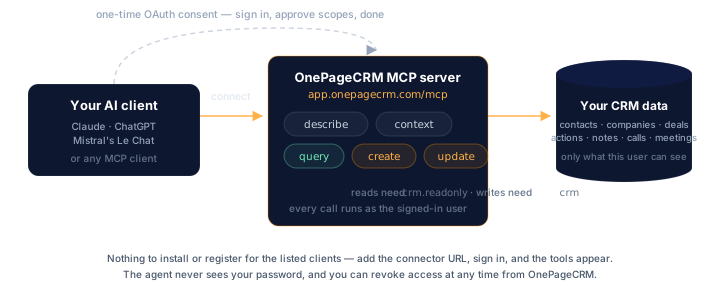
The OnePageCRM MCP server exposes CRM data and actions to AI agents through the Model Context Protocol. Once connected, the agent can read your contacts, deals, actions, notes, calls, and meetings — and create or update them on your behalf.
Endpoint
https://app.onepagecrm.com/mcpThe server speaks MCP over HTTP and uses OAuth 2.1 for authorization. You never paste an API key into the AI client — instead the client redirects you to OnePageCRM, you sign in, you approve the connection, and tokens flow back to the client behind the scenes.
Tools the server exposes
| Tool | Purpose |
|---|---|
describe(entity) | Per-field schema — types, query traits (filter/sort/group/aggregate), writable/required flags, lookups, and examples. |
context() | Account-specific reference data — statuses, pipelines, users, tags, custom fields. |
query(oql) | Read data via OQL — filters, ordering, aggregates. |
create(entity, data) | Create a contact, deal, action, note, call, or meeting. |
update(entity, id, data) | Update an existing object. |
feedback(message, category) | Report a gap or problem with this server to the team that maintains it. Writes no CRM data. |
Supported AI clients
These AI clients connect out of the box — there is no registration step on your end and nothing to build:
- ChatGPT (OpenAI)
- Claude (Anthropic — claude.ai, Claude Code)
- Mistral Vibe
- Grok (xAI)
- Perplexity
- Superhuman Go
Add the MCP endpoint URL as a connector, sign in, approve the consent screen, and you’re connected. Each client above links to its own setup steps and requirements; if a connection won’t complete, see troubleshooting.
Claude Code connects from the terminal rather than a settings screen.
claude mcp add --transport http OnePageCRM https://app.onepagecrm.com/mcpThen start claude, run /mcp, pick OnePageCRM, and authenticate — the
same consent screen opens in your browser.
Don’t see your client? If it speaks MCP but doesn’t connect out of the box, get in touch — we’ll get it set up.
First prompts to try
Once connected, the agent has a small toolbox: describe, context,
query, create, update, feedback. Drive it in plain language — it
picks the right tools for you, and it will chain several in one request.
- “What’s on my Action Stream today?”
- “Show me the deals I closed last quarter, grouped by owner.”
- “Turn this call transcript into a note for Jane Doe and add a follow-up action.”
- “Reschedule my overdue actions across next week, by priority.”
- “Add this as a contact, tag them Trade Show, and set an action to call Tuesday.”
Permissions
You pick the connection’s permission level on the consent screen, which offers three checkboxes:
| On the consent screen | Scope | Adds |
|---|---|---|
| Allow AI access (MCP) — required | mcp | describe, context, feedback |
| View CRM data — required | crm.readonly | query |
| View and update CRM data — optional | crm | create, update |
The first two are both required, so the smallest connection you can
approve is mcp + crm.readonly: an agent that reads your CRM but
cannot change it. Approve the third as well and it can write.
mcp is the scope that switches the feature on. A token without it
never reaches the server — every request comes back 403. On its own
it would reach only the tools that touch no records, which is why the
consent screen pairs it with a data scope rather than offering it
alone.
Focused users cannot connect — authorization is rejected at the OAuth step, before any scope is considered.
A connection never gains scope later — refreshed tokens keep exactly what you approved. To move from read-only to read-write (or back), disconnect the client and connect again with the scope you want.
Within the approved scope, the agent acts as the user who authorized it. If you can see a contact, the agent can see it; if you can edit a deal, the agent can edit it.