OAuth
OAuth 2.1
Use OAuth 2.1 to authenticate requests to the OnePageCRM API on behalf of your users.
Maintained by the OnePageCRM engineering team · Last updated Jul 14, 2026
Use OAuth 2.1 to authenticate requests to the OnePageCRM API on behalf of your users. Your application never handles user passwords. The user authenticates directly with OnePageCRM and grants your app a scoped, time-limited access token.
While OAuth is in closed beta, you can read these docs and start building against your own account with an API key today.
When to use OAuth
| If you want to | Use |
|---|---|
| Build an app that acts on behalf of any OnePageCRM user | OAuth 2.1 (this guide) |
| Access your own account from a script or internal tool | API key (no user login required) |
| Let users connect their CRM to your SaaS product | OAuth 2.1 (this guide) |
| Build an AI agent or MCP integration | OAuth 2.1 with mcp scope |
How it works
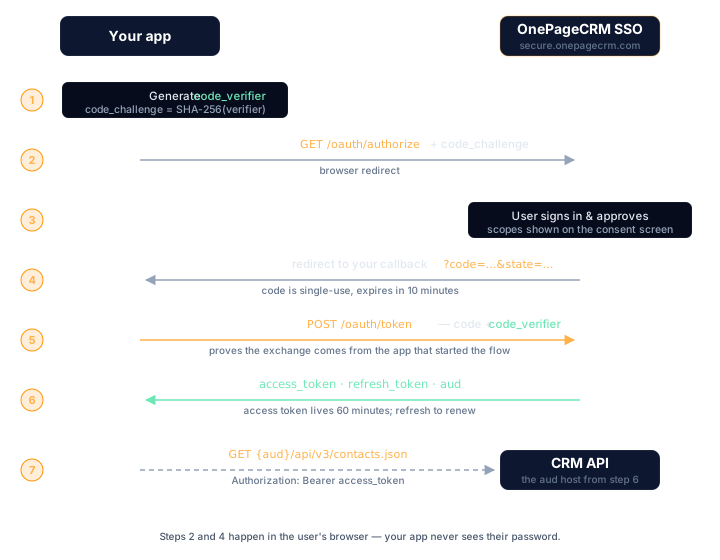
A user authorizing your app follows these steps:
- On your site, the user clicks a button that redirects them to OnePageCRM.
- On OnePageCRM, the user logs in and approves the permissions your app requested.
- OnePageCRM redirects the user back to your app with a short-lived authorization code.
- Your app exchanges the code for an access token and a refresh token.
- Your app calls the CRM API using the access token in the
Authorization: Bearerheader. - When the access token expires, your app uses the refresh token to get a new one silently, without prompting the user again.
The authorization code is single-use and expires in 10 minutes. The access token is valid for 60 minutes. The refresh token lets your app maintain the session without asking the user to log in again.
Who is involved
| Party | Role |
|---|---|
| Your application | Requests access and calls the API on the user’s behalf |
Authorization server (secure.onepagecrm.com) | Authenticates the user and issues tokens |
CRM API (app.onepagecrm.com) | Validates the token and serves data |
| The user | Logs in and approves what your app can access |
Client types
Before you start, decide whether your app is a public or confidential client.
Public clients
Apps where the source code is visible to users: browser apps, mobile apps, single-page apps.
- Cannot store a
client_secretsecurely - Use PKCE to prove identity instead of a secret
token_endpoint_auth_method: none- Receive a new refresh token on every use (rotation)
Confidential clients
Apps that run on a server you control, such as Node.js, Python, or Ruby backends.
- Can store a
client_secretsecurely on the server - Authenticate with
client_secret_basic(HTTP Basic) orclient_secret_post - Refresh tokens are longer-lived
If your app runs entirely in the browser or on a user’s device, it is a public client. If it runs on your own server, it is a confidential client.
How PKCE works
PKCE (Proof Key for Code Exchange) prevents authorization codes from being used by anyone other than the app that requested them.
Before redirecting the user, your app generates a random secret (code_verifier) and sends a hash of it (code_challenge) to OnePageCRM. When exchanging the code for tokens, your app sends the original code_verifier. OnePageCRM hashes it, checks it matches the challenge it received, and only issues tokens if they match.
A stolen authorization code is useless without the code_verifier that only ever existed in your app.
PKCE is mandatory in OAuth 2.1. OnePageCRM only supports S256 (SHA-256).
Scopes and permissions
Scopes define what an access token is permitted to do. You request scopes when redirecting the user. They are shown on the consent screen and can be approved or narrowed by the user.
| Scope | Access |
|---|---|
crm.readonly | Read-only access to your CRM data |
crm | Full read and write access to the CRM |
mcp | Access for AI and MCP integrations |
The granted scope is always the most restrictive of: what the server supports, what your client is registered for, what the user approved, and what your app requested. You can request less than your registered scope, never more.
Request the narrowest scope that does the job: crm.readonly if your app only reads, crm only when it writes. Request mcp only if your integration talks to the OnePageCRM MCP server — it does nothing for a regular REST integration. A narrow request is also an easier consent screen to approve.
Common questions
When do I need OAuth instead of an API key?
When your app acts on behalf of other OnePageCRM users — a SaaS
integration, a public app, or an AI agent using the mcp scope. For
scripts and internal tools working against your own account, an
API key is simpler.
How long do tokens last? The authorization code is single-use and expires in 10 minutes. The access token is valid for 60 minutes. The refresh token maintains the session without asking the user to log in again.
Is PKCE required?
Yes — PKCE is mandatory in OAuth 2.1, and OnePageCRM only supports the
S256 (SHA-256) challenge method. Public clients use it to prove
identity instead of a client secret.
Next steps
- Quickstart: get credentials and complete your first token exchange with working code.
- Reference: every endpoint, parameter, error code, and security detail.