OAuth
OAuth Reference
Every endpoint, parameter, token type, scope, and error code for the OnePageCRM OAuth 2.1 server.
Maintained by the OnePageCRM engineering team · Last updated Jul 14, 2026
Base URL
| URL | |
|---|---|
| Authorization server (authorization & tokens) | https://secure.onepagecrm.com |
| CRM API | https://app.onepagecrm.com |
All OAuth endpoints are on secure.onepagecrm.com. The aud field in every token response contains the CRM API base URL for that user’s account.
Discovery
GET /.well-known/oauth-authorization-serverReturns server capabilities: endpoint URLs, supported scopes, and grant types. No authentication required. Open CORS, safe to call from a browser.
curl https://secure.onepagecrm.com/.well-known/oauth-authorization-serverResponse:
{
  "issuer": "https://secure.onepagecrm.com",
  "registration_endpoint": "https://secure.onepagecrm.com/oauth/register",
  "authorization_endpoint": "https://secure.onepagecrm.com/oauth/authorize",
  "token_endpoint": "https://secure.onepagecrm.com/oauth/token",
  "response_types_supported": ["code"],
  "grant_types_supported": ["authorization_code", "refresh_token"],
  "token_endpoint_auth_methods_supported": ["client_secret_basic", "client_secret_post", "none"],
  "code_challenge_methods_supported": ["S256"],
  "scopes_supported": ["crm.readonly", "crm", "mcp"]
}
Although the metadata advertises a registration_endpoint, self-service registration isn’t open during the closed beta; clients are approved by the OnePageCRM team — see Client registration.
Client registration
Client registration is handled by the OnePageCRM team while OAuth is in closed beta — see Client registration for how to get credentials and the redirect URI rules.
Authorization
GET /oauth/authorizeRedirects the user to the OnePageCRM login and consent screen.
https://secure.onepagecrm.com/oauth/authorize
  ?response_type=code
  &client_id=YOUR_CLIENT_ID
  &redirect_uri=https://myapp.example.com/callback
  &scope=crm.readonly
  &state=RANDOM_VALUE
  &code_challenge=BASE64URL_SHA256_OF_VERIFIER
  &code_challenge_method=S256
Parameters:
| Parameter | Required | Description |
|---|---|---|
response_type | Yes | Always code |
client_id | Yes | Your registered client ID |
redirect_uri | Conditional | Required if you registered more than one |
scope | No | Space-separated. Defaults to client’s registered scope |
state | Recommended | Random value; verify it in the callback to prevent CSRF |
code_challenge | Yes | BASE64URL(SHA256(code_verifier)) |
code_challenge_method | Yes | Must be S256 |
Success response: redirect to your redirect_uri:
https://myapp.example.com/callback?code=AUTH_CODE&state=YOUR_STATE&iss=https://secure.onepagecrm.comError response: redirect with error parameters:
https://myapp.example.com/callback?error=access_denied&error_description=...&state=YOUR_STATEerror | When it happens |
|---|---|
access_denied | User clicked Decline on the consent screen |
invalid_request | Missing or invalid parameter: no PKCE, bad redirect URI |
invalid_client | client_id is not registered |
unauthorized_client | Client not allowed this grant type |
invalid_scope | Scope not registered for this client |
server_error | Internal server error |
Authorization code grant
POST /oauth/token
Content-Type: application/x-www-form-urlencoded
Exchanges an authorization code for an access token and refresh token. The code is single-use and expires in 10 minutes.
curl -X POST https://secure.onepagecrm.com/oauth/token \
  -H "Content-Type: application/x-www-form-urlencoded" \
  -d "grant_type=authorization_code" \
  -d "code=AUTH_CODE" \
  -d "redirect_uri=https://myapp.example.com/callback" \
  -d "client_id=YOUR_CLIENT_ID" \
  -d "code_verifier=YOUR_CODE_VERIFIER"
For confidential clients, authenticate with HTTP Basic instead of client_id in the body:
curl -X POST https://secure.onepagecrm.com/oauth/token \
  -u "YOUR_CLIENT_ID:YOUR_CLIENT_SECRET" \
  -H "Content-Type: application/x-www-form-urlencoded" \
  -d "grant_type=authorization_code" \
  -d "code=AUTH_CODE" \
  -d "redirect_uri=https://myapp.example.com/callback" \
  -d "code_verifier=YOUR_CODE_VERIFIER"
Parameters:
| Parameter | Description |
|---|---|
grant_type | authorization_code |
code | The authorization code from the callback |
redirect_uri | Must match the one used in the authorization request |
client_id | Your client ID (public clients only; omit if using HTTP Basic) |
code_verifier | The original random string generated before login |
Response:
{
  "access_token": "k2tV5VE1b3...",
  "token_type": "Bearer",
  "expires_in": 3600,
  "scope": "crm.readonly",
  "aud": "https://app.onepagecrm.com",
  "refresh_token": "dGhpcyBpcyBh..."
}| Field | Description |
|---|---|
access_token | Use in Authorization: Bearer header. Valid for 60 minutes |
token_type | Always Bearer |
expires_in | Seconds until the access token expires |
scope | The granted scope; may be narrower than requested |
aud | The CRM API base URL for this user’s account |
refresh_token | Use to get a new access token silently |
Errors:
error | HTTP | When it happens |
|---|---|---|
invalid_grant | 400 | Code expired, already used, or code_verifier doesn’t match |
invalid_client | 401 | Wrong client_id or client_secret |
invalid_request | 400 | Missing parameter, wrong content type, or mixed auth methods |
unauthorized_client | 400 | Client not allowed this grant type |
Refresh token grant
POST /oauth/token
Content-Type: application/x-www-form-urlencoded
Gets a new access token using a refresh token. No user interaction required.
curl -X POST https://secure.onepagecrm.com/oauth/token \
  -H "Content-Type: application/x-www-form-urlencoded" \
  -d "grant_type=refresh_token" \
  -d "refresh_token=YOUR_REFRESH_TOKEN" \
  -d "client_id=YOUR_CLIENT_ID"
Parameters:
| Parameter | Required | Description |
|---|---|---|
grant_type | Yes | refresh_token |
refresh_token | Yes | Your current refresh token |
client_id | Yes | Your client ID |
scope | No | Can request the same or a narrower scope |
Response: Same format as the authorization code response. For public clients, a new refresh token is always returned. Replace the old one immediately.
Errors:
error | HTTP | When it happens |
|---|---|---|
invalid_grant | 400 | Refresh token expired, revoked, or already rotated |
invalid_client | 401 | Wrong client_id |
invalid_request | 400 | Missing parameter |
Client authentication
| Method | How | When to use |
|---|---|---|
none | client_id in the POST body, no secret | Public clients (browser/mobile) |
client_secret_basic | Authorization: Basic base64(id:secret) header | Confidential clients (recommended) |
client_secret_post | client_id + client_secret in the POST body | Confidential clients (alternative) |
Only one method per request. Sending both a Basic header and body credentials is rejected with invalid_request.
Scopes
| Scope | Access |
|---|---|
crm.readonly | Read-only access to your CRM data |
crm | Full read and write access |
mcp | Access for AI / MCP integrations |
Scopes are layered. The final token scope is the most restrictive of: server-supported → client-registered → user-approved → app-requested. You can always request less than your registered scope, never more.
Token lifetimes
| Token | Lifetime |
|---|---|
| Authorization code | 10 minutes, single-use |
| Access token | 60 minutes |
| Refresh token (public client) | 7-day idle TTL, 90-day absolute max |
| Refresh token (confidential client) | 30-day idle TTL, 365-day absolute max |
Idle TTL resets on every use. Absolute max never resets. After 90 days (public) or 365 days (confidential), the user must log in again.
Lifetimes are policy, not physics — they can change. Drive your
refresh logic off expires_in from the token response instead of
hard-coding any of these numbers.
Token rotation
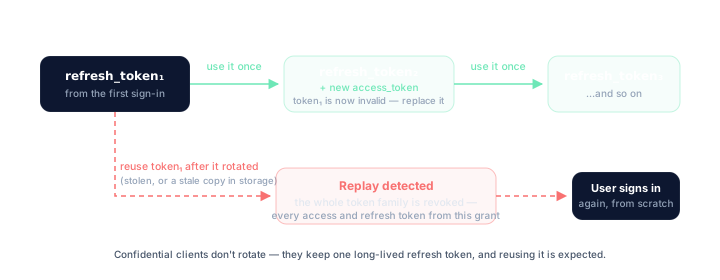
Public clients receive a new refresh token on every use. The old one is immediately invalidated.
If an already-rotated token is reused, the server detects a replay attack and revokes the entire token family: all access tokens and refresh tokens from that authorization.
Storing tokens
| What | Where | Why |
|---|---|---|
| Access token | Memory (JS variable) | Not persisted, invisible to other tabs and scripts |
| Refresh token | sessionStorage | Survives page reloads; gone on tab close |
code_verifier | sessionStorage | Single-use; delete immediately after the callback |
state | sessionStorage | Single-use; delete immediately after the callback |
Avoid localStorage. Tokens persist forever and are accessible to any script on the page.
CORS policy
The token endpoint adds CORS headers for public clients only (token_endpoint_auth_method: none). Your app’s origin must match the scheme, host, and port of a registered redirect URI.
Example: registering https://myapp.example.com/callback allows requests from https://myapp.example.com.
Confidential clients never receive CORS headers — the browser blocks the response. Call the token endpoint from your backend instead.
The discovery endpoint has open CORS (Access-Control-Allow-Origin: *).
Troubleshooting
invalid_grant on the token endpoint
Three causes account for almost every case:
| Cause | Check |
|---|---|
| Code expired or already used | Authorization codes live 10 minutes and work once. Retrying a token request replays the code — don’t |
code_verifier mismatch | The verifier must be the exact string whose SHA-256 you sent as code_challenge. A new verifier generated on the callback page is the classic bug |
redirect_uri mismatch | The redirect_uri in the token request must equal the one in the authorization request, character-for-character |
Refresh suddenly fails and API calls return 401
This applies to public clients only. If a refresh token is used
twice — because of a race between tabs, a retry on timeout, or a
restored backup — the server treats it as a replay attack and revokes
the entire token family: every access token and refresh token from
that authorization. From your side it looks like a working integration
that abruptly gets invalid_grant on refresh and 401 on API calls.
There is no partial recovery. Send the user through the full
/oauth/authorize flow again. To avoid it: serialize refresh calls
behind a single lock, and always replace the stored refresh token the
moment a new one arrives.
Confidential clients are different: they keep one long-lived refresh token, its idle TTL resets on every use, and reuse is expected — no rotation, no family revocation.
CORS errors calling the token endpoint from a browser
The token endpoint adds CORS headers only for public clients
(token_endpoint_auth_method: none), and only for origins that match
the scheme, host, and port of a registered redirect URI. If your page
is served from an origin you never registered (a preview deploy, a
different port), the preflight fails. Register a redirect URI on that
origin, or proxy the token call through your backend.
Confidential clients never receive CORS headers on the token endpoint — that’s by design. Call it from your backend, not the browser.
The discovery endpoint is open CORS — if discovery works but the token call doesn’t, it’s an origin mismatch, not a network problem.
How do I revoke a token?
There is no /oauth/revoke endpoint. To “log out”, discard the tokens
on your side — the access token expires within 60 minutes and the
refresh token expires when its TTL runs out. Server-side revocation
happens automatically on replay detection, or by OnePageCRM admin
action.
Where’s the userinfo endpoint?
There isn’t one. The aud field in every token response carries the
user’s CRM API base URL — use it to route API calls. For anything else
about who authorized, keep your own session state from before the
redirect.
Security checklist
- PKCE used on every authorization request (
code_challenge_method: S256) -
stateverified in the callback before processing the code - Authorization code exchanged within 10 minutes
- Each authorization code used only once
- Refresh token replaced on every use (public clients)
- Access token kept in memory, not
localStorage -
401from the API triggers re-login, not a silent failure -
redirect_uriuses HTTPS in production -
errorparameter in callback URL handled and shown to the user