Getting started
The OnePageCRM data model
The seven core entities behind every OnePageCRM surface, how they connect, and how each one maps to the REST API, webhooks, OQL, and MCP.
Maintained by the OnePageCRM engineering team · Last updated Oct 1, 2026
OnePageCRM is action-focused. It is a queue of next steps, not a database of records. The data model exists to answer one question: who do I follow up with next, and why? Read this page once and you’ll understand the domain before you touch a single endpoint.
The map
Seven core entities. Contacts sit at the center — everything else hangs off a contact.
Company ◄──┐ (optional link)
           │
        Contact ─── the hub of the model
           ├── Actions    what to do next (assigned to a user)
           ├── Deals      sales opportunities (status + pipeline stage)
           ├── Notes      the written record (can also reference a deal)
           ├── Calls      logged calls
└── Meetings logged meetings| Entity | Belongs to | Key references |
|---|---|---|
| Contact | Company (optional) | company_id, owner_id |
| Company | — | rolls up status and tags (when sync is on) |
| Deal | Contact (required) | contact_id, owner_id, pipeline_id |
| Action | Contact (required) | contact_id, assignee_id |
| Note | Contact (required) | contact_id, author_id, optional deal link (deal_id in OQL, linked_deal_id in the REST API) |
| Call | Contact (required) | contact_id, author_id |
| Meeting | Contact (required) | contact_id, author_id |
Two rules carry most of the model:
- A deal cannot exist without a contact. Neither can an action, note, call, or meeting. Resolve the contact first; everything else follows.
- A contact can exist without a company. The company link is optional — but a contact must have a name or a company name.
Contacts
A contact is a person in your CRM. The contact is the hub — every other record (except companies) points at exactly one contact.
- A contact needs a first/last name or a company name. Both together is normal; a contact with neither is rejected.
- The company display name is a plain string (
company_name, in both OQL and the REST API);company_idis the optional link to a Company record. They are separate fields — see Companies for why. In OQL the linked record’s own fields are reachable through thecompanylookup, ascompany.<field>. - Every contact has an owner (
owner_id, a user) — the team member responsible for it. status_idandlead_source_idclassify the contact — see Statuses and lead sources.- Contacts carry
tags, per-userstarred, and custom fields. - A contact’s position in the Action Stream comes from its top action — see Actions.
Field-level reference: OQL contacts.
Companies
A company groups the contacts that belong to one organization. Companies are deliberately lightweight:
- No owner. Ownership lives on contacts, not companies.
- Auto-created. Save a contact with a company name and no
company_id, and the company record is created (or reused) and linked. You never create a company directly. - Roll-ups, not source data. A company can sync a common status and common tags across all of its contacts when sync is enabled. Company size is the count of its non-deleted contacts.
- Contacts can also be linked across companies — one person who matters to several organizations.
- Companies support their own custom fields.
Field-level reference: OQL companies.
Deals
A deal is a sales opportunity attached to a contact.
- One primary contact, required. A deal can additionally be
linked to more contacts, but
contact_idalways points at the primary one. - Status is exactly one of
pending,won,lost. - Stage is a per-pipeline integer, not sequential — a typical
pipeline uses values like
10,20,40. Accounts can have multiple pipelines, each with its own stages. A pipeline is a sales or a delivery pipeline — deals in a delivery pipeline are always won (they track post-sales projects). Pending deals exposestage; won and lost deals exposelast_stage. - Two close dates.
expected_close_dateis the forecast on a pending deal.close_dateis the actual date, set when the deal becomes won or lost. - Money.
amountis the deal value; recurring deals multiply it bymonths, and totals, margin, and commission are computed from these. - Line items. A deal can carry deal items (name, description,
qty, price, cost, amount);
has_deal_itemsflags their presence. - Own owner. A deal’s
owner_idis independent of the contact’s owner — a teammate can own the deal on your contact. - Deals support their own custom fields, and notes can reference a deal.
Field-level reference: OQL deals.
Actions and the Action Stream
Actions are why the rest of the model exists. An action is a short
task (max 140 characters) on a contact, assigned to a user, with one
of five types. While an action is open, the type is what its status
field carries. Once completed, REST and webhooks serialize
status: "done" instead; OQL keeps the type in status and flags
completion with the separate completed boolean.
| Type | Meaning | Date | Action Stream position |
|---|---|---|---|
asap | Do now | none | Top |
date | Scheduled for a date | date | Sorted by date; overdue rises |
date_time | Scheduled with an exact time | date + exact_time | Sorted by timestamp, in the assignee’s timezone |
waiting | Waiting on the contact | waiting_since | Below dated actions |
queued | No deadline yet | none, position only | Bottom |
Completing an action stamps a completion time and removes it from the stream; you can reopen it later. Completed actions stay on the contact as history.
The one-next-action principle
Each contact has one top next action per assignee — the most urgent open, non-queued action. The system maintains this for you:
- A contact can hold only one
asapaction per assignee. Create a second and the existing one is automatically demoted to a dated action for today. - When you complete the top action, the next most urgent action on that contact takes its place. No manual promotion needed.
- Queued actions never become the top action on their own — they wait until you give them a date or make them ASAP.
How the stream sorts
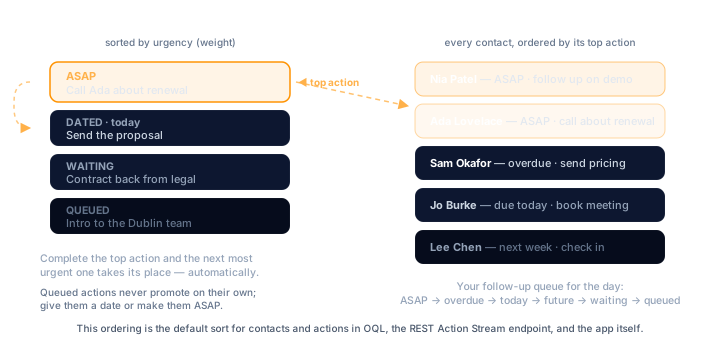
Every action carries a computed weight. Higher means more urgent.
The resulting order is: ASAP → overdue → today → future dates →
waiting → queued. Queued actions sort by their manual position.
The Action Stream is the list of contacts sorted by the weight
of their top next action — your follow-up queue for the day. The
REST API exposes it read-only, and in OQL, contacts and actions
return in Action Stream order by default when you omit order_by —
see OQL concepts.
Accounts can also define predefined actions and action groups — reusable templates (with date and type shortcuts) applied to a contact in one click.
Field-level reference: OQL actions.
Notes, calls, and meetings
Notes, calls, and meetings are the logged history of what happened with a contact.
- All three require a contact. A note can additionally reference a
deal (
deal_idin OQL,linked_deal_idin the REST API), but it is always contact-scoped first. - Each records an author (
author_id) — the user who logged it.author_idnever changes. Theauthordisplay name stored alongside it does on notes: editing a note restampsauthorwith the editing user’s name. Calls and meetings keep the original name. - Logging any of the three updates the contact’s
last_activity_date.
Field-level references: notes, calls, meetings.
Cross-cutting concepts
Ownership, assignment, authorship
Three different user references, three different meanings:
| Field | Lives on | Means |
|---|---|---|
owner_id | Contact | Who the contact belongs to. Drives visibility. |
owner_id | Deal | Who owns the deal. Independent of the contact’s owner. |
assignee_id | Action | Who has to do it. Can be any teammate, not just the contact owner. |
author_id | Note, Call, Meeting | Who logged it. Immutable (the author name on a note reflects the last editor). |
Companies have none of these — they inherit everything from their contacts.
Statuses and lead sources
Both are account-defined, ordered lists, not global enums. Each
entry has a system_id (e.g. lead, prospect, customer), a
display name, and a position. The contact stores just the system id
as a string, and surfaces expose both: the id as status_id /
lead_source_id, the display name as status / lead_source. The
REST API writes the id. In OQL the two are
one field, so you can read, filter, group and write by either. The
default status for a new contact is lead.
Fetch the account’s actual lists over the API — the quickstart shows the call.
Tags
Tags are free-form strings kept in one account-level list. They live on contacts only — deals, actions, notes, calls, and meetings have no tags. Adding a new tag to a contact adds it to the account list automatically. A company can mirror a common tag set across all of its contacts when tag sync is enabled.
Custom fields
A custom field is an account-defined, typed field available on
contacts, companies, and deals. The literal type values are single
and multi (single- and multi-line text), number, dropdown,
date, checkbox, anniversary, and
external_id. In OQL
they’re queryable by name as custom_fields.<name> — in select, where, and
order_by — and custom_fields.* returns them all (filterability
depends on the field type).
Private contacts
A contact can be marked private. In the app, a private contact is
visible only to its owner. The REST API goes further: it excludes
private contacts entirely — even the owner cannot fetch one over the
API. Records hanging off a private contact (deals, actions, notes,
calls, meetings) inherit the restriction. Webhooks skip full-payload
events for private contacts too; only deleted events still fire —
see webhook events.
IDs and timestamps
Every entity ID is a 24-character hex string
("507f1f77bcf86cd799439011"), unique per entity type and stable for
the life of the record. Every record
carries created_at and modified_at; some entities add purpose
fields like the contact’s last_activity_date.
Beyond the seven
The REST API exposes more than the core records. Supporting resources either configure the account — users, statuses, lead sources, pipelines, custom-field definitions, predefined actions — or read across it, like the Action Stream. Most are covered above as cross-cutting concepts; the full list is in the API reference.
One entity, every surface
The same seven core entities appear on every surface. This table is the crosswalk:
| Entity | REST root | Webhook type | OQL from | MCP |
|---|---|---|---|---|
| Contact | /api/v3/contacts | contact | contacts | ✓ |
| Company | /api/v3/companies | company | companies | ✓ |
| Deal | /api/v3/deals | deal | deals | ✓ |
| Action | /api/v3/actions | action | actions | ✓ |
| Note | /api/v3/notes | note | notes | ✓ |
| Call | /api/v3/calls | call | calls | ✓ |
| Meeting | /api/v3/meetings | meeting | meetings | ✓ |
- REST — every endpoint, parameter, and response shape in the API reference.
- Webhooks — the full
type×reasonevent matrix in Events. - OQL — one JSON query language across all seven core entities; start with the overview.
- MCP — the MCP server exposes all seven
through its
querytool (OQL), pluscreateandupdatefor writes.
Where to go next
- Quickstart — get credentials and make your first call in five minutes.
- Your first API call — a guided walkthrough of the request/response cycle.
- OQL concepts — the query language built on this model.
- Webhooks overview — react to changes in these entities in real time.