Extension points
External ID
Map OnePageCRM contacts, companies, and deals to records in your own system with a unique External ID custom field.
Maintained by the OnePageCRM engineering team · Last updated Jul 17, 2026
External ID lets your integration store its own stable identifier against OnePageCRM records. Use it to:
- Keep a bidirectional mapping between OnePageCRM IDs and IDs in your system without maintaining a separate lookup table.
- Find the right CRM record from a webhook, an API response, or a support ticket in a single lookup.
- Avoid duplicates when syncing: upsert by your ID instead of guessing by name or email.
How it works
An External ID is a custom field type (external_id), available on
contacts, companies, and deals. You define one External ID
field per external system, then store one string value per record.
Two properties make it different from a plain text field:
- Unique — a value can exist on only one record per field. Writing a duplicate is rejected.
- Exact lookup — because values are unique, filtering by External ID returns exactly one record or none, never a list to disambiguate.
| Constraint | Value |
|---|---|
| Resources | contacts, companies, deals |
| Value type | string |
| Max value length | 312 characters (longer values are truncated) |
| Values per record per field | 1 |
| Uniqueness | one record per (field, value) pair |
| Field name length | up to 35 characters |
1. Create the field (one-time, admin)
Creating the field is a one-time setup step, done by an account admin
in the app: open Contact Fields (or Company / Deal Fields) in
your account settings and click + Add. Set a Field name, choose
External ID as the Field type, and optionally paste a
Third-party app URL template — your app’s record URL with the
unique identifier replaced by [ID] (see
linking back). Mandatory works like
any other custom field and defaults to Not required.
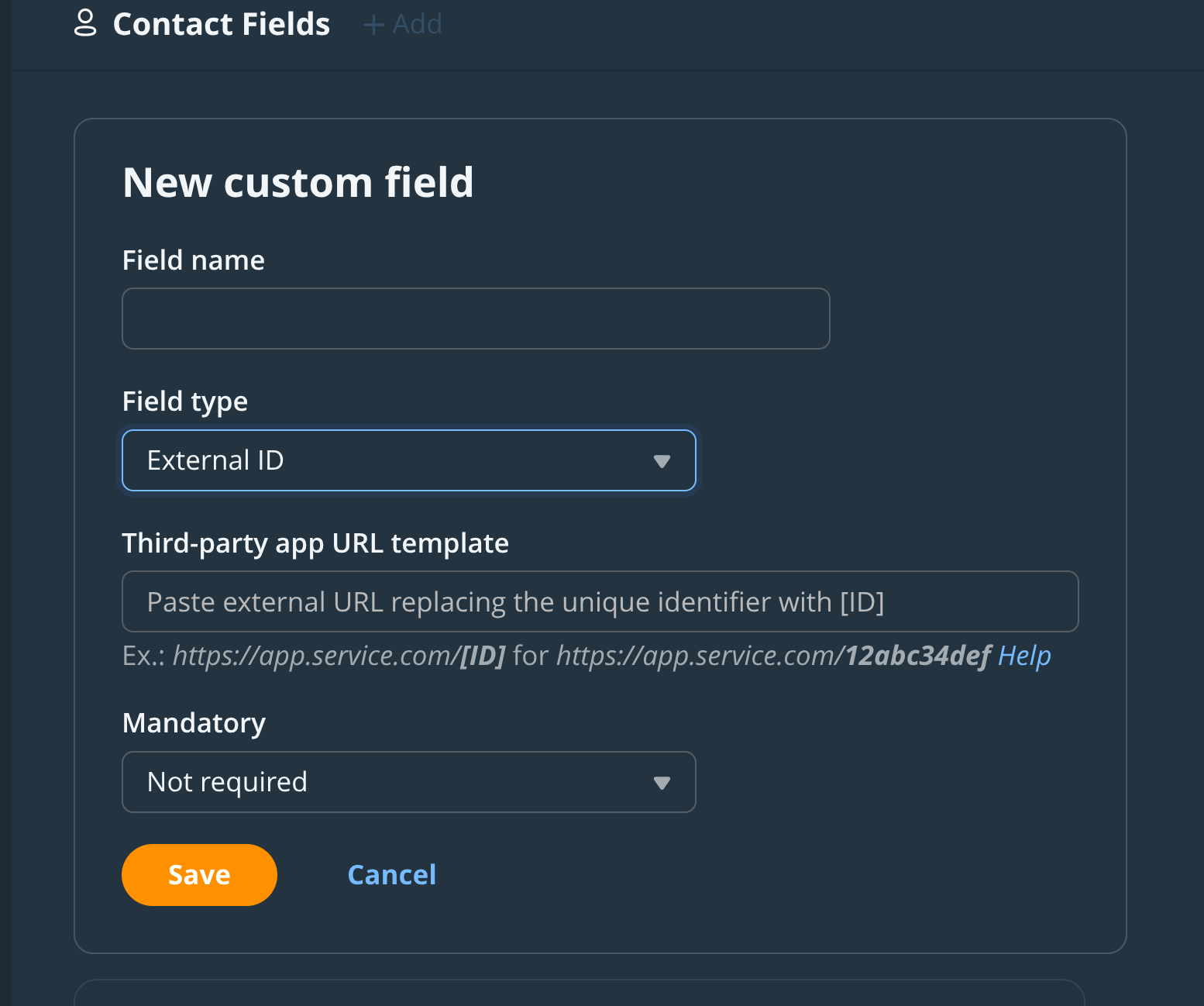
If you’re scripting account setup with an admin’s API key, the field
can also be created via the API — POST /api/v3/custom_fields.json
(company_fields / deal_fields for the other resources) with
{ "name": "Acme ID", "type": "external_id" }. Two caveats:
- Not available to OAuth apps. Field management requires API-key
auth from an admin user; an OAuth token gets
403regardless of scope. If you’re building a third-party integration, make field creation part of your customer’s onboarding instructions instead. - No URL template. The API accepts only
nameandtype; the template can only be set in the in-app form above.
A field’s type cannot be changed after creation.
2. Find the field’s id
Everything else your integration does works with either auth method.
List the fields and find yours by name — do this once at install
time and store the id:
curl -H "Authorization: Bearer ACCESS_TOKEN" \
  https://app.onepagecrm.com/api/v3/custom_fields.json
3. Set a value
Pass the field and value in the custom_fields array when creating or
updating a contact (use company_fields on companies and deal_fields
on deals). The flat item shape works on all three resources:
curl -u "USER_ID:API_KEY" \
  -X PUT "https://app.onepagecrm.com/api/v3/contacts/CONTACT_ID.json?partial=true" \
  -H "Content-Type: application/json" \
  -d '{
    "custom_fields": [
      { "id": "FIELD_ID", "value": "cus_8c1ab2" }
    ]
  }'
There’s also a nested item shape, where the field reference is wrapped
in a resource-specific key — custom_field on contacts,
company_field on companies, deal_field on deals — with value
alongside the wrapper:
{ "custom_field": { "id": "FIELD_ID" }, "value": "cus_8c1ab2" }Prefer the flat shape: it’s identical on every resource.
You can reference the field by name instead of id if you prefer.
To clear a value, send an empty string.
If the value already exists on another record, the write fails with a validation error:
External ID value='cus_8c1ab2' for custom field ID=FIELD_ID is already takenThat’s your duplicate detection. Treat it as “this record is already mapped” and look the existing record up instead.
4. Look up a record by External ID
Filter any list endpoint with custom_field_id + custom_field_value:
curl -u "USER_ID:API_KEY" \
  "https://app.onepagecrm.com/api/v3/contacts.json?custom_field_id=FIELD_ID&custom_field_value=cus_8c1ab2"
The same pair of parameters works on /companies.json and
/deals.json. Because values are unique, the result contains either
exactly one record or none.
5. Read it back
Custom field values come back on every record read, with the full field definition alongside the value:
{
  "custom_fields": [
    {
      "custom_field": {
        "id": "5aad9b039007ba28c9ebad56",
        "name": "Acme ID",
        "type": "external_id"
      },
      "value": "cus_8c1ab2"
    }
  ]
}
Responses use the same resource-specific wrapper keys: custom_field
on contacts, company_field on companies, deal_field on deals.
Sync pattern: idempotent upsert
That uniqueness makes upserts safe to retry. For each record in your system:
- Look up by External ID
(
?custom_field_id=...&custom_field_value=...). - Found? Update that record by its OnePageCRM
id. - Not found? Create the record with the External ID set in the same request.
- Create failed with “already taken”? Another worker beat you to it — go back to step 1.
Running the same sync twice produces the same result. No duplicate contacts, no separate mapping table to keep consistent.
For the reverse direction, webhook payloads include the record’s custom field values — read your External ID straight out of the event to find the matching record on your side.
Link back to your system
An External ID field can carry a URL template. Set one and OnePageCRM renders the value as a clickable link on the record — one click from a contact to the same customer in your app:
https://billing.example.com/customers/[ID][ID] is replaced with the field’s value — for example,
https://app.service.com/[ID] renders the value 12abc34def as a link
to https://app.service.com/12abc34def.
Set the template in the Third-party app URL template input when an
admin creates or edits the field in the OnePageCRM web app; the API
returns it as a read-only url_template attribute on the field.
See also
- Custom Button — deep-link from a contact or deal into your app using template variables, including custom field values.
- Webhook payloads — events carry the record’s custom field values, so you can read your External ID straight out of the payload.